Central Processing Unit (CPU)
Watch this topic in 60 seconds
Free preview · Lesson 1
Understanding Central Processing Unit (CPU)
The Central Processing Unit (CPU): The Brain of Your Computer
Welcome, future computer scientists! Today, we're going to demystify one of the most important parts of any computer, smartphone, or tablet: the Central Processing Unit, or CPU. Think of the CPU as the 'brain' of your computer. Just like your brain handles all your thoughts, decisions, and actions, the CPU handles almost everything your computer does.
What is the CPU and What Does It Do?
At its core, the CPU is an electronic circuit that executes instructions that make up a computer program. It performs basic arithmetic, logic, controlling, and input/output operations specified by the instructions. In simple terms, it's the component that processes all the data and commands that allow your computer to work.
Imagine your computer is a busy restaurant kitchen, and the CPU is the head chef. The chef receives orders (instructions) from customers, decides how to prepare them, cooks the food, and then sends it out. Without the chef, the kitchen can't function and no food gets made! Similarly, without a CPU, your computer is just a collection of inert parts.
The Core Tasks of a CPU: The Fetch-Decode-Execute Cycle
Every single task the CPU performs, from opening an app to typing a letter, goes through a continuous cycle of four main steps:
- Fetch: The CPU gets an instruction from the computer's memory (RAM). Think of this as the chef picking up a new recipe card from the recipe book.
- Decode: The CPU figures out what the instruction means and what it needs to do. This is like the chef reading the recipe card and understanding, "Okay, I need to chop vegetables now."
- Execute: The CPU performs the actual operation requested by the instruction. This is the chef actually chopping the vegetables or stirring the pot. This is where the real work happens!
- Write Back (or Store): The CPU stores the result of the operation back into memory or registers so it can be used later. The chef might write down that the vegetables are chopped and ready, or put them into a bowl for the next step.
Think of the CPU as an incredibly fast assembly line worker. Instructions come in, the worker quickly understands what to do with each item (decode), performs the necessary action (execute), and then places the finished item back on the line (write back). This process happens millions or even billions of times per second!
Key Components Inside the CPU
Even though the CPU is tiny, it's packed with specialized parts that work together:
-
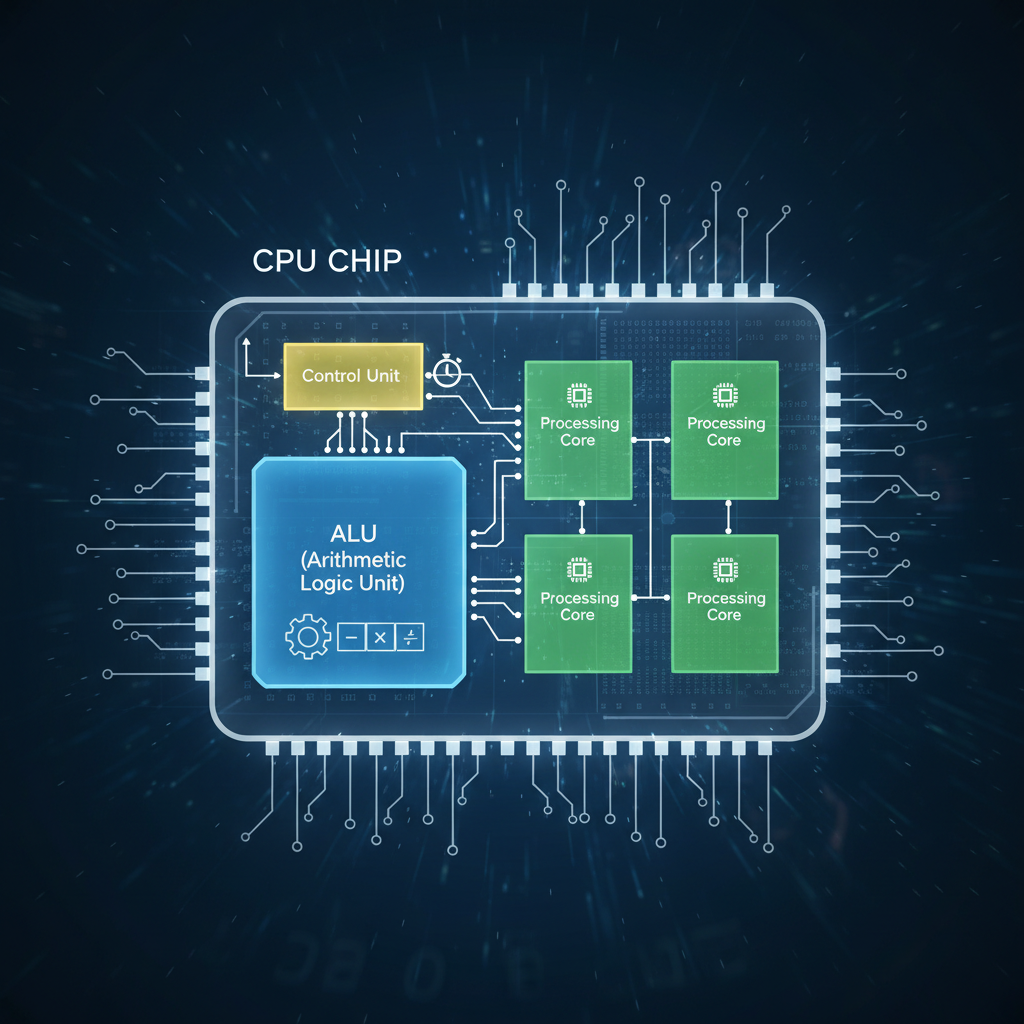
Arithmetic Logic Unit (ALU):
This is the 'calculator' and 'decision-maker' part of the CPU. The ALU performs all arithmetic operations (like addition, subtraction, multiplication, division) and logical operations (like comparing numbers to see if one is greater than another). It's where the actual math and comparisons happen.
Analogy 3: The Calculator and Judge
In our chef analogy, the ALU is like the chef's mental calculator for measurements (e.g., 'add 2 cups of water') and their ability to make quick judgments (e.g., 'is this ingredient fresh enough?'). -
Control Unit (CU):
The CU is the 'manager' or 'orchestra conductor' of the CPU. It manages and coordinates all the components of the CPU and the entire computer system. It fetches instructions from memory, decodes them, and then directs the other parts of the CPU (like the ALU) on what to do. It ensures all operations happen in the correct sequence.
Analogy 4: The Orchestra Conductor
The Control Unit is like the conductor of an orchestra. It doesn't play any instruments itself, but it tells each musician (other CPU components) when to play, what to play, and how to play, ensuring the entire performance (program) runs smoothly and in harmony. -
Registers:
These are tiny, super-fast storage locations directly inside the CPU. Registers temporarily hold data that the CPU is currently working on or needs immediate access to. They are the fastest memory available to the CPU, even faster than cache memory or RAM.
Analogy 5: The Chef's Immediate Counter Space
Think of registers as the small, crucial counter space right next to the chef's cutting board. These are where the ingredients or tools currently being actively used are placed for instant access, rather than having to walk to the pantry or refrigerator every time.
How CPUs Are Measured: Speed and Power
When you look at CPU specifications, you'll often see terms like 'GHz' or 'cores'. Let's break them down:
-
Clock Speed (GHz - Gigahertz):
This measures how many instruction cycles the CPU can complete per second. One Gigahertz means one billion cycles per second! A higher clock speed generally means the CPU can process instructions faster.
Analogy 6: How Fast the Chef Works
If our chef processes one step of a recipe every second, their 'clock speed' is 1 Hz. If they can process one billion steps per second, that's 1 GHz! A faster clock speed means the chef can complete a single task (like chopping one ingredient) quicker. -
Cores:
Many modern CPUs have multiple 'cores'. Each core is essentially a complete processing unit within the CPU that can perform its own fetch-decode-execute cycle independently. So, a 'dual-core' CPU has two brains working together, a 'quad-core' has four, and so on.
Analogy 7: Multiple Chefs in One Kitchen
Imagine our restaurant kitchen now has not just one head chef, but two, four, or even eight specialized chefs all working simultaneously on different dishes or different parts of the same large meal. This allows the kitchen to prepare many more meals much faster! -
Threads:
Some CPUs also have 'threading' (like Intel's Hyper-Threading or AMD's SMT). This allows a single physical core to handle two streams of instructions (or 'threads') at roughly the same time, by switching very rapidly between them or processing them if one part of the core is idle. It makes a single core appear to the operating system as two 'logical' cores.
Analogy 8: The Multitasking Chef
Think of a highly efficient chef (a single core) who can stir soup with one hand while chopping vegetables with the other, or quickly switch between tasks without missing a beat. They're doing multiple things concurrently, making the most of their time and resources.
Why is the CPU So Important?
The CPU is critical because it's the component that actually does the work. Without it, software couldn't run, calculations couldn't be performed, and you wouldn't be able to interact with your computer at all. Every click, every keystroke, every pixel change on your screen, is a result of the CPU processing instructions.
As technology advances, CPUs continue to get smaller, faster, and more energy-efficient, allowing for more powerful and portable devices that we rely on every day.
Conclusion
The Central Processing Unit is truly the engine and the brain of any computing device. Understanding its basic functions, like the fetch-decode-execute cycle, and its key components, like the ALU and Control Unit, gives you a foundational understanding of how computers work at their very core. Keep learning, and you'll soon be building your own mental models of even more complex computer systems!
Keep learning, free
Create a free Syllabax account to unlock practice questions and games for this topic.
Visual Learning Enhanced! 🚀
To help you master this topic, we use Advanced Syllabax AI to generate detailed diagrams and visual models.
Note on Visuals: The AI sometimes makes spelling errors in image labels. Please refer to the lesson text for the correct terminology.