Software: System vs. Application
Watch this topic in 60 seconds
Free preview · Lesson 1
Understanding Software: System vs. Application
Understanding Software: System vs. Application (Grade 10, Foundational)
Imagine your computer, tablet, or smartphone. It's an amazing piece of technology, but without instructions, it's just a fancy paperweight. These instructions are what we call software. Software is essentially the set of programs and data that tells the computer what to do and how to do it. Think of the computer's hardware (the physical parts like the screen, keyboard, and processor) as the 'body' and the software as the 'brain' and 'instructions' that make the body move and perform tasks.
The Two Big Families of Software
Software isn't just one big type; it actually comes in two main families, each with a very important and distinct job. These families are System Software and Application Software. To understand them better, let's use some everyday analogies.
1. System Software: The Foundation and Manager
Think of building a house. Before you can put in furniture, paint the walls, or even have a roof, you need a strong foundation, walls, and a basic structure. You also need utilities like electricity and plumbing to be installed and working. System software is very much like this foundation and essential infrastructure for a computer.
Definition: System software is a type of computer program designed to run a computer's hardware and application programs. It's the core software that manages and controls the computer's internal operations, making sure everything works smoothly. It provides a platform for application software to run.
What does it do?
- Manages Hardware: It tells the computer's parts (like the processor, memory, storage drives, and printer) how to communicate and work together. It's like the conductor of an orchestra, making sure all the different instruments play in harmony.
- Provides a Platform: It creates the environment (the 'stage') upon which other programs (application software) can perform. Without system software, no other program could even start.
- Basic Functions: It handles essential tasks like starting up the computer, managing files, controlling input (keyboard, mouse) and output (screen, printer).
Key Examples of System Software:
- Operating Systems (OS): This is the most crucial type of system software. Popular examples include Windows (on most PCs), macOS (on Apple computers), Linux (used widely in servers and some PCs), Android (on most smartphones and tablets), and iOS (on iPhones and iPads). The OS is like the main engine of a car; it makes the car run and allows you to drive it.
- Device Drivers: These are small programs that allow specific hardware devices (like a printer, graphics card, or webcam) to communicate with the operating system. Think of them as special instruction manuals for each unique car part, telling the main engine how to interact with it.
- Utility Software: These programs help to maintain and optimize the computer's performance. Examples include antivirus software (protecting your system), disk cleanup tools (freeing up space), and backup utilities (saving your data). These are like the maintenance crew and tools for your car, keeping it in good shape.
2. Application Software: The Tools for Tasks
Now, let's go back to our house analogy. Once the foundation is laid, the walls are up, and the utilities are working (thanks to system software), you can start to fill your house with furniture, appliances, decorations, and other things that make it useful and comfortable for specific purposes. Application software is exactly like these specific items.
Definition: Application software (often just called 'apps') is a type of computer program designed to perform a specific task or set of tasks for the end-user. It's what you use to actually 'do things' on your computer.
What does it do?
- User-Specific Tasks: It helps you accomplish particular jobs, whether for work, entertainment, education, or communication.
- Runs on System Software: Application software needs system software (especially an operating system) to run. It's like the furniture in your house; it needs the house itself to be there first.
Key Examples of Application Software:
- Productivity Software: Word processors (like Microsoft Word, Google Docs) for writing, spreadsheets (like Excel, Google Sheets) for calculations, presentation software (like PowerPoint, Google Slides) for creating presentations. These are like your specific tools for getting work done, such as a hammer or screwdriver in a toolbox.
- Web Browsers: Programs like Chrome, Firefox, Safari, or Edge that allow you to access and view websites on the internet. This is like a special vehicle that takes you to different destinations on the web.
- Communication Software: Email clients (like Outlook, Gmail), messaging apps (like WhatsApp, Discord), video conferencing tools (like Zoom, Google Meet). These are like your telephone or postal service, allowing you to connect with others.
- Entertainment Software: Video games, media players (like VLC, Spotify), streaming apps (like Netflix, YouTube). These are like your TV, gaming console, or music player, providing specific forms of enjoyment.
- Design and Editing Software: Photo editors (like Photoshop, GIMP), video editors (like Premiere Pro, DaVinci Resolve), CAD software for architectural design. These are like specialized art supplies or crafting tools.
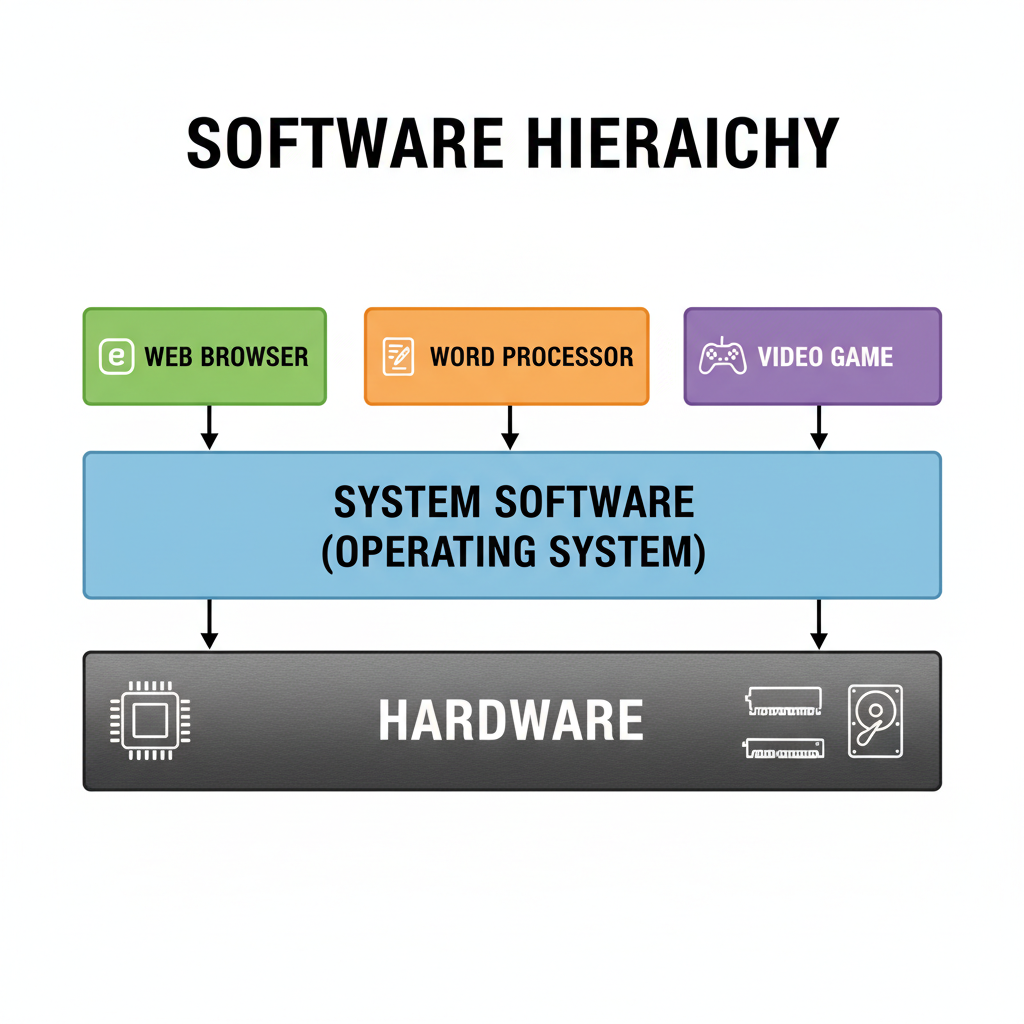 ⚠️ This picture may have spelling mistakes. Trust the words in the lesson.
How They Work Together (The Symphony)
You can't have one without the other for a truly functional and useful computer. System software provides the essential framework and environment, and application software gives the computer its specific purpose and allows users to do countless tasks. It's a bit like a restaurant: The kitchen, plumbing, and electricity (system software) are essential for the restaurant to function, but it's the specific dishes on the menu (application software) that customers come for and that provide the actual service.
When you open a web browser (application software), the operating system (system software) ensures that the browser gets the necessary memory, processing power, and access to the network hardware to connect to the internet. Without the OS, the browser would have no 'stage' to perform on.
Recap
In simple terms, System Software runs the computer itself, managing all its internal parts and operations. Application Software helps *you* (the user) do specific things, from writing a report to playing a game. Both are vital for the complete computer experience!
Keep learning, free
Create a free Syllabax account to unlock practice questions and games for this topic.
Visual Learning Enhanced! 🚀
To help you master this topic, we use Advanced Syllabax AI to generate detailed diagrams and visual models.
Note on Visuals: The AI sometimes makes spelling errors in image labels. Please refer to the lesson text for the correct terminology.