Basic Python Syntax
Watch this topic in 60 seconds
Free preview · Lesson 1
Understanding Basic Python Syntax
Unlocking the Power of Python: Your First Steps into Programming!
Welcome, future coders! Imagine you're learning a new language, but instead of talking to people, you're learning to talk to computers. That's exactly what programming is, and Python is one of the friendliest languages out there to start with. Think of Python as a universal translator that helps you give instructions to your computer. It's like teaching a very smart, very obedient pet new tricks!
What is Python and Why Learn It?
Python is a popular, high-level programming language known for its simplicity and readability. It's used for everything from building websites and apps to analyzing data, creating games, and even controlling robots!
- Simple: Python's syntax (its grammar and vocabulary) is very similar to everyday English, making it easy to read and write.
- Versatile: It's like a Swiss Army knife for programming – it can do almost anything!
- Powerful: Companies like Google, Netflix, and NASA use Python. If it's good enough for them, it's good enough for you!
1. The Very Basics: Comments - Your Code's Secret Notes!
Imagine you're writing a recipe. Sometimes you add little notes to yourself or to someone else who might use the recipe later, like "Don't overmix!" or "This is my grandma's secret ingredient." These notes aren't part of the actual cooking process, but they help explain things. In programming, we have something similar called comments.
Comments are lines of text within your code that the computer completely ignores. They're just for humans! They help you explain what your code does, why you did something a certain way, or to temporarily disable a line of code.
How to write comments in Python:
- Single-line comments: Start a line with a hash symbol (
#). Everything after the#on that line is a comment. - Multi-line comments: While Python doesn't have a specific multi-line comment syntax like some other languages, you can use triple quotes (
"""or''') to create multi-line strings that aren't assigned to a variable. Since the computer sees them as unassigned strings, it effectively ignores them, making them useful for documentation or longer comments.
# This is a single-line comment. The computer will ignore this.
print("Hello, world!") # This comment explains what the print() function does.

"""
This is a multi-line comment.
It can span across several lines.
Useful for explaining bigger sections of code.
"""
'''
You can also use single triple quotes for multi-line comments.
Both work the same way!
'''
2. Variables: Labeled Boxes for Your Information!
Think of variables like small boxes with labels on them. You can put different items (information) into these boxes, and then refer to the box by its label whenever you want to use what's inside. The cool thing is, you can change what's inside the box whenever you want!
In programming, variables are used to store data. This data can be numbers, text, or even more complex things. When you create a variable, you give it a name, and then you "assign" it a value using the equals sign (=).
Creating and Using Variables:
# Creating a variable named 'my_age' and putting the number 16 inside it.
my_age = 16

# Creating a variable named 'my_name' and putting the text "Alice" inside it.
my_name = "Alice"

# Now we can use these variables
print(my_name)  # Output: Alice
print(my_age)   # Output: 16

# We can even change what's inside the box
my_age = 17 # Alice just had a birthday!
print(my_age) # Output: 17
Variable Naming Rules (The "Rules of the Box Label"):
Just like you can't put just anything on a box label, there are some rules for naming variables:
- Names can only contain letters (a-z, A-Z), numbers (0-9), and underscores (
_). - Names cannot start with a number. (Imagine a box labeled "3apples" – it's confusing!)
- Names are case-sensitive (
ageis different fromAgeandAGE). Think of it as "apple" vs "Apple" – they're distinct! - Keywords (words Python already uses for special purposes, like
print,if,for) cannot be used as variable names. - It's good practice to use descriptive names (e.g.,
student_nameinstead of justs) and usesnake_case(all lowercase, words separated by underscores).
3. Data Types: What Kind of Information Are We Storing?
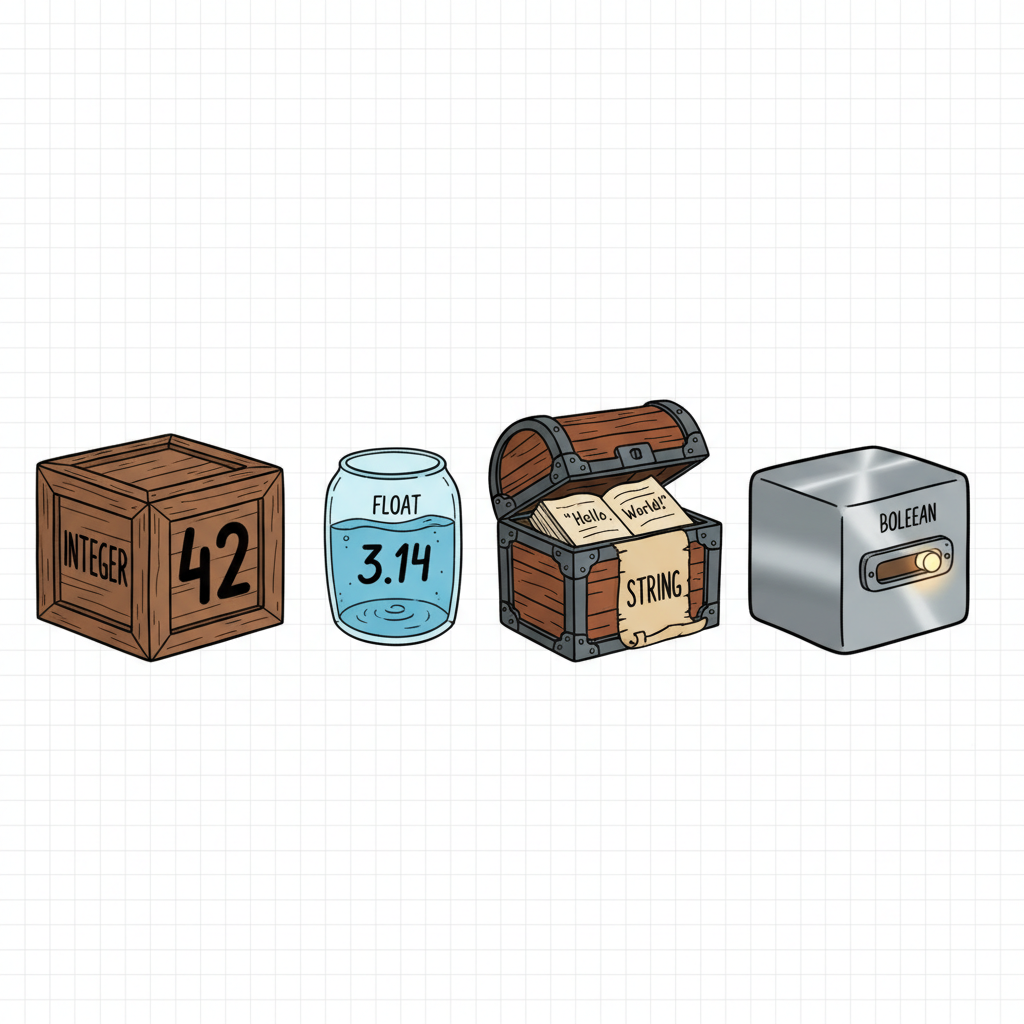
Our boxes (variables) can hold different kinds of items. A box for fragile glass is different from a box for heavy books. Similarly, in Python, data comes in different "types." The computer needs to know what kind of data it's dealing with so it knows how to handle it.
Common Data Types (The "Types of Items"):
-
Integers (
int): These are whole numbers, positive or negative, without any decimal point.Analogy: Counting apples (1, 2, 3) or number of siblings (-1 if you're an only child and feeling dramatic!).
number_of_students = 30 score = -5 # Yes, negative numbers are integers too! -
Floating-Point Numbers (
float): These are numbers with a decimal point.Analogy: Measuring height (1.75 meters) or prices ($9.99).
temperature = 22.5 pi_value = 3.14159 -
Strings (
str): This is text data, like words, sentences, or even single characters. Strings are always enclosed in single quotes (') or double quotes (").Analogy: A sticky note with a message on it. The quotes are like the sticky part holding the message together.
greeting = "Hello, Python!" name = 'Charlie' message = "He said, 'Python is fun!'" # You can use one type of quote inside the other. -
Booleans (
bool): These are special values that can only be one of two things:TrueorFalse. They are super important for making decisions in your code.Analogy: A light switch – it's either ON (True) or OFF (False). There's no in-between.
is_sunny = True
has_permission = False
 ⚠️ This picture may have spelling mistakes. Trust the words in the lesson.
4. Operators: Your Code's Action Verbs!
Operators are special symbols or keywords that perform operations on values and variables. Think of them as the action verbs in your code's sentences. You've already seen one: the assignment operator (=).
a) Arithmetic Operators (The Calculator):
These are like the buttons on your calculator – they perform mathematical calculations.
+(Addition):5 + 3results in8-(Subtraction):10 - 4results in6*(Multiplication):6 * 7results in42/(Division):10 / 2results in5.0(note: division always returns a float!)%(Modulus - Remainder):10 % 3results in1(10 divided by 3 is 3 with a remainder of 1)**(Exponentiation - Power):2 ** 3results in8(2 to the power of 3, or 2*2*2)//(Floor Division - Integer Division):10 // 3results in3(divides and returns the whole number part, discarding the remainder)
result = 15 + 7 # result is 22
price = 50 * 1.2 # price is 60.0 (50 * 20% tax)
remainder = 25 % 4 # remainder is 1
b) Assignment Operators (Shorthand for Updating Boxes):
These are used to assign values to variables, often combining an arithmetic operation with assignment.
=(Assign):x = 10+=(Add and assign):x += 5is the same asx = x + 5-=(Subtract and assign):x -= 3is the same asx = x - 3*=(Multiply and assign):x *= 2is the same asx = x * 2/=(Divide and assign):x /= 4is the same asx = x / 4- ...and so on for
%=,**=,//=.
score = 100
score += 20 # score is now 120
money = 50
money -= 15 # money is now 35
c) Comparison Operators (Asking Questions):
These operators compare two values and always return a Boolean result (True or False). Think of them as asking your computer a "yes" or "no" question.
==(Equal to):5 == 5isTrue,5 == 6isFalse. (Note: two equals signs for comparison, one for assignment!)!=(Not equal to):5 != 6isTrue,5 != 5isFalse>(Greater than):10 > 5isTrue<(Less than):3 < 7isTrue>=(Greater than or equal to):10 >= 10isTrue,10 >= 5isTrue<=(Less than or equal to):5 <= 5isTrue,5 <= 10isTrue
is_adult = (age >= 18) # is_adult will be True if age is 18 or more, False otherwise
print(10 == "10") # False (different data types)
d) Logical Operators (Making Complex Decisions):
These operators combine conditional statements (the True/False results from comparison operators) to create more complex decisions. Imagine them as words like "and," "or," and "not" in a sentence.
and: ReturnsTrueif BOTH conditions areTrue.Analogy: "I will go to the park IF it is sunny AND I finish my homework." (Both must be true)
(5 > 3) and (10 < 20) # True and True -> True (5 > 10) and (10 < 20) # False and True -> Falseor: ReturnsTrueif AT LEAST ONE condition isTrue.Analogy: "I will go to the store IF I need milk OR I need bread." (Only one needs to be true)
(5 > 10) or (10 < 20) # False or True -> True (5 > 10) or (10 > 20) # False or False -> Falsenot: Reverses the result;TruebecomesFalse, andFalsebecomesTrue.Analogy: "It is NOT raining." If it is raining (True), then 'not raining' is False. If it is not raining (False), then 'not raining' is True.
not (5 > 3) # not True -> False
        not (10 == 5) # not False -> True
5. Input and Output: Talking to and Listening from the User!
A program that just sits there and does nothing isn't very exciting. We want our programs to interact with us! This is where input and output come in.
a) print(): Speaking Out Loud (Output)!
The print() function is how your Python program "speaks" or displays information to you, the user, on the screen. It's like your computer saying, "Hey, here's what I've got!"
print("Hello, programmer!") # Prints the text "Hello, programmer!"
print(123)                 # Prints the number 123
name = "World"
print("Hello,", name, "!") # You can print multiple things separated by commas.
print(f"Your name is {name}.") # f-strings (formatted string literals) are a modern way to embed variables directly.
The f-string (short for "formatted string literal") is a super handy way to combine text and variables. You put an f before the opening quote of your string, and then you can put variable names directly inside curly braces {} within the string. Python will automatically replace them with their values!
b) input(): Listening to the User (Input)!
The input() function is how your Python program "listeners" to you. It pauses the program, displays a message to the user (optional), and waits for the user to type something and press Enter. Whatever the user types is then returned as a string.
# The program asks for your name, waits, and stores what you type into the 'user_name' variable.
user_name = input("What is your name? ")
print(f"Nice to meet you, {user_name}!")

# Important Note: input() always gets text (a string). If you need a number, you have to convert it!
# Try this:
# age = input("How old are you? ")
# print(f"Next year you will be {age + 1} years old.") # This will cause an error!
# Correct way:
age_str = input("How old are you? ")
age_int = int(age_str) # Convert the string to an integer
print(f"Next year you will be {age_int + 1} years old.")
The int() function (and float() for decimals) is like a magical converter. It tries to turn the text you give it into a whole number (or decimal number). If the text isn't a valid number, it will politely complain with an error!
6. Introduction to Control Flow: Making Decisions with if/else
Just like you make decisions every day ("If it's sunny, I'll go outside, else I'll stay in"), computers also need to make choices based on conditions. The if statement is your program's way of saying, "Let me check something, and if it's true, I'll do this."
Crucially, Python uses **indentation** (spaces or tabs at the beginning of a line) to define blocks of code. This is like putting different parts of a recipe into separate, clearly marked sections. If lines are indented the same way, they belong to the same block. If you indent incorrectly, Python will get confused!
# Analogy: Deciding what to wear based on the weather
weather = "sunny"

if weather == "sunny": # This is the condition. If it's True, the indented code runs.
    print("Wear sunglasses and a hat!")
    print("It's a great day for a walk.")
else: # If the 'if' condition is False, the code under 'else' runs.
    print("Bring an umbrella.")
    print("Maybe stay indoors and read.")

print("End of weather decision.") # This line always runs, regardless of the 'if/else'
Notice the colon (:) after the `if` and `else` statements. This signals that a new indented block of code is coming. The lines that are indented below `if` or `else` are part of that block. Once the indentation goes back to the original level, that block is over.
You've now taken your first monumental steps into the world of Python programming! These foundational concepts – comments, variables, data types, operators, input/output, and basic control flow with indentation – are the building blocks for almost everything you'll ever create. Keep experimenting, keep asking questions, and most importantly, keep coding!
Keep learning, free
Create a free Syllabax account to unlock practice questions and games for this topic.
Visual Learning Enhanced! 🚀
To help you master this topic, we use Advanced Syllabax AI to generate detailed diagrams and visual models.
Note on Visuals: The AI sometimes makes spelling errors in image labels. Please refer to the lesson text for the correct terminology.