What is a Computer?
Watch this topic in 60 seconds
Free preview · Lesson 1
Understanding What is a Computer?
What is a Computer? Your Digital Super Helper!
Have you ever wondered how your favorite video game knows what to do when you press a button? Or how your phone can show you videos, play music, and let you talk to friends all at once? The amazing answer to these questions is: the computer!
But what exactly is a computer? In simple terms, a computer is a clever electronic machine that can follow instructions to do amazing things with information. Think of it like a super-smart robot that helps us work, play, learn, and connect with the world.
Imagine a Super Chef: An Analogy for How Computers Work
To understand what a computer does, let's imagine a talented chef in a busy kitchen. This chef is a bit like a computer:
- 1. Getting Ingredients (Input): First, the chef gathers all the ingredients needed for a meal: potatoes, spices, meat, vegetables. This is like the computer getting input – the information or instructions we give it.
- 2. Cooking & Preparing (Processing): Next, the chef carefully mixes, chops, stirs, and cooks the ingredients, following a special recipe. This is like the computer's "brain" doing all the hard work, or processing, to turn the input into something useful.
- 3. Serving the Meal (Output): Once everything is cooked, the chef proudly serves a delicious meal on a plate. This is like the computer giving us the results of its work, called output – what it shows us or does for us.
- 4. Keeping Recipes & Groceries (Storage): Finally, the chef keeps a recipe book for future use and a pantry full of ingredients. This is like the computer's storage – where it remembers information and programs for later.
Just like our super chef, every computer performs these four main tasks to do whatever we ask of it!
The Four Super Powers of a Computer: IPOS!
Let's look at these four superpowers in more detail. We often remember them with the acronym IPOS:
1. Input: Giving Instructions to the Computer
What it is: Input is how you talk to the computer and give it information or commands. It's like your senses (seeing, hearing, touching) that gather information from the world around you.
- Keyboard: When you type a message or a document, you're giving the computer text input.
- Mouse: When you click on an icon or move the cursor, you're giving the computer instructions.
- Microphone: Speaking into a microphone allows the computer to take in your voice as sound input.
- Camera: Taking a picture or recording a video gives the computer visual input.
- Touchscreen: Tapping or swiping on a tablet or smartphone is another way to give input.
2. Processing: The Computer's "Brain" at Work
What it is: Processing is the most exciting part! This is where the computer's "brain" (called the Central Processing Unit, or CPU) does all the thinking, calculating, and following instructions. It takes the input you gave it and figures out what to do next.
- Analogy: Think of it like your own brain solving a math problem, deciding what to say, or figuring out how to catch a ball.
- Example: When you click on a game icon, the computer processes that click to start loading the game. When you add two numbers, the CPU calculates the correct answer.
3. Output: Showing You the Results
What it is: Output is how the computer shows you what it's done or gives you information back. It's like your mouth speaking, your hands writing, or a TV showing you a movie.
- Monitor/Screen: This is how the computer shows you pictures, videos, text, and everything else you see.
- Speakers/Headphones: This is how the computer plays music, sound effects, or voices.
- Printer: A printer gives you a physical copy (on paper) of documents or pictures from the computer.
- Projector: This shows images from the computer onto a large screen or wall.
4. Storage: Remembering Everything for Later
What it is: Storage is where the computer keeps all its information and programs so it doesn't forget. It's like your memory, a library full of books, or a pantry full of groceries. Without storage, the computer would forget everything the moment you turned it off!
- Hard Drive (HDD) or Solid State Drive (SSD): These are the main places inside a computer where all your files, games, pictures, documents, and even the operating system (like Windows or macOS) are stored permanently.
- USB Drives (Flash Drives): Small, portable devices you can plug in to carry files with you.
- Cloud Storage: Storing files online, like Google Drive or iCloud, so you can access them from anywhere with an internet connection.
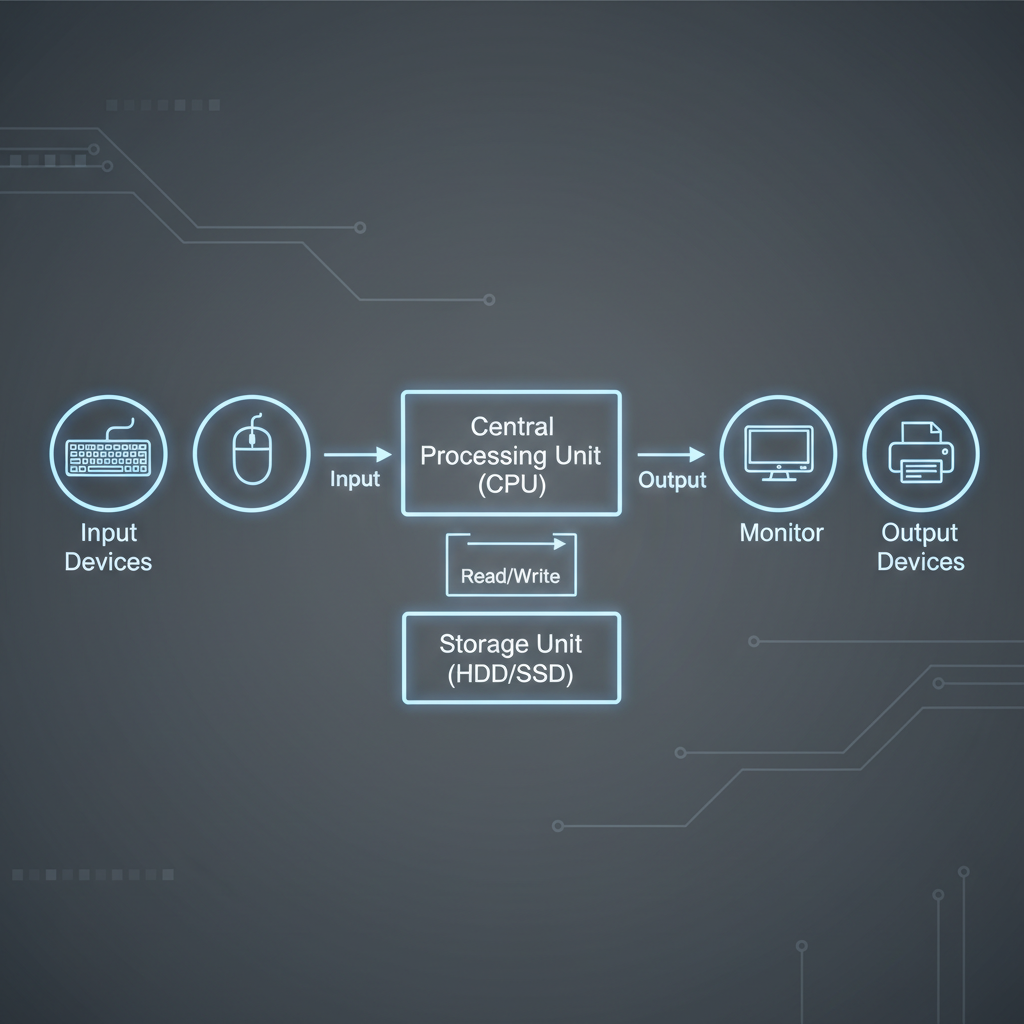
Computers Are Everywhere!
When you hear the word "computer," you might first think of a desktop PC or a laptop. But did you know that computers are in many, many more places than just your desk?
- Smartphones & Tablets: Your phone is a powerful computer you carry in your pocket!
- Smartwatches: These small devices on your wrist track your steps, show notifications, and more, thanks to tiny computers inside.
- Smart TVs: Your television can connect to the internet, stream movies, and run apps because it has a computer built-in.
- Game Consoles: Xbox, PlayStation, and Nintendo Switch are all specialized computers designed for gaming.
- Even Cars & Appliances: Modern cars have computers that control everything from the engine to the navigation system. Some refrigerators, washing machines, and even light bulbs have simple computers inside!
All these devices, big or small, still follow the basic IPOS idea: they take input, process it, give you output, and store information.
Hardware vs. Software: The Body and the Brain
To wrap things up, it's good to know two other important terms:
- Hardware: These are the physical parts of the computer that you can touch. Think of it as the "body" of the computer. Examples: Keyboard, screen, mouse, wires, the computer tower itself.
- Software: These are the programs and instructions that tell the hardware what to do. You can't touch software, but it makes the hardware come alive! Think of it as the "brain" and "personality" of the computer. Examples: Video games, web browsers, drawing apps, the operating system (like Windows or iOS).
Conclusion
So, a computer is much more than just a box. It's a versatile and powerful electronic assistant that takes information from you, thinks about it, gives you results, and remembers everything for later. From your smartphone to the vast internet, computers are truly the digital super helpers that make our modern world run!
Keep learning, free
Create a free Syllabax account to unlock practice questions and games for this topic.
Visual Learning Enhanced! 🚀
To help you master this topic, we use Advanced Syllabax AI to generate detailed diagrams and visual models.
Note on Visuals: The AI sometimes makes spelling errors in image labels. Please refer to the lesson text for the correct terminology.