Input Devices: Scanners & Mics
Watch this topic in 60 seconds
Free preview · Lesson 1
Understanding Input Devices: Scanners & Mics
Understanding Input Devices: Scanners & Microphones
Imagine trying to tell a story or draw a picture without using your eyes or ears. It would be super tough, right? Well, computers are a lot like us! They need ways to 'see' and 'hear' the world around them so they can understand what we want them to do. These 'senses' for computers are called input devices.
Input devices are simply tools that help us put information INTO a computer. Think of it like a funnel, guiding information from our world into the digital world inside the computer. Today, we're going to explore two very common and super useful input devices: Scanners and Microphones.
Part 1: Scanners – The Computer's Digital Eye
Have you ever wanted to send a drawing you made on paper to a friend digitally, or save an old family photo to your computer? That's where a scanner comes in handy! A scanner is like a super-smart digital camera specifically designed to take pictures of flat objects, like documents, photos, or even magazine pages, and turn them into digital images the computer can understand.
What Does a Scanner Do?
Think of a scanner as your computer's way of 'seeing' a physical piece of paper and remembering exactly what was on it. It captures all the text, colors, and pictures and turns them into a file on your computer, like a JPEG image or a PDF document. Once it's digital, you can email it, edit it, print copies, or save it forever without worrying about the original getting lost or damaged.
How Does a Scanner Work? (The Simple Version)
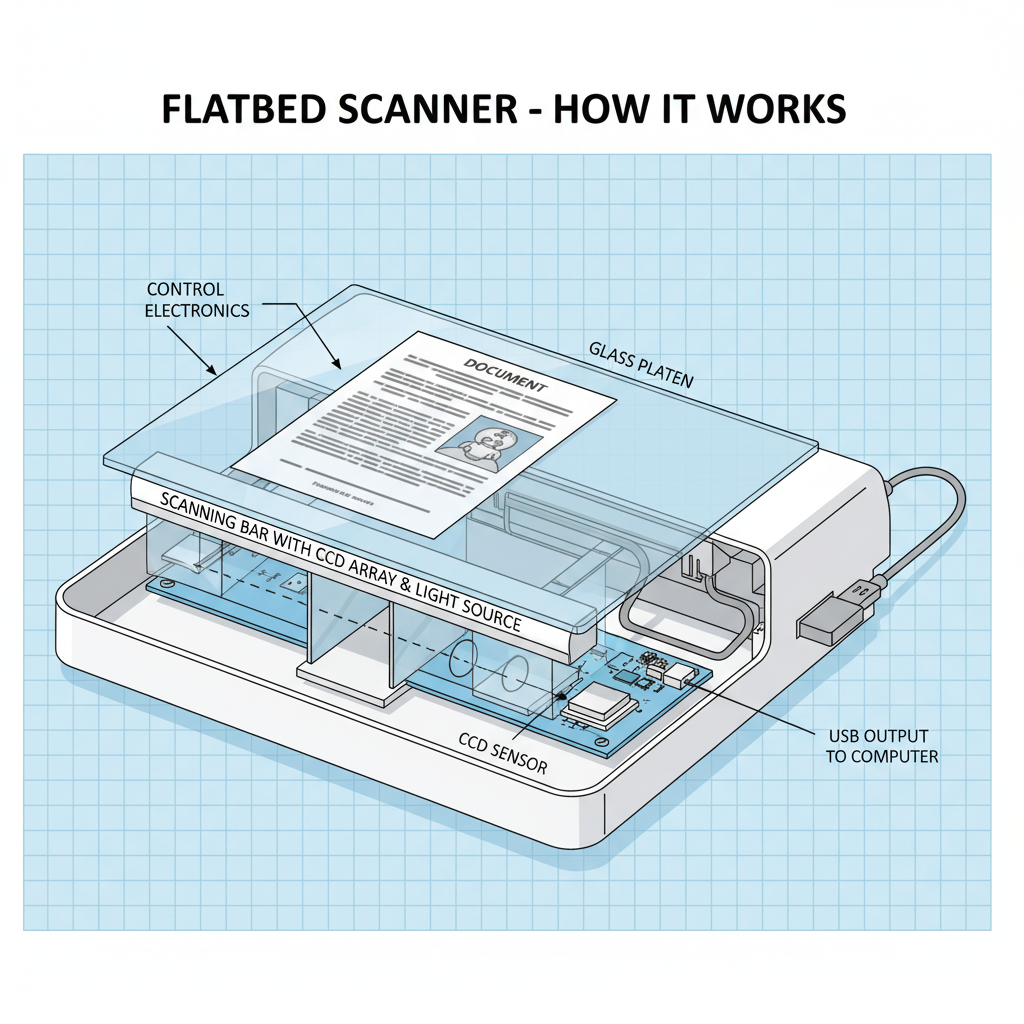
- Light Shines: When you place a document on a scanner and close the lid, a bright light bar moves across the document, similar to how a flashlight might move across a dark room.
- Light Bounces Back: This light bounces off the paper. Lighter parts of the paper reflect more light, and darker parts (like text or dark pictures) reflect less light.
- Sensor Sees It: A special sensor, like a tiny electronic eye, 'sees' the reflected light. It measures how much light comes back from each tiny spot on the paper.
- Digital Picture Created: The scanner then converts these light measurements into digital data – a bunch of numbers. These numbers are like a code that tells the computer exactly what color and brightness each tiny spot should be, creating a perfect digital copy of your document. It's like building a picture with millions of tiny colored dots!
Analogy Time! Imagine you're drawing a picture on a piece of paper. A scanner is like taking that paper and putting it under a giant magnifying glass that also has a camera. The camera takes a super-detailed photo of every single tiny bit of your drawing, and then saves that photo to your computer. Voila! Your physical drawing is now a digital drawing.
Types of Scanners:
- Flatbed Scanners: These are the most common type. They look like a small photocopier with a glass plate where you lay your document. They're great for books, photos, and delicate items.
- Document Scanners: These are built for speed! They have an automatic feeder that pulls pages through quickly, making them perfect for scanning stacks of paper. Think of them like a super-fast paper eater!
- Handheld Scanners: These are small, wand-like devices you drag across a document. They're portable but can be a bit tricky to get a perfectly straight scan.
Here's a visual of a common flatbed scanner:
Part 2: Microphones – The Computer's Digital Ear
Just like scanners help computers see, microphones help them 'hear'! A microphone is an input device that takes sound waves – like your voice, music, or any noise – and turns them into electrical signals that a computer can understand and process. Without microphones, we wouldn't have voice assistants like Siri or Alexa, or be able to talk to our friends online!
What Does a Microphone Do?
A microphone's job is to capture sound from the real world and convert it into a digital format. Once sound is digital, a computer can record it, play it back, analyze it (like for voice commands), or send it to someone else over the internet.
How Does a Microphone Work? (The Simple Version)
- Sound Waves Hit: When you speak or a sound occurs, it creates vibrations in the air called sound waves. These waves travel through the air.
- Diaphragm Vibrates: Inside the microphone, there's a very thin, delicate piece of material called a 'diaphragm' (imagine a tiny, super-sensitive drum skin). When sound waves hit it, the diaphragm vibrates back and forth.
- Vibrations Become Electricity: These vibrations are then converted into tiny electrical signals. Different types of microphones do this in slightly different ways, but the end result is an electrical signal that matches the pattern of the sound waves.
- Digital Conversion: Finally, these electrical signals are sent to a special chip (either inside the microphone or in your computer) that converts them into digital information – numbers the computer can store and work with.
Analogy Time! Think of a microphone like your ear. Your eardrum vibrates when sound hits it, and your brain interprets those vibrations as sound. A microphone's diaphragm is its eardrum, and the computer is its brain, taking those vibrations and turning them into something meaningful (digital sound data).
Types of Microphones:
- Dynamic Microphones: These are very common, especially for live performances and general use. They're tough and don't need external power. Think of the microphones rock stars use on stage!
- Condenser Microphones: These are much more sensitive and pick up very fine details in sound. They're often used in recording studios for vocals and instruments. They usually need power to work.
- USB Microphones: These are super easy to use! You just plug them into a USB port on your computer, and they're ready to go. Many gaming headsets have built-in USB microphones.
- Built-in Microphones: Most laptops, smartphones, and webcams have tiny microphones built right into them, perfect for quick calls or recordings.
Bringing It Together: Scanners & Microphones
So, what do scanners and microphones have in common? They are both incredible input devices that act as bridges between our physical world and the digital world of computers. One helps the computer 'see' documents and photos, while the other helps it 'hear' voices and sounds. They transform real-world, analog information (light and sound) into digital data (numbers) that computers can store, process, and share. They are essential tools that make our computers so much more interactive and useful!
Keep learning, free
Create a free Syllabax account to unlock practice questions and games for this topic.
Visual Learning Enhanced! 🚀
To help you master this topic, we use Advanced Syllabax AI to generate detailed diagrams and visual models.
Note on Visuals: The AI sometimes makes spelling errors in image labels. Please refer to the lesson text for the correct terminology.