Web Browsers & Search Engines
Watch this topic in 60 seconds
Free preview · Lesson 1
Understanding Web Browsers & Search Engines
Web Browsers & Search Engines: Your Internet GPS!
Hey 8th Graders! Ever wonder how you get to your favorite gaming site, find information for a school project, or watch that hilarious cat video online? It's not magic, it's technology! Two of the most important tools you use every single day to explore the vast world of the internet are Web Browsers and Search Engines. Think of them as your personal internet GPS and vehicle, helping you navigate to wherever you want to go online.
What is the Internet, Anyway? (A Quick Recap!)
Before we dive into browsers and search engines, let's quickly remember what the internet is. Imagine the internet as a gigantic, worldwide library. This library isn't filled with physical books, but with billions of digital documents, images, videos, and more, all stored on computers (called servers) all around the globe. These documents and pages are what we call 'websites'. Just like a library has different sections and books, the internet has countless websites, each with its own address.
Web Browsers: Your Internet Doorway and Vehicle
What is a Web Browser?
Let's start with web browsers. A web browser is a special program or application on your computer, tablet, or phone that allows you to access and view websites on the internet. Think of your web browser like a car. The internet is the vast network of roads, and websites are all the different destinations (houses, shops, schools) you want to visit on those roads. Without a car (browser), you can't really travel to those places!
Another great analogy? Your web browser is like the special 'door' or 'window' through which you look at the internet. Without this door, you can't see or interact with all the amazing things happening online.
How Does a Web Browser Work? (The Internet Translator)
Websites are built using complex computer languages (like HTML, CSS, JavaScript). When you type a website address (like www.google.com) into your browser's address bar and press Enter, your browser does a lot of work behind the scenes:
- Requesting the Page: Your browser sends a message (a 'request') across the internet to the server where that website is stored, asking for the web page you want to see.
- Receiving the Data: The server 'sends back' all the information (the computer code, images, text, videos) that makes up that web page.
- Translating and Displaying: This is where your browser really shines! It takes all that complex code and translates it into the beautiful, interactive page you see on your screen. It figures out where the text goes, what the images look like, how videos play, and how buttons respond when you click them. It's like your browser is a super-smart translator and artist, taking raw instructions and turning them into a visual experience!
Key Features of a Web Browser
- Address Bar: This is the box at the top where you type website addresses (URLs), like typing a destination into your car's navigation system.
- Tabs: Most browsers let you open multiple websites at once in different 'tabs' within the same window. Imagine having several books open to different pages on your desk, but all within one big binder.
- Bookmarks/Favorites: If you find a website you love and want to visit often, you can 'bookmark' it. This is like putting a special sticky note on a page in a book or saving a favorite destination in your car's GPS so you don't have to type it every time.
- History: Your browser remembers the websites you've visited. This is like a journal of all your past internet trips.
- Back/Forward Buttons: These allow you to easily go back to a previous page or forward to one you just left, much like flipping pages in a book.
Popular Web Browsers
Just like there are different types of cars, there are many different web browsers:
- Google Chrome: Very popular, made by Google.
- Mozilla Firefox: Known for its privacy features.
- Microsoft Edge: Comes with Windows computers.
- Apple Safari: The default browser for Apple devices like iPhones and Macs.
Search Engines: Your Internet Super Librarian
What is a Search Engine?
Now, let's talk about search engines. While a web browser is your 'car' to get onto the internet, a search engine is like your 'super librarian' or 'ultra-fast index' for the entire internet library. Imagine walking into a giant library with billions of books. How would you ever find the exact information you need? You'd ask a librarian or use a catalog system, right?
That's exactly what a search engine does! It's a powerful tool that helps you find specific information, websites, images, videos, and more, across the entire internet. Instead of typing an exact address, you type in what you're looking for (your 'keywords'), and the search engine finds relevant results for you.
How Does a Search Engine Work? (Spiders and Indexes!)
Search engines don't just magically know everything. They have a complex system that works something like this:
- Crawling (The Spiders!): Search engines use automated programs, often called 'spiders' or 'web crawlers'. These spiders constantly scour the internet, following links from one page to another, much like you'd follow a trail of breadcrumbs. They read and analyze the content of billions of web pages.
- Indexing (The Giant Catalog): As the spiders find and read pages, they send all that information back to the search engine's massive databases. Here, the content is organized and stored in a gigantic index – like a super detailed catalog for the entire internet library. This index lists keywords and where they can be found on different websites.
- Ranking (Finding the Best Match): When you type a question or keywords into a search engine, it quickly looks through its massive index. It then uses complex algorithms (like secret recipes) to decide which websites are most relevant, trustworthy, and popular for your search. It then 'ranks' these results, showing you the most helpful ones first. This is like a librarian instantly knowing the best book for your specific question based on their deep knowledge of the library.
Key Features of a Search Engine
- Search Bar: Where you type your keywords or questions.
- Search Results Page (SERP): The page that displays all the links and snippets of information that match your search.
- Filters and Tools: Most search engines let you filter results by images, videos, news, shopping, or even by date, making your search more precise.
Popular Search Engines
- Google: By far the most popular search engine in the world.
- Bing: Microsoft's search engine.
- DuckDuckGo: Known for its focus on user privacy.
- Yahoo Search: Another long-standing search engine.
Browsers and Search Engines: A Dynamic Duo
It's important to understand that web browsers and search engines are different things, but they work together hand-in-hand. You often use a search engine within a web browser.
Think back to our car and GPS analogy: Your web browser is the car that lets you drive on the internet roads. A search engine is the GPS system inside your car. You use the GPS (search engine) to find your destination (information), and then your car (browser) takes you there!
When you open your browser (like Chrome), you might see a search bar right in the middle of the screen, or you might type your search directly into the address bar. In both cases, your browser is using a search engine (usually Google by default, but you can change it!) to find what you're looking for.
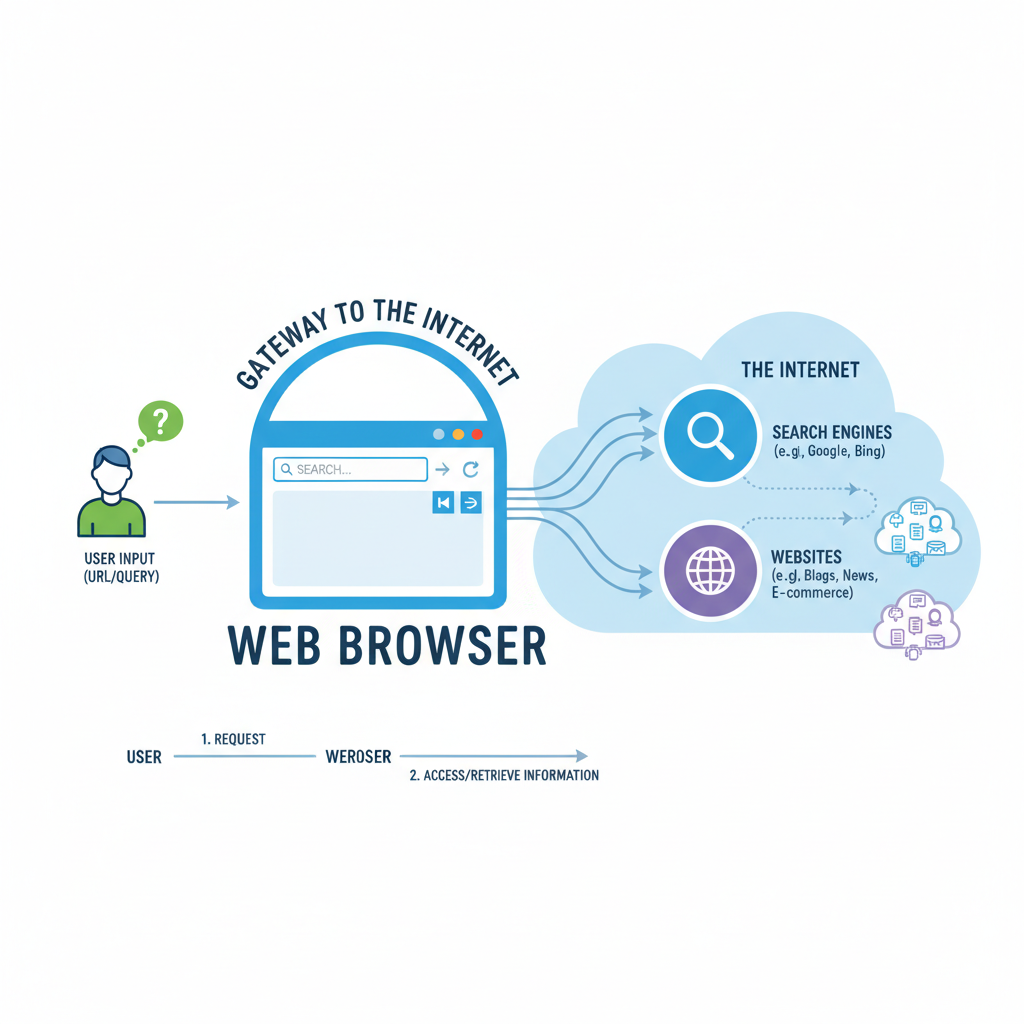 ⚠️ This picture may have spelling mistakes. Trust the words in the lesson.
Being a Smart Surfer: Tips for 8th Graders
Effective Searching
- Use Specific Keywords: Instead of 'dogs', try 'best dog breeds for families'.
- Use Quotes for Exact Phrases: If you're looking for a specific phrase, put it in "quotation marks" (e.g., "the quick brown fox").
- Try Different Keywords: If your first search doesn't work, try rephrasing your question or using different words.
- Evaluate Your Sources: Not everything you read online is true! Look for reputable websites (like educational institutions, government sites, well-known news organizations).
Online Safety & Privacy Basics
- Be Mindful of What You Click: If a link looks suspicious or too good to be true, it probably is.
- Don't Share Personal Info: Never give out your full name, address, phone number, or school name to strangers online.
- Understand Cookies: Websites often use 'cookies' to remember you (like keeping you logged in) or track your browsing habits. Your browser settings allow you to manage these.
Conclusion
Web browsers and search engines are powerful tools that have revolutionized how we learn, communicate, and entertain ourselves. Understanding what they are, how they work, and how they work together is a fundamental skill for navigating the digital world safely and effectively. So next time you open your browser and type something into a search engine, you'll know exactly what's happening behind the scenes!
Keep learning, free
Create a free Syllabax account to unlock practice questions and games for this topic.
Visual Learning Enhanced! 🚀
To help you master this topic, we use Advanced Syllabax AI to generate detailed diagrams and visual models.
Note on Visuals: The AI sometimes makes spelling errors in image labels. Please refer to the lesson text for the correct terminology.