Email and Online Communication
Watch this topic in 60 seconds
Free preview · Lesson 1
Understanding Email and Online Communication
Email and Online Communication: Your Digital Passport
Welcome to the foundational guide to email and online communication! In today's world, knowing how to communicate effectively and safely online is as important as knowing how to speak clearly in person. Think of online communication as your digital passport – it opens up a world of possibilities, from connecting with friends and family to learning new things and even future career opportunities.
This guide will help you understand the core concepts, basic definitions, and best practices for navigating the digital world. We'll break down complex ideas into simple terms and use plenty of analogies to make everything crystal clear.
1. What is Email? Your Digital Mailbox
Imagine the postal service. You write a letter, put it in an envelope, address it, put a stamp on it, and drop it in a mailbox. Days later, it arrives at its destination. Email (electronic mail) is basically the same thing, but super-fast and completely digital!
1.1. Anatomy of an Email Address
Just like your home has a street name and house number, an email address has a specific structure so messages know exactly where to go. It always looks something like username@domain.com.
- Username: This is your unique identifier, like your name or house number. It's usually what you choose when you create your email account (e.g., john.doe@example.com).
- @ (at sign): This symbol is like the word "at." It separates your username from the domain. It tells the email system: "Look for this user at this specific service."
- Domain: This part identifies the email service provider or organization you belong to, like the street or city your house is on (e.g., username@gmail.com, username@outlook.com, username@schoolname.edu).
1.2. Key Components of an Email Message
When you compose an email, you'll see several fields that are important for proper delivery and understanding:
-
To: This is where you put the email address(es) of the primary recipient(s). These are the main people you intend the email for. Analogy: This is like the main address written on the front of a letter's envelope.
-
Cc (Carbon Copy): This stands for "Carbon Copy." You add email addresses here for people who need to be kept in the loop but aren't the primary recipient. Everyone in the 'To' and 'Cc' fields can see who else received the email. Analogy: Imagine making a copy of a physical letter using carbon paper and sending it to someone else. Everyone knows they both got a copy.
-
Bcc (Blind Carbon Copy): This stands for "Blind Carbon Copy." Similar to 'Cc', but recipients in the 'Bcc' field are hidden from other recipients (those in 'To' and 'Cc'). This is useful when you want to send an email to many people without revealing everyone's email address to each other. Analogy: This is like sending a copy of a letter to someone secretly. The main recipient doesn't know this person also received it.
-
Subject: This is a short, descriptive title that tells the recipient what the email is about. A good subject line is clear and concise, helping the recipient decide if they need to open it immediately. Analogy: This is like the title on the spine of a book or the label on a package – it gives you a quick idea of what's inside.
-
Body: This is the main content of your email – your actual message! It's where you write what you want to communicate. Analogy: This is the actual letter written inside the envelope.
-
Attachments: You can attach files (documents, photos, videos) to your email. These files are sent along with your message. Analogy: This is like putting extra documents or photos inside a package you're mailing.
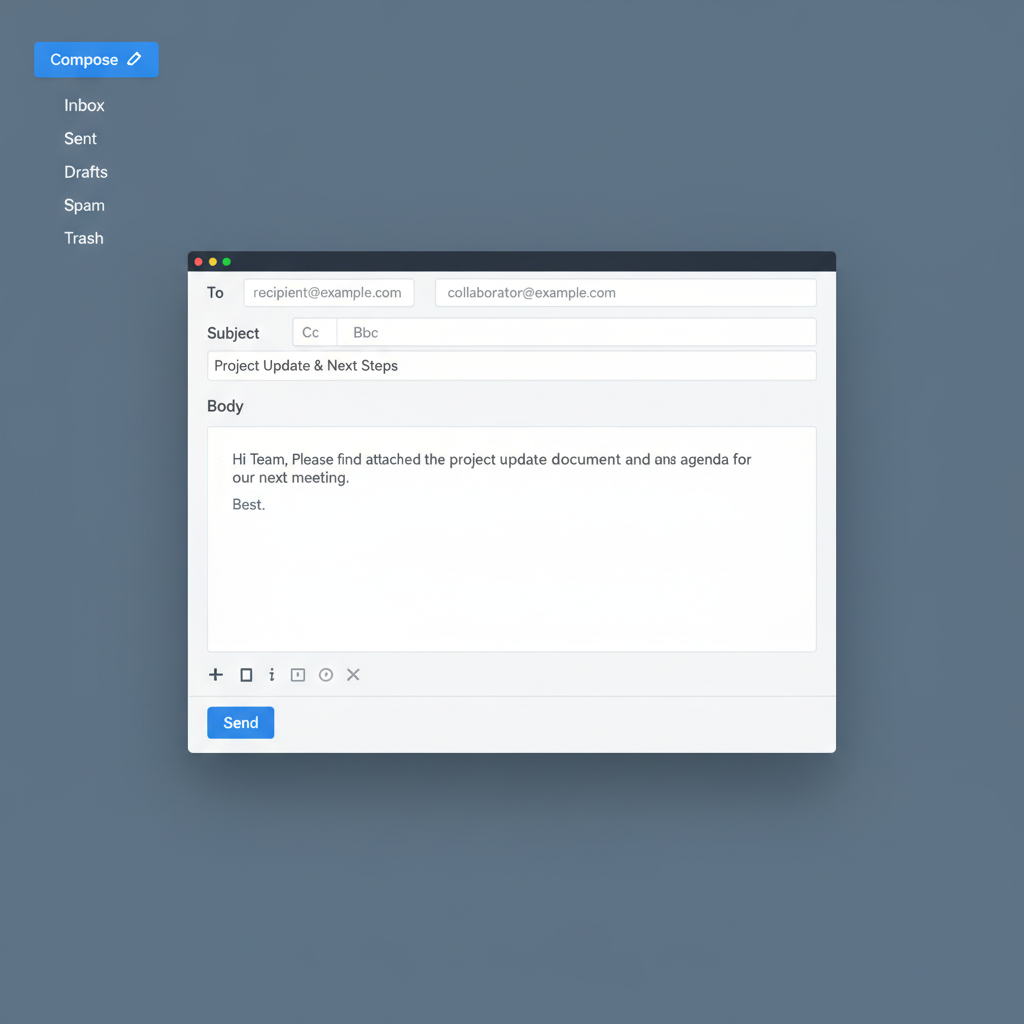 ⚠️ This picture may have spelling mistakes. Trust the words in the lesson.
Figure 1: A visual representation of a typical email interface, highlighting its main components.
2. Beyond Email: Other Forms of Online Communication
While email is great for formal communication and sending detailed messages, the internet offers many other ways to connect instantly!
2.1. Instant Messaging (IM) / Chat
Think of IM or chat as quick, real-time conversations, like passing notes back and forth in class, but digitally.
- Purpose: Quick questions, informal chats, sharing links or small bits of information immediately.
- Examples: WhatsApp, Messenger, Discord, SMS text messages (though often cellular, they are a form of instant digital communication).
2.2. Social Media
Social media platforms are like digital public squares or community notice boards where people share updates, photos, videos, and opinions with a wider audience.
- Purpose: Connecting with friends, family, and communities; sharing personal updates; following news and interests; discovering new content.
- Examples: Instagram, TikTok, X (formerly Twitter), Facebook.
2.3. Video Conferencing
Video conferencing allows you to see and talk to people in real-time over the internet, essentially bringing people together visually from different locations.
- Purpose: Online classes, virtual meetings, connecting with distant family/friends, interviews.
- Examples: Zoom, Google Meet, Microsoft Teams, FaceTime.
3. Netiquette: The Rules of the Digital Road
Just like there are manners for interacting in person, there are rules for behaving online called netiquette (internet + etiquette). Following netiquette ensures smooth, respectful, and effective communication.
Key Netiquette Guidelines:
- Be Respectful: Treat others online as you would in person. Avoid using offensive language, sarcasm that might be misunderstood, or making personal attacks.
- Think Before You Post: Once something is online, it can be very difficult to remove. Ask yourself: Is this something I'd want everyone (including my teachers, future employers, or family) to see?
- Keep it Concise: Get to the point quickly, especially in emails and messages. Long, rambling communications can be frustrating.
- Use Proper Grammar and Spelling: This makes your message clear and shows professionalism and respect for the recipient's time.
- Avoid ALL CAPS: Writing in all capital letters online is considered shouting and can be perceived as aggressive.
- Respect Privacy: Don't share personal information about yourself or others without permission. This includes photos, addresses, or private conversations.
- Consider Your Audience: Adjust your tone and language based on who you're communicating with (e.g., be more formal with a teacher than with a friend).
4. Staying Safe Online: Your Digital Armor
The internet is a fantastic tool, but it also has potential risks. Just like you wouldn't leave your front door unlocked, you need to protect your online presence.
4.1. Strong Passwords
Your password is the lock on your digital door.
- Make them Complex: Use a combination of uppercase and lowercase letters, numbers, and symbols.
- Make them Unique: Don't use the same password for multiple accounts.
- Keep them Private: Never share your passwords with anyone, except trusted parents/guardians if necessary.
4.2. Beware of Phishing
Phishing is a type of online scam where attackers try to trick you into giving them your personal information (like passwords, bank details) by pretending to be a trustworthy entity, like your bank, school, or a popular website.
- Look for Red Flags: Grammatical errors, urgent requests for personal info, suspicious links, and sender addresses that don't match the supposed organization are all warning signs.
- Verify Before You Click: If an email seems suspicious, don't click on any links or open attachments. Instead, go directly to the official website or contact the organization through a known phone number.
4.3. Protecting Your Privacy
- Be Mindful of What You Share: Every photo, comment, or personal detail you post online contributes to your digital footprint. Once it's out there, it's hard to control.
- Adjust Privacy Settings: On social media and other platforms, take time to understand and adjust your privacy settings to control who sees your content.
- Location Sharing: Be very cautious about sharing your real-time location. Turn off location services for apps that don't genuinely need them.
Conclusion
Understanding email and online communication is a fundamental skill in today's digital age. By grasping the basics of how email works, recognizing different communication methods, practicing good netiquette, and prioritizing online safety, you'll be well-equipped to navigate the internet confidently and responsibly. Keep exploring, keep learning, and communicate wisely!
Keep learning, free
Create a free Syllabax account to unlock practice questions and games for this topic.
Visual Learning Enhanced! 🚀
To help you master this topic, we use Advanced Syllabax AI to generate detailed diagrams and visual models.
Note on Visuals: The AI sometimes makes spelling errors in image labels. Please refer to the lesson text for the correct terminology.