Functions and Procedures
Watch this topic in 60 seconds
Free preview · Lesson 1
Understanding Functions and Procedures
Understanding Functions and Procedures: Your Digital Toolbox!
Welcome, 8th graders, to an exciting journey into the world of programming! Today, we're going to uncover two super important concepts that are like magic spells for making computer programs powerful and easy to understand: Functions and Procedures. Don't let the fancy names scare you; they're actually quite simple and incredibly useful!
What's the Big Idea? Think of a Recipe Book!
Imagine you love baking cookies. You wouldn't write down all the steps for 'making dough,' 'adding chocolate chips,' and 'baking in the oven' every single time you want to bake. Instead, you'd have a recipe for 'Chocolate Chip Cookies.' When you want cookies, you just follow that one recipe!
In programming, functions and procedures are exactly like these recipes. They are blocks of instructions, or pieces of code, that are grouped together to perform a specific task. Once you've written a function or procedure, you can use it again and again, whenever you need that task done, without writing all the instructions from scratch every time.
Why Do We Need Them?
Think about building with LEGOs. If you wanted to build a car, you wouldn't mold every single LEGO brick from raw plastic each time. Instead, you use pre-made wheels, doors, and windows. Functions and procedures are like these pre-made LEGO parts:
- Reusability (Don't Repeat Yourself!): Imagine you need to calculate the area of a rectangle many times in your program. Instead of writing
length * widthover and over, you can create a function calledcalculateRectangleArea. Then, whenever you need it, you just 'call' that function! This saves time and prevents mistakes. - Organization (Tidy Room, Tidy Code): Breaking down a big program into smaller, manageable functions and procedures makes it much easier to understand, just like organizing your messy room into different sections for clothes, toys, and books.
- Readability (Easy to Follow): When you read a book, it's divided into chapters. You don't get a giant scroll of text! Functions and procedures make your code like a book with chapters, making it easier for you (and others) to read and understand what's happening.
- Debugging (Finding Bugs is Easier!): If there's a problem (a 'bug') in your program, it's much easier to find and fix it within a small function than to search through a giant block of code. It's like finding a leak in one specific pipe rather than checking the entire plumbing system of a house.
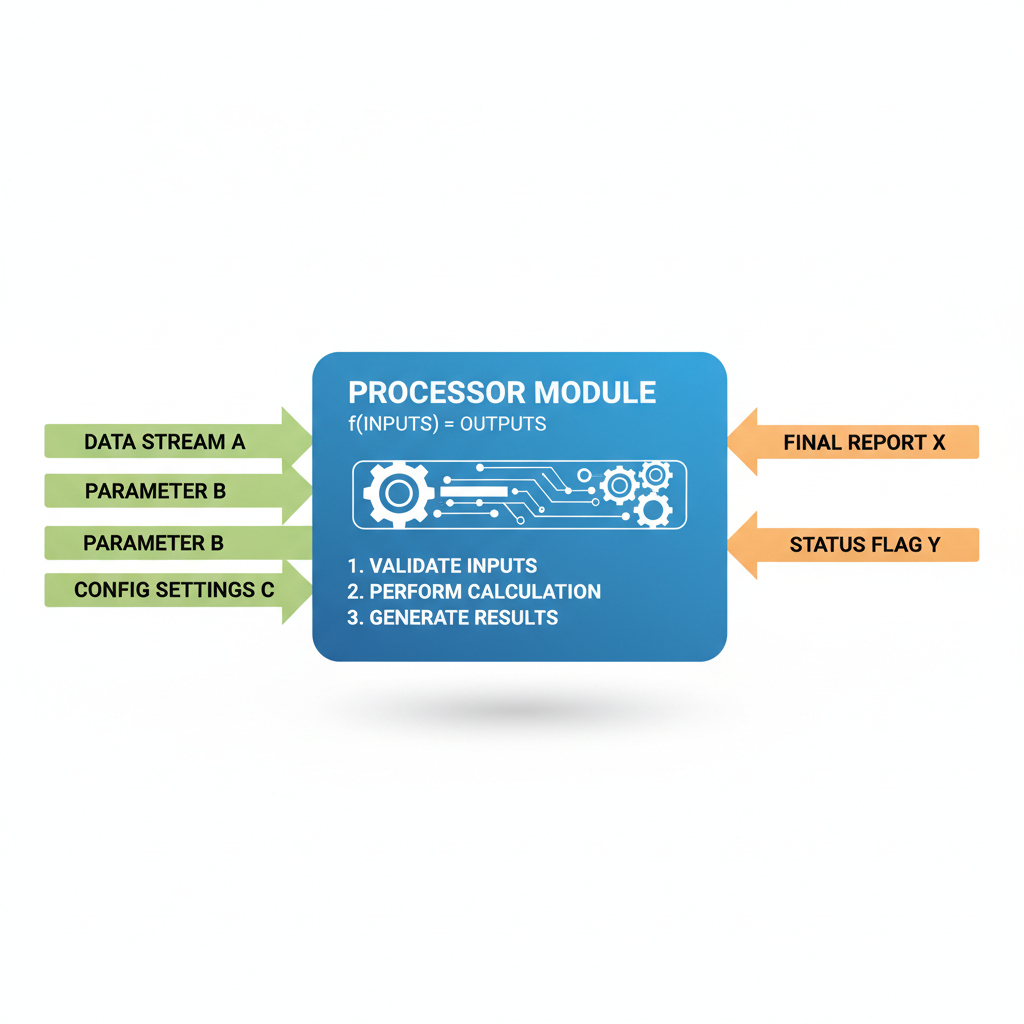
The Anatomy of a Function/Procedure: Input, Process, Output
Most functions and procedures follow a simple pattern, much like our cookie recipe:
-
Input (Ingredients):
This is the information or 'data' that the function or procedure needs to do its job. For our cookie recipe, the inputs are ingredients like flour, sugar, eggs, and chocolate chips. In programming, these are called arguments or parameters.
Example: A function that adds two numbers needs number1 and number2 as inputs.
-
Process (Steps):
This is the actual work or instructions that the function or procedure performs using the inputs. For the cookie recipe, it's mixing the ingredients, shaping the dough, and baking. In programming, this is the 'code' inside the function.
Example: The addition function would have an instruction like
result = number1 + number2. -
Output (The Finished Product):
After doing its work, a function might produce a result or an 'output.' For the cookie recipe, the output is a batch of delicious cookies! In programming, functions often 'return' a value.
Example: The addition function would return the calculated
result.
Functions vs. Procedures: A Small but Important Difference
While often used interchangeably, especially when you're starting out, there's a subtle difference between functions and procedures:
-
Functions: They Return a Value (Like a Math Problem Answer)
Think of a calculator. When you press '2 + 3 =', the calculator gives you back the answer '5'. A function almost always calculates something and 'returns' that result. It's designed to compute a value that you can then use in other parts of your program.
Example (Pseudo-code):
FUNCTION addNumbers(num1, num2):
sum = num1 + num2
RETURN sum
END FUNCTION
myResult = addNumbers(5, 7) // myResult now holds 12 -
Procedures: They Just Do Something (Like Following an Instruction)
Imagine telling a robot, 'Move forward 5 steps!' The robot performs the action, but it doesn't give you back a number or a specific piece of data. Procedures (sometimes called 'subroutines' or 'methods') are designed to perform a task or a series of actions without necessarily returning a specific value.
Example (Pseudo-code):
PROCEDURE sayHello(name):
DISPLAY 'Hello, ' + name + '!'
END PROCEDURE
sayHello('Alice') // This will just display 'Hello, Alice!' on the screen
In many modern programming languages, the term 'function' is often used for both, or the distinction isn't as strict. But understanding that some blocks of code produce a value and others just perform actions is a great foundational step!
Let's Recap!
Functions and procedures are like mini-programs within your bigger program. They help you write neat, efficient, and easy-to-understand code. By using them, you become a smarter, more organized programmer!
Keep learning, free
Create a free Syllabax account to unlock practice questions and games for this topic.
Visual Learning Enhanced! 🚀
To help you master this topic, we use Advanced Syllabax AI to generate detailed diagrams and visual models.
Note on Visuals: The AI sometimes makes spelling errors in image labels. Please refer to the lesson text for the correct terminology.