Algorithms and Flowcharts
Watch this topic in 60 seconds
Free preview · Lesson 1
Understanding Algorithms and Flowcharts
Understanding Algorithms and Flowcharts: Your Guide to Structured Problem-Solving (Grade 10)
Welcome, Grade 10 learners! In today's world, where technology touches every aspect of our lives, understanding how computers 'think' and solve problems is incredibly valuable. At the heart of all computer programs, apps, and even complex systems, lie two fundamental concepts: Algorithms and Flowcharts. Think of them as the blueprint and the treasure map for problem-solving. They help us break down big, intimidating problems into small, manageable steps, ensuring we reach the correct solution efficiently. This foundational guide will equip you with the knowledge to design clear, logical solutions to any problem.
Part 1: The Brain Behind the Operation – What is an Algorithm?
Defining an Algorithm
Imagine you want to bake a cake. What's the first thing you need? A recipe, right? A recipe is a perfect analogy for an algorithm. An algorithm is simply a set of well-defined, step-by-step instructions to solve a particular problem or perform a specific task. It's like a detailed plan that, if followed precisely, guarantees you'll get the desired outcome.
In computer science, algorithms are the bedrock. Before a programmer writes a single line of code, they first design an algorithm to tell the computer exactly what to do. Whether it's sorting a list of names, finding the fastest route on a map, or even recommending a movie, an algorithm is working behind the scenes.
Key Characteristics of a Good Algorithm
Just like a good recipe needs to be clear and complete, a good algorithm has several important characteristics:
- Clear and Unambiguous: Each step must be precise and leave no room for misunderstanding. If a recipe says "add flour," it's ambiguous. "Add 2 cups of all-purpose flour" is clear.
- Finite: An algorithm must always come to an end after a finite number of steps. It can't go on forever like a never-ending story!
- Effective (Feasible): Each step must be practical and achievable. You can't have a step like "fly to the moon" in a recipe for cookies unless you're a superhero chef!
- Input: An algorithm usually takes zero or more inputs. For our cake recipe, ingredients like flour, sugar, and eggs are the inputs.
- Output: An algorithm must produce at least one output. The baked cake is the output of our recipe algorithm.
Algorithms in Everyday Life (Analogies Galore!)
Algorithms aren't just for computers; we use them constantly without even realizing it:
- Getting Ready for School: Your morning routine is an algorithm! Get out of bed → Brush teeth → Get dressed → Eat breakfast → Grab backpack → Leave for school. Each step is clear, ordered, and leads to the outcome of being ready for school.
- Giving Directions: If a friend asks for directions to your house, you provide an algorithm: "Go straight for two blocks → Turn left at the traffic light → My house is the third one on the right."
- Assembling IKEA Furniture: Those instruction manuals are prime examples of algorithms! They show you, step-by-step, how to turn a pile of parts into a functional piece of furniture.
Part 2: The Visual Aid – What is a Flowchart?
Defining a Flowchart
While an algorithm provides step-by-step instructions in text, sometimes it's easier to understand a process if you can see it. That's where a flowchart comes in! A flowchart is a graphical or pictorial representation of an algorithm. Think of it as a visual map or a treasure map for your algorithm. It uses different shapes to represent different types of steps and arrows to show the flow or sequence of those steps.
Flowcharts make algorithms much easier to understand, especially complex ones. They help you visualize the logic, identify potential issues, and ensure that all possible scenarios are considered.
Common Flowchart Symbols and Their Meanings
Just like road signs have specific meanings, each shape in a flowchart has a standard purpose:
-
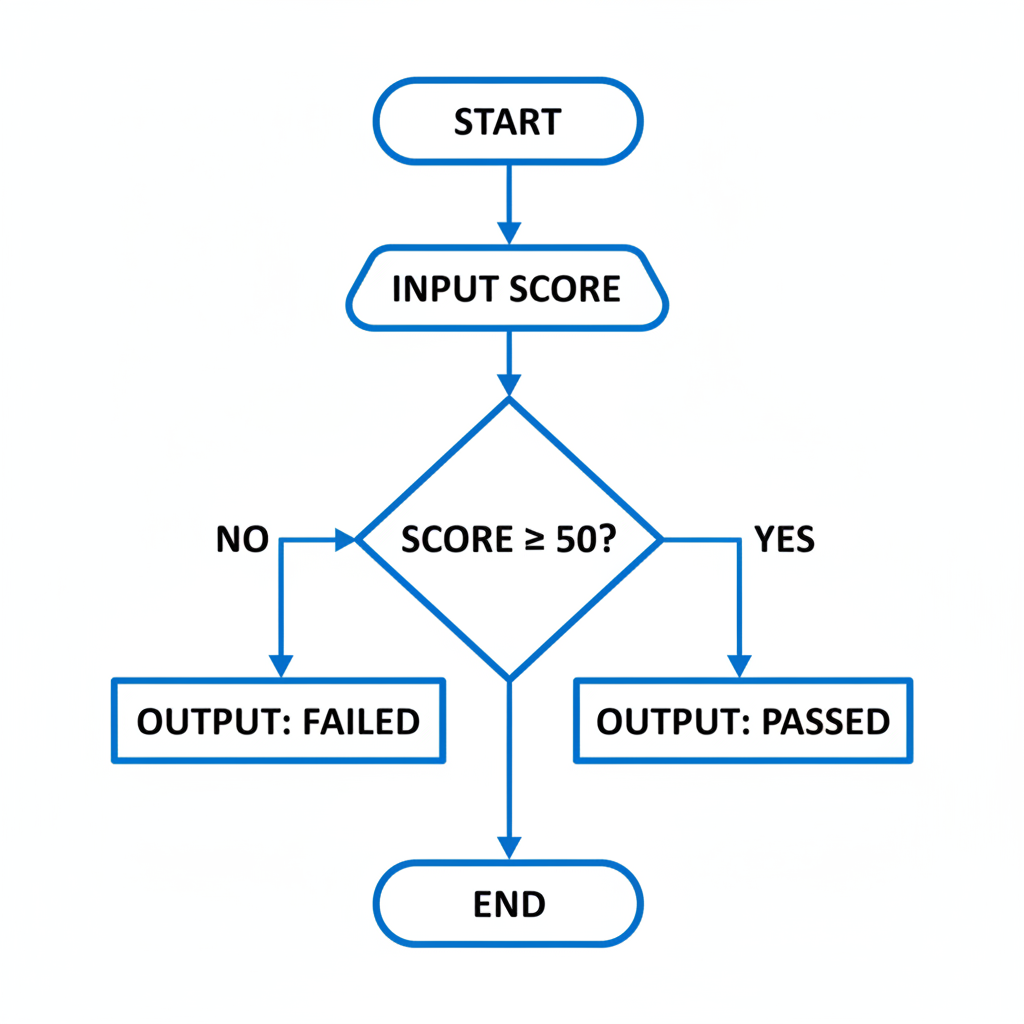
Terminal (Start/End): This oval shape represents the beginning or end of a program or process. It's like the "START" and "STOP" buttons.
Analogy: The "START" and "FINISH" lines in a race. -
Process (Action/Calculation): A rectangle represents a step where an action is performed or a calculation is made. This could be adding two numbers, assigning a value, or printing something.
Analogy: A task in your to-do list, like "Make a sandwich." -
Input/Output: This parallelogram shape is used for any operation where data is entered into the system (input) or displayed/printed out (output).
Analogy: Asking a question (input) or giving an answer (output). -
Decision: A diamond shape indicates a point where a decision needs to be made. This usually involves a question that can be answered with a "Yes" or "No" (or "True" or "False"), leading to different paths.
Analogy: A crossroads where you choose left or right based on a condition (e.g., "Is it raining?" If yes, take umbrella path; if no, take no umbrella path). -
Flow Lines (Arrows): These arrows show the direction of the flow, connecting one symbol to another. They indicate the sequence in which the steps are executed.
Analogy: The arrows on a road map showing you which way to go.
Here's an example of a simple flowchart to illustrate how these symbols come together:
Part 3: Bringing it Together – Algorithm vs. Flowchart
While algorithms and flowcharts both serve the purpose of outlining a solution, they do so in different ways:
- Algorithm: Text-based, detailed, step-by-step instructions. Focuses on the logical sequence of operations.
- Flowchart: Graphic-based, visual representation of an algorithm. Focuses on illustrating the flow of control and decision points.
You can think of it this way: the algorithm is the raw story, written out word-for-word. The flowchart is like a comic book version of that story, using pictures and arrows to guide you through the plot.
Why are they important together?
An algorithm is the core idea, the 'what to do'. A flowchart is a tool to design, visualize, and communicate that idea, the 'how to do it' graphically. Using them together ensures that your problem-solving approach is both logically sound and easy to understand by others (or even your future self!). They are crucial first steps before writing any computer code, helping you iron out any logical errors or missing steps.
Conclusion
Algorithms and flowcharts are foundational concepts in computer science and critical skills for problem-solving in any field. By understanding how to break down problems into clear, sequential steps (algorithms) and represent these steps visually (flowcharts), you gain powerful tools for logical thinking and systematic problem resolution. Keep practicing, and you'll soon be designing elegant solutions to complex challenges!
Keep learning, free
Create a free Syllabax account to unlock practice questions and games for this topic.
Visual Learning Enhanced! 🚀
To help you master this topic, we use Advanced Syllabax AI to generate detailed diagrams and visual models.
Note on Visuals: The AI sometimes makes spelling errors in image labels. Please refer to the lesson text for the correct terminology.