Robotics & Automation Basics
Watch this topic in 60 seconds
Free preview · Lesson 1
Understanding Robotics & Automation Basics
Robotics & Automation Basics: Your Future, Automated!
Grade 8 | Foundational Concepts | Unleashing Your Inner Engineer
What's All the Buzz About Robots?
Have you ever seen a robotic arm on a car assembly line, or perhaps a small robot vacuum cleaner zooming around your house? These amazing machines are everywhere, and they're changing the world! Welcome to the exciting world of Robotics and Automation, where we learn how machines can help us do tasks, from the simple to the super complex.
Imagine having a helpful friend who never gets tired, never makes a mistake, and can do the same task perfectly, millions of times. That's kind of what a robot is! And automation is all about making things happen automatically, without constant human help.
Meet the Robot: Your Programmable Helper
So, what exactly is a robot? At its core, a robot is a machine designed to carry out a complex series of actions automatically, especially one programmable by a computer. Think of it like a smart tool that you can teach to do different things.
Let's break down a robot into its main parts, just like how you have different parts that make you work:
-
1. The Body (Manipulator/Structure)
This is the physical frame of the robot, like your skeleton and muscles. It's what gives the robot its shape and allows it to move. Robotic arms, for example, have joints just like your elbow or shoulder, allowing them to reach and bend. Some robots might roll on wheels, while others might have legs to walk.
Analogy: Think of it as the robot's backbone and limbs. Without it, there’s nothing for the other parts to attach to or move.
-
2. The Brain (Controller)
Every robot needs a brain, and for robots, this is usually a computer. The controller tells the robot what to do, when to do it, and how to do it. It stores the instructions (the program) and sends signals to the robot's other parts to make them move or react.
Analogy: This is just like your own brain! Your brain processes information, makes decisions, and sends signals to your muscles to move your arms or legs.
-
3. The Senses (Sensors)
How does a robot know what's happening around it? It uses sensors! Sensors are like the robot's eyes, ears, and sense of touch. They collect information from the environment. Examples include cameras (seeing), microphones (hearing), temperature sensors, pressure sensors (feeling if something is there), and distance sensors.
Analogy: Imagine trying to walk around with your eyes closed! Sensors help the robot 'see' and 'feel' its way through the world, just like your senses help you.
-
4. The Muscles (Actuators)
Once the brain decides what to do, it needs to tell the robot's parts to move. That's where actuators come in! Actuators are the components that convert energy (usually electrical) into physical motion. Motors are a very common type of actuator. They make the robot's joints turn or wheels spin.
Analogy: These are the robot's muscles! They receive signals from the brain and make the robot's body parts move.
-
5. The Hand (End-Effector)
At the very end of a robotic arm, you'll often find something called an end-effector. This is the part that interacts with the world to perform a task. It could be a gripper to pick things up, a welding torch to join metal, a paint sprayer, or even a surgical tool.
Analogy: Think of it as the robot's hand, or the specific tool it's holding to do its job.
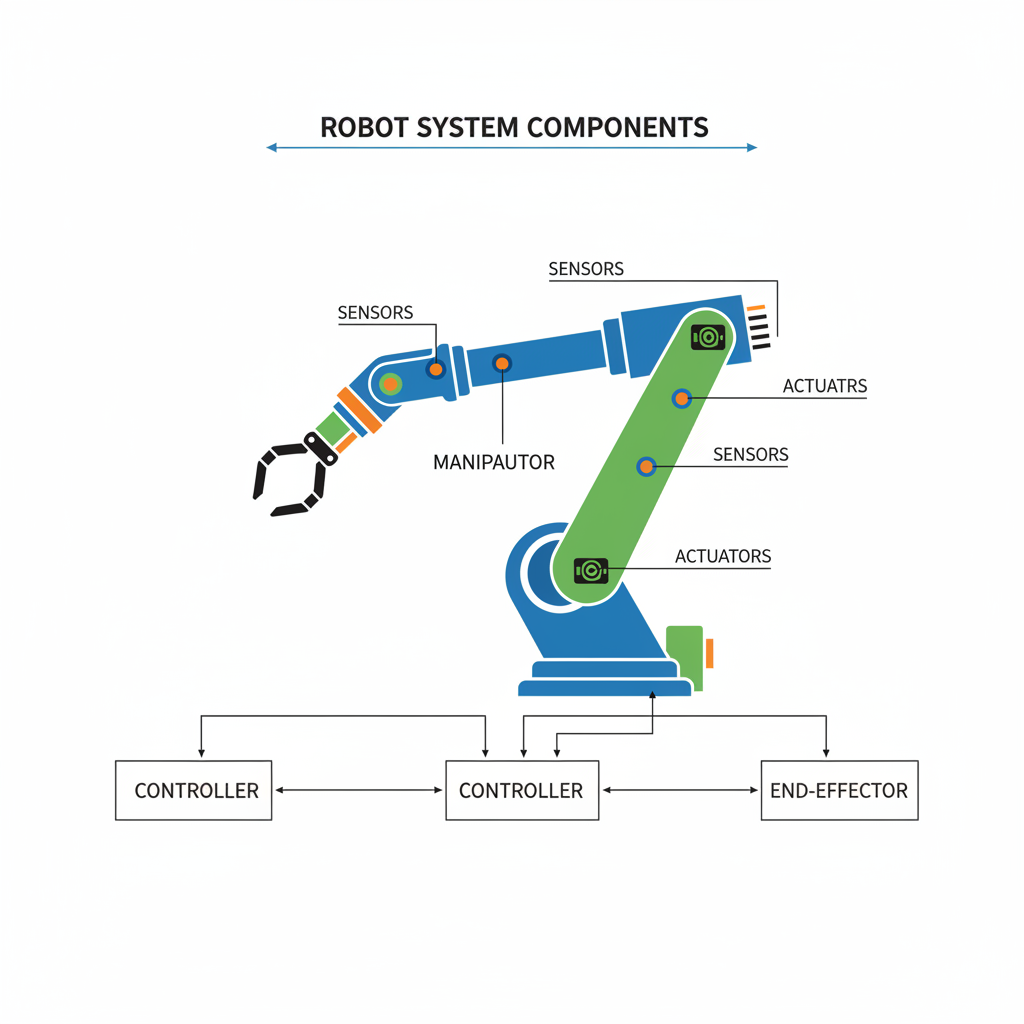 ⚠️ This picture may have spelling mistakes. Trust the words in the lesson.
What is Automation? Beyond Just Robots!
While robots are super cool, automation is a bigger idea. Automation is the technology by which a process or procedure is performed without human assistance. It's about making systems, machines, or processes operate automatically.
Analogy: Think of your washing machine. You load the clothes and press a button, but it automatically fills with water, washes, rinses, and spins – all on its own! That's automation. A self-checkout machine at the grocery store is another example of automation.
Robots are often used in automated systems, but not all automation involves robots. For example, a timed sprinkler system that turns on and off by itself is automation, but there isn't necessarily a 'robot' involved in the way we usually think of one.
Types of Automation (Simplified):
-
Fixed Automation: Like an assembly line that always does the same steps in the same order. It's very efficient for making lots of identical products.
Analogy: A car wash that follows the exact same steps for every car.
-
Programmable Automation: Machines that can be reprogrammed to do different tasks. Robots are great examples of this!
Analogy: A smart oven that you can program to bake different foods at different temperatures and times.
-
Flexible Automation: An advanced form of programmable automation that can quickly change between different tasks without much downtime. Think of a factory that can switch from making one type of shoe to another with minimal effort.
Analogy: A fancy coffee machine that can make a latte, a cappuccino, or an espresso with just a touch of a button, changing its internal process instantly.
How Do Robots "Think" and "Act"?
The basic cycle for most robots can be summarized as: Sense → Think → Act.
- Sense: The robot uses its sensors to gather information from its surroundings (e.g., detects an object, measures temperature, 'sees' a line).
- Think: The controller (brain) processes this information using its program. It decides what to do based on what its sensors detected and the instructions it was given.
- Act: The controller sends signals to the actuators (muscles) to perform a physical action (e.g., move the arm, turn a wheel, grab an object).
This cycle happens incredibly fast, allowing robots to react and perform tasks effectively.
Robots and Automation All Around Us!
You might be surprised how much robotics and automation touch our lives:
- Manufacturing: Giant robotic arms assemble cars, phones, and almost everything else we buy. They weld, paint, and lift heavy parts.
- Healthcare: Surgical robots assist doctors with incredibly precise operations. Automated systems help pharmacists sort and dispense medicines.
- Exploration: Rovers explore Mars, taking pictures and collecting samples. Underwater drones explore the deepest parts of our oceans.
- Service Industry: Robot vacuum cleaners (like Roomba), robotic lawnmowers, self-driving cars, and even drones delivering packages are becoming more common.
- Agriculture: Robots can plant seeds, harvest crops, and monitor the health of plants with great precision.
- Home & Entertainment: Smart home devices (like voice assistants that control lights or thermostats) are forms of automation. Robotic toys and games are also popular.
Why Are Robots & Automation So Important?
These technologies bring many benefits:
- Safety: Robots can do dangerous jobs that are too risky for humans, like handling toxic materials, defusing bombs, or working in extreme temperatures.
- Efficiency: They can work tirelessly, 24/7, without breaks, making production much faster.
- Accuracy & Precision: Robots can perform tasks with incredible exactness, reducing errors and ensuring high quality.
- Consistency: They perform the same action the exact same way every single time, leading to predictable results.
- Doing the Impossible: Robots allow us to explore places humans cannot easily go, like outer space or the deep ocean.
Of course, there are also challenges, like the initial cost of building and programming robots, and the need for people to learn new skills to work alongside these technologies.
Looking Ahead: Your Role in the Future
Robotics and automation are not just for scientists in labs; they are becoming part of our everyday lives. Understanding these basics is the first step to being part of this exciting future. Who knows, maybe one day you'll be designing the next generation of helpful robots!
Keep learning, free
Create a free Syllabax account to unlock practice questions and games for this topic.
Visual Learning Enhanced! 🚀
To help you master this topic, we use Advanced Syllabax AI to generate detailed diagrams and visual models.
Note on Visuals: The AI sometimes makes spelling errors in image labels. Please refer to the lesson text for the correct terminology.