Input and Output Devices
Watch this topic in 60 seconds
Free preview · Lesson 1
Understanding Input and Output Devices
Understanding Input and Output Devices: Your Computer's Way to Talk!
Hello, Young Computer Scientist!
Have you ever wondered how you talk to a computer, and how it talks back to you? It's a lot like how you communicate with your friends, family, or even pets! You use your senses to understand what's happening around you, and then you use your voice or actions to respond. Computers do something very similar, but they use special gadgets called Input and Output Devices.
Think of it like a conversation. For a conversation to happen, someone needs to speak (give input), and someone needs to listen (receive output). Then, the listener thinks, and speaks back (gives output), which the first person then hears (receives input). It's a constant back-and-forth!
Part 1: Input Devices – Giving Your Computer its "Senses"
Imagine you want to tell your computer to open a game. How do you do it? You click a mouse, or you type on a keyboard, right? These are your computer's way of 'listening' to you. Input devices are like the computer's senses. They are the tools you use to send information, data, or commands INTO the computer.
Think of your own body: your eyes see, your ears hear, your fingers feel. These are your 'input' organs because they bring information from the outside world into your brain. Input devices do the same for a computer.
Key Input Devices and Their Superpowers:
- Keyboard: Your Computer's Typewriter
This is probably the most common input device you use! When you type a message, write a story, or enter a password, you're giving instructions to the computer using the keyboard. Each key press is a piece of information, like telling a friend a specific word. - Mouse: Your Computer's Pointing Finger
A mouse lets you move a pointer (usually an arrow) around on the screen. With a click, you can select items, open programs, or navigate websites. It's like pointing at something you want and saying, "Hey, computer, I want *that*!" - Microphone: Your Computer's Ears
Want to record your voice, talk to friends online, or use voice commands? A microphone is what you need! It takes the sound waves from your voice and turns them into digital information the computer can understand. It's like someone listening very carefully to every word you say. - Scanner: Your Computer's Copy Machine for Pictures/Documents
Have a drawing, a photo, or a document on paper that you want to put onto your computer? A scanner is the device that can 'read' that physical item and create a digital copy of it. It's like taking a very detailed photograph of your paper document and sending it into the computer. - Webcam: Your Computer's Eyes
A webcam is like a small digital camera that sits on top of your monitor or is built into your laptop. It captures live video and still images, allowing you to have video calls or record yourself. It gives your computer the ability to 'see' what's in front of it. - Touchscreen: A Multi-Talented Input (and Output!) Device
Many phones, tablets, and even some laptops have touchscreens. When you tap, swipe, or pinch with your fingers, you are directly giving commands to the computer. This is a special one because it's also an output device (more on that later!). - Joystick/Game Controller: Your Computer's Game Navigator
For gaming enthusiasts, joysticks and game controllers are essential. They allow you to control characters and actions in games with precision, like steering a car in a racing game or moving a character through a virtual world.
Part 2: Output Devices – Your Computer's Way to "Talk Back"
Now that you've given your computer instructions, how does it show you the results? It uses output devices! Output devices are the tools the computer uses to send information, data, or results OUT to you, the user.
Going back to our body analogy: your mouth speaks words, your hands write, your facial expressions show feelings. These are your 'output' organs because they convey information from your brain to the outside world. Output devices do the same for a computer.
Here's a visual representation of how different parts of a computer system work together:
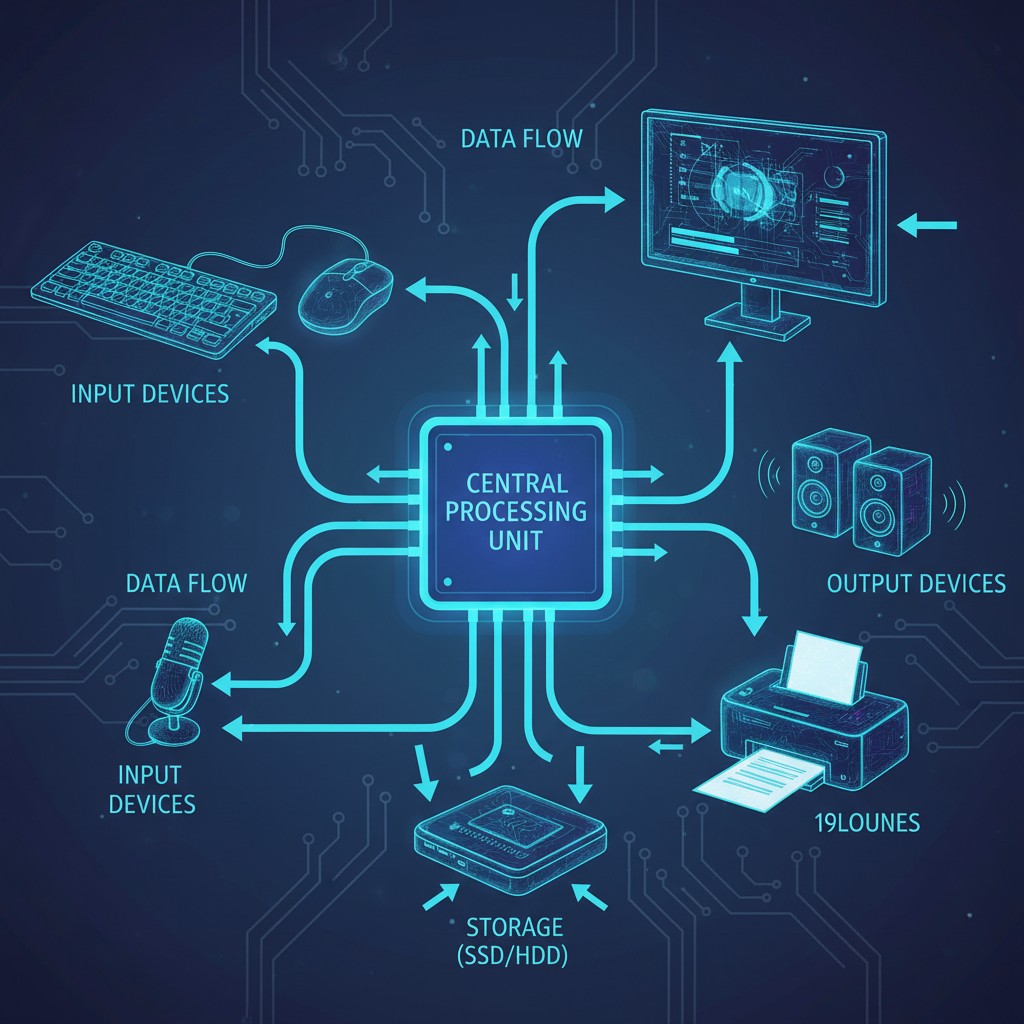 ⚠️ This picture may have spelling mistakes. Trust the words in the lesson.
Key Output Devices and How They Communicate:
- Monitor (or Screen): Your Computer's Display Board
This is where you see everything! Text, images, videos, games – all the visual information the computer wants to show you appears on the monitor. It's like a TV screen, but for your computer's thoughts and work. - Printer: Your Computer's Document Maker
Want a physical copy of a document, a photo, or a report that's on your computer? A printer takes that digital information and puts it onto paper. It's like the computer using its 'hands' to write or draw something for you on a physical sheet. - Speakers/Headphones: Your Computer's Voice
When you listen to music, watch a video, or hear system alerts, the sound comes through speakers or headphones. These devices convert the computer's digital sound signals into actual sounds you can hear. It's how your computer 'speaks' or plays music for you. - Projector: Your Computer's Giant Screen Enlarger
A projector takes the image from your computer screen and projects it onto a larger surface, like a wall or a special screen. This is great for presentations, watching movies with a group, or playing games on a huge display. It's like making your computer's 'voice' loud enough for everyone in a big room to 'hear' (or see!).
Part 3: The Best of Both Worlds – Input AND Output Devices
Remember the touchscreen we talked about? It's a fantastic example of a device that can do both! When you touch the screen, you are giving input. When the screen shows you images and text, it's providing output.
Examples of Hybrid (Input & Output) Devices:
- Touchscreen: As mentioned, you touch (input) and it displays (output). It's like having a conversation where you both listen and speak using the same tool.
- Modem/Router: These devices connect your computer to the internet. They receive data from the internet (input to your computer) and send data from your computer out to the internet (output from your computer). They are the ultimate two-way communication devices for networks!
Why Are They So Important? The "Conversation"!
Without input devices, your computer would be like a super-smart robot that can't hear or understand anything you say. It would just sit there, waiting for instructions it can't receive.
Without output devices, your computer would be like a person who can think brilliant thoughts but can't speak or write them down. You'd never know what it was doing or how it was responding!
Together, input and output devices create the vital 'conversation' between you and your computer. They allow you to command it, and for it to show you the amazing things it can do. They are the bridge that connects the human world to the digital world!
Recap: Input vs. Output
Remember this simple rule:
- INput = Information GOES IN to the computer.
- OUTput = Information COMES OUT of the computer.
Keep an eye out for these devices in your daily life. Every time you interact with a screen, type a message, or hear a sound from a device, you're seeing input and output devices in action!
Keep learning, free
Create a free Syllabax account to unlock practice questions and games for this topic.
Visual Learning Enhanced! 🚀
To help you master this topic, we use Advanced Syllabax AI to generate detailed diagrams and visual models.
Note on Visuals: The AI sometimes makes spelling errors in image labels. Please refer to the lesson text for the correct terminology.