Introduction to Computer Networks
Watch this topic in 60 seconds
Free preview · Lesson 1
Understanding Introduction to Computer Networks
Introduction to Computer Networks: Connecting Our Digital World
Imagine a world where you couldn't send a text message, watch a video online, or even search for information on the internet. Hard to picture, right? That's because we live in a world constantly connected, thanks to something called computer networks. For Grade 10 students, understanding the basics of how these networks work is like learning the fundamental rules of how our digital world communicates.
What is a Computer Network? The "Talkative Group"
At its simplest, a computer network is a collection of computers and other devices (like smartphones, tablets, and printers) that are connected together to share resources and information. Think of it like a group of friends talking to each other. Each friend is a device, and when they talk, they are sharing information.
- Sharing Resources: Instead of every student needing their own printer, a network allows everyone in a classroom to use one shared printer. This is like multiple people using the same public water fountain instead of everyone having their own well.
- Sharing Information: Networks let you send emails, share photos, stream videos, and browse websites. This is like passing notes in class (if your teacher allowed it!) or a group discussion where everyone contributes ideas.
Why Are Networks So Important? The "Power of Together"
Computer networks are the backbone of almost everything we do digitally:
- Communication: From instant messaging to video calls, networks allow us to connect with people across the street or across the globe.
- Access to Information: The internet, the biggest network of all, gives us instant access to a vast ocean of knowledge.
- Collaboration: People can work together on documents or projects even if they are in different locations.
- Entertainment: Streaming movies, online gaming, and social media all rely on robust networks.
Core Concepts: The ABCs of Network Communication
Just like learning a language requires understanding words, sentences, and grammar, understanding networks requires grasping a few core ideas:
1. Nodes or Hosts: The "Speakers and Listeners"
Every device connected to a network is called a node or a host. This includes your computer, smartphone, a printer, a server, or even a smart TV. Each node is a participant in the network's conversation.
Analogy: In our "group of friends talking" analogy, each friend is a node. In a classroom, each student with a device connected to the school Wi-Fi is a node.
2. Data or Information: The "Message Itself"
This is what is being sent and received across the network. It could be a text message, a picture, a video stream, a webpage, or an email. Without data, there would be no reason for networks to exist.
Analogy: The actual words, thoughts, or ideas being exchanged between the friends.
3. Communication Medium: The "Path of the Message"
How does the data actually travel from one device to another? The communication medium is the physical or wireless pathway.
- Wired Mediums: Think of physical cables.
- Ethernet Cables: These look like thicker phone cables and are commonly used to connect computers directly to routers or switches. They're like physical roads for data.
- Fiber Optic Cables: These use light pulses to transmit data, making them extremely fast and efficient. Imagine super-fast express lanes where information travels at the speed of light!
- Wireless Mediums: These don't use physical cables.
- Wi-Fi: Uses radio waves to send data through the air, allowing devices to connect without wires. It's like invisible pathways for your information.
- Bluetooth: Used for short-range connections, like connecting your wireless headphones to your phone. Think of it as a very short-range whisper.
Analogy: If friends are talking, the air around them is the medium. If they're using walkie-talkies, the radio waves are the medium. If they're passing notes, the paper note and the hand that carries it are the medium.
4. Protocols: The "Rules of the Road"
For devices to understand each other, they need to follow a common set of rules. These rules are called protocols. Just like people speaking different languages need a common language or a translator to communicate, devices need protocols to ensure data is sent, received, and understood correctly.
- TCP/IP (Transmission Control Protocol/Internet Protocol): This is the most famous set of protocols and is the foundation of the internet. Think of IP as the "addressing system" (where to send the letter) and TCP as the "delivery guarantee" (making sure all parts of the letter arrive and in the right order).
- HTTP (Hypertext Transfer Protocol): This protocol is used for viewing web pages. When you type `http://` in a browser, you're telling your computer to use this protocol to fetch the webpage.
Analogy: Protocols are like traffic laws (stay on the right, stop at a red light) that ensure cars (data) move smoothly and safely on the roads (communication medium). Or, they are the grammar and vocabulary rules that make conversations understandable.
Basic Network Components: The "Team Players"
To make a network work, various specialized devices play crucial roles:
1. Router: The "Traffic Cop/Postal Worker"
A router connects different networks together. It's like a traffic cop or a postal worker who knows the best routes to send your data from your home network to the vast internet, or from one department in a school to another. When you access a website, your request goes through your router to find its way to the website's server.
2. Switch: The "Local Intersection Manager"
A switch connects multiple devices within the SAME network (like your home or school network). It's smarter than a simple hub (an older device) because it knows exactly which device needs which data, sending it only to the intended recipient. Think of it as a smart postal worker who delivers letters directly to the correct house on a street, instead of shouting the message to everyone on the street.
3. Modem: The "Translator"
A modem (Modulator-Demodulator) is a device that translates digital signals from your computer into analog signals that can travel over your internet service provider's (ISP's) lines (like cable or fiber) and vice versa. It's essential for connecting your home network to the internet. Think of it as a language translator between your home network and the internet's main "language."
4. Servers: The "Central Library/Information Hub"
A server is a powerful computer that provides services or resources to other computers (clients) on the network. For example, a web server stores websites, an email server handles emails, and a file server stores shared files. They are like a central library holding all the books (information) that people (clients) can come and read.
5. Clients: The "Readers/Requesters"
A client is a computer or device that requests services or resources from a server. Your personal computer, smartphone, or tablet are usually clients when you browse the web, send emails, or access shared files. They are the ones who visit the library to get information.
Types of Networks: Different Sizes, Different Jobs
Networks come in various sizes, each designed for different purposes:
1. PAN (Personal Area Network): The "Whisper Network"
A PAN is a very small network, typically used for personal devices within a short range (a few meters). Examples include connecting your Bluetooth headphones to your phone, or a wireless mouse to your laptop. It's like a private conversation you have with someone very close to you.
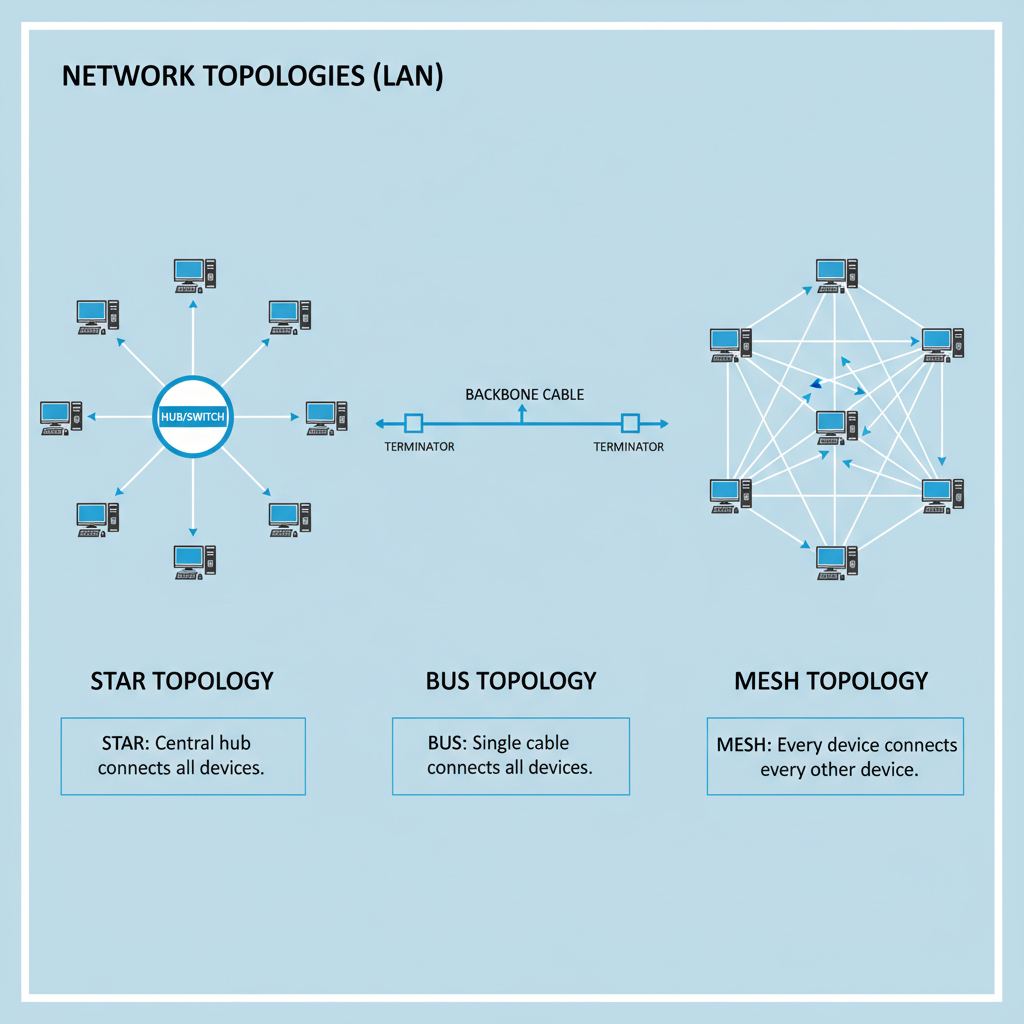
2. LAN (Local Area Network): The "Classroom Discussion"
A LAN covers a small geographical area, such as a home, office building, or school campus. Devices within a LAN can share resources like printers, files, and internet access. This is your most common type of network experience. Imagine a classroom where all students can talk to each other and use the same whiteboard.
3. MAN (Metropolitan Area Network): The "City-Wide News Channel"
A MAN covers a larger area than a LAN, typically spanning a city or a large campus. It connects multiple LANs together. For example, a university might have several LANs for different departments, all connected by a MAN. Think of it as a local news channel that covers the entire city's events.
4. WAN (Wide Area Network): The "Global Conference"
A WAN covers a very large geographical area, often connecting cities, countries, or even continents. The most famous example of a WAN is the internet itself! It connects countless LANs and MANs worldwide. This is like a massive global conference where everyone from different countries can communicate and share information.
How Does Data Travel? The "Journey of a Letter"
When you send a message or request a webpage, your data doesn't travel as one giant block. Instead, it's broken down into small pieces called packets.
- Packets: Imagine you're sending a long letter. Instead of putting the entire letter into one huge envelope, you tear it into many small pieces, put each piece into a small envelope, and number them (1 of 10, 2 of 10, etc.). This makes it easier and more efficient to send. Each packet contains a small piece of your data, along with "address" information (where it came from, where it's going) and sequencing information.
- IP Addresses (Internet Protocol Addresses): Every device on a network that communicates using TCP/IP has a unique address, like a street address for your house. This is how routers know where to send the packets. An IP address looks something like
192.168.1.1or a longer version for newer networks. - DNS (Domain Name System): It would be very hard to remember all those numerical IP addresses! That's where DNS comes in. It's like a massive phone book that translates human-friendly website names (like
google.com) into their corresponding IP addresses. When you typegoogle.com, your computer asks a DNS server for its IP address, then uses that IP address to find Google's server.
Conclusion: The Connected Future
Computer networks are not just a luxury; they are a fundamental part of our modern lives, powering everything from your social media feeds to global scientific research. By understanding these basic concepts – what networks are, their core components, the different types, and how data travels – you've taken your first step into understanding the intricate, interconnected world of computing. Keep exploring, because the world of networks is constantly evolving!
Keep learning, free
Create a free Syllabax account to unlock practice questions and games for this topic.
Visual Learning Enhanced! 🚀
To help you master this topic, we use Advanced Syllabax AI to generate detailed diagrams and visual models.
Note on Visuals: The AI sometimes makes spelling errors in image labels. Please refer to the lesson text for the correct terminology.