Conditionals: Making Decisions in Code
Watch this topic in 60 seconds
Free preview · Lesson 1
Understanding Conditionals: Making Decisions in Code
Conditionals: Making Decisions in Code
Hello, future programmers! Have you ever had to make a choice? Perhaps your parents asked, "If you finish your homework, you can play video games. Otherwise (else), you'll need to help with dinner." You make decisions like this all the time, constantly evaluating situations and choosing the best path forward. Computers, just like us, need to make decisions too! They can't just follow a set of instructions blindly; they need to react to different situations, user inputs, or changing data. This ability to make choices is incredibly powerful and it's what makes computer programs smart and useful. This crucial concept in coding is called conditionals!
What are Conditionals? The Brains of Your Code!
Think of conditionals as the "brains" of your computer programs. They are special instructions that allow your code to ask questions, like "Is this true?" or "Is this number bigger than that number?" Based on the answer (which is always either TRUE or FALSE), the computer then decides which specific block of code to run next. Without conditionals, a program would just do the exact same thing every single time, no matter what. Imagine a game where your character always walks forward, even if there's a wall! Or a calculator that always adds, even if you want it to subtract. That would be pretty boring and not very useful, right?
Conditionals bring flexibility and intelligence to your programs. They allow your code to adapt, respond, and perform different actions based on different circumstances. This is how games react when you press a button, how apps respond to your touch, and how websites change what they show you based on what you click.
Analogy 1: The Traffic Light Decision
Let's use a common example from real life: a traffic light. When you're driving or walking, you constantly make decisions based on the light:
- If the light is green, you go.
- Else if the light is yellow, you slow down (or prepare to stop).
- Else (if) the light is red, you stop.
The "If" Statement: Your First Decision-Maker
The simplest conditional is the if statement. It's like saying, "ONLY if this specific thing is true, then do this action. Otherwise, just ignore this action and move on." It's a single gatekeeper for a block of code.
Here's how you can think about it in simple terms:
IF (the school day is over) THEN
    Go home
In this scenario, if the school day is NOT over (meaning the condition is false), you don't go home. You just stay at school and wait for the next instruction, which might be to go to your next class. The action "Go home" is only performed if the condition "the school day is over" is true.
In actual code, it often looks something like this (we'll use a mix of real code ideas and simplified language, often called pseudo-code):
    current_age = 15

    IF (current_age >= 13):
        PRINT("You are old enough to create a social media account!")

    PRINT("Remember to ask for parent permission!")
Let's trace this code: `current_age` is 15. Is `15 >= 13`? Yes, that's TRUE! So, the message "You are old enough to create a social media account!" would be printed. Then, the program continues and prints "Remember to ask for parent permission!" which is outside the `if` block, so it always prints.
What happens if `current_age` was 10? Is `10 >= 13`? No, that's FALSE. So, the message "You are old enough to create a social media account!" would NOT be printed. The program would skip it and immediately jump to print "Remember to ask for parent permission!".
The "If-Else" Statement: Making a Choice Between Two Paths
Sometimes, you don't just want to do something if a condition is true; you want to do something DIFFERENT if it's false. This is where the if-else statement comes in. It's like having two clearly defined paths: "If this is true, go down the left path. OTHERWISE (else), go down the right path." The key is that you *always* go down one path or the other; you never skip both, and you never go down both.
Think about getting dressed in the morning based on the weather:
IF (the weather forecast says rain) THEN
    Take your umbrella
ELSE (meaning, the weather forecast does NOT say rain)
    Leave your umbrella at home
You can't take your umbrella AND leave it at home at the same time! And you're not going to do neither. One of these options will always happen based on the weather forecast.
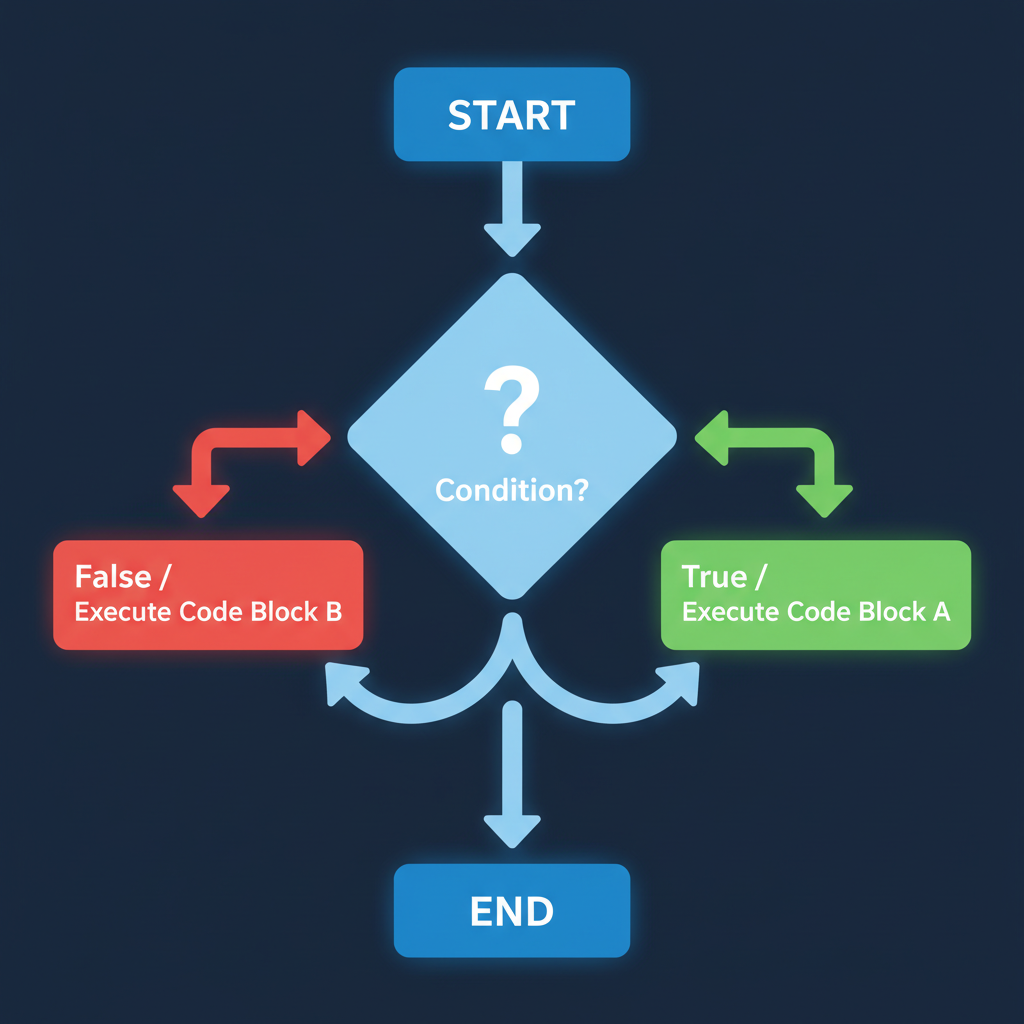
In code, an if-else statement might look like this:
    student_score = 75

    IF (student_score >= 60):
        PRINT("Congratulations! You passed the test.")
    ELSE:
        PRINT("Don't worry, you can try again next time!")
If `student_score` is 80, the condition `80 >= 60` is TRUE, so the first message prints. If `student_score` is 50, the condition `50 >= 60` is FALSE, so the `ELSE` block executes, and the second message prints. One or the other, always!
"If-Elif-Else" (or "If-Else If-Else"): More Than Two Choices!
What if you have more than just two choices? What if there are many possibilities, like our traffic light example with green, yellow, and red? This is when you use if-elif-else. (The term "elif" is short for "else if" and is commonly used in languages like Python. Other languages might explicitly write "else if").
This powerful conditional structure allows your program to check multiple conditions in a specific order. It's like a list of questions that the computer goes through, one by one, until it finds one that is true. As soon as it finds a true condition, it performs the action linked to it and then skips all the remaining `elif` and `else` parts of that decision block.
Think about choosing what to eat for lunch:
IF (I am craving pizza):
    Order a large pepperoni pizza
ELIF (I am craving a burger):
    Order a cheeseburger with fries
ELIF (I want something healthy):
    Order a chicken Caesar salad
ELSE (if none of the above are true, meaning I don't want pizza, a burger, or a salad):
    Decide what to cook at home
The program will go down this list. If you are craving pizza, it orders pizza and completely ignores the burger, salad, and cooking options. If you're not craving pizza but *are* craving a burger, it orders the burger and ignores the salad and cooking options, and so on. The `ELSE` at the very end is like a "catch-all" – it only runs if *none* of the `IF` or `ELIF` conditions before it were true.
Example in pseudo-code for a grading system:
    final_grade = "B"

    IF (final_grade == "A"):
        PRINT("Excellent work!")
    ELIF (final_grade == "B"):
        PRINT("Very good!")
    ELIF (final_grade == "C"):
        PRINT("Good effort, keep practicing.")
    ELSE:
        PRINT("Let's review the material together.")
In this case, since `final_grade` is "B", the first `IF` condition (`final_grade == "A"`) is FALSE. The program then checks the first `ELIF` condition (`final_grade == "B"`), which is TRUE. So, "Very good!" would be printed. After printing this, the program would then skip the remaining `ELIF` and the final `ELSE` block because it found a true condition and performed its action.
What if `final_grade` was "F"? Then the `IF` for "A" would be false, the `ELIF` for "B" would be false, and the `ELIF` for "C" would also be false. Since none of the previous conditions were true, the `ELSE` block would finally be executed, printing "Let's review the material together."
Conditions: The True/False Questions Your Code Asks
We've been talking a lot about "conditions being true" or "conditions being false." But what exactly IS a condition in code? A condition is a statement that the computer can evaluate to be either True or False. These are called Boolean expressions (named after a famous mathematician named George Boole, who developed the system of logic behind them!).
You already use Boolean logic in everyday life without even realizing it:
- "Is it raining outside right now?" (Answer: True or False)
- "Am I hungry?" (Answer: True or False)
- "Is 5 greater than 10?" (Answer: False)
- "Is my favorite color blue?" (Answer: True or False, depending on your actual favorite color!)
Comparison Operators: Asking the Questions with Symbols
To create these True/False questions in code, we use special symbols called comparison operators. They help us compare two values or pieces of data.
==(Equal to): Checks if two values are exactly the same. Remember, this is different from a single=which is used to *assign* a value to a variable.- Example: `5 == 5` is True. `5 == 7` is False.
- Example: `"apple" == "apple"` is True. `"apple" == "orange"` is False.
!=(Not equal to): Checks if two values are different from each other.- Example: `5 != 7` is True. `5 != 5` is False.
>(Greater than): Checks if the value on the left is numerically bigger than the value on the right.- Example: `10 > 5` is True. `3 > 8` is False.
<(Less than): Checks if the value on the left is numerically smaller than the value on the right.- Example: `5 < 10` is True. `8 < 3` is False.
>=(Greater than or equal to): Checks if the value on the left is numerically bigger than or the same as the value on the right.- Example: `10 >= 10` is True. `12 >= 10` is True. `8 >= 10` is False.
<=(Less than or equal to): Checks if the value on the left is numerically smaller than or the same as the value on the right.- Example: `10 <= 10` is True. `8 <= 10` is True. `12 <= 10` is False.
These comparison operators are the essential tools you use to build the True/False conditions that drive all your conditional statements!
Why are Conditionals So Important in the Digital World?
Conditionals are not just a small part of programming; they are absolutely fundamental to almost every computer program, app, game, or website you interact with every day. Without conditionals, the digital world as we know it simply wouldn't exist or would be incredibly simplistic. Think about it:
- Video Games: "If player health is zero, then display 'Game Over'." "If player collects a coin, then add 1 to their score." "If player presses the jump button, then make character jump."
- Mobile Apps: "If user enters the correct password, then allow login." "If an item is in stock, then allow it to be added to the cart; else, display 'Out of Stock'." "If the GPS detects you're near a restaurant, then suggest it."
- Websites: "If a user clicks on a menu icon, then show the navigation menu." "If the search bar is empty when user clicks search, then display 'Please type something to search'." "If a user is logged in, then display their profile picture."
- Robotics and Smart Devices: "If a sensor detects an obstacle, then stop and turn left." "If the smart thermostat detects the temperature is below 20 degrees, then turn on the heater." "If the robot vacuum's battery is low, then go back to the charging station."
Conditionals are what allow code to be dynamic, smart, responsive, and truly useful. They give programs the ability to think, adapt, and make decisions based on changing information, making our technology far more intelligent and interactive.
Recap and Practice!
You've learned that conditionals are how computers make decisions, choosing different paths of action based on whether a specific condition is true or false. You've explored the three main types of conditional statements: `if` for a single decision, `if-else` for two alternative paths, and `if-elif-else` for multiple sequential choices. Crucially, you've also discovered how comparison operators like `==`, `!=`, `>`, `<`, `>=`, and `<=` are used to create the True/False (Boolean) conditions that drive all these powerful decision-making structures in code. Keep practicing, and you'll be building smart programs in no time!
Keep learning, free
Create a free Syllabax account to unlock practice questions and games for this topic.
Visual Learning Enhanced! 🚀
To help you master this topic, we use Advanced Syllabax AI to generate detailed diagrams and visual models.
Note on Visuals: The AI sometimes makes spelling errors in image labels. Please refer to the lesson text for the correct terminology.