Introduction to Computer Networks
Watch this topic in 60 seconds
Free preview · Lesson 1
Understanding Introduction to Computer Networks
Introduction to Computer Networks for 7th Graders: Connecting Our Digital World!
Hello, young explorers of the digital universe! Have you ever wondered how your phone talks to your friend's phone, or how you can watch a video from a website halfway across the world? The secret is something called a computer network. It might sound complicated, but it's really just a clever way for computers and other digital devices to talk to each other and share things, just like you talk to your friends!
What is a Computer Network? Think of it Like a Conversation!
Imagine you and your friends are playing a game. If you want to share a toy or tell someone a secret, you need a way to communicate, right? Maybe you pass the toy, or you whisper. A computer network is very similar! It's a group of two or more computers (or other devices like tablets, phones, and printers) that are connected together so they can:
- Share Information: Like sending a picture to a friend.
- Share Resources: Like everyone in your family using the same printer.
- Communicate: Like video chatting with grandparents far away.
Analogy: Think of your classroom. All the students (devices) can talk to each other (connect) to share ideas (information) or use shared crayons (resources). Your classroom is like a tiny computer network!
Why Do We Need Networks? Sharing is Caring (and Efficient)!
Imagine if every time you wanted to show a friend a photo from your phone, you had to physically hand your phone over. Or if every computer in your school needed its own printer! That would be a lot of printers and a lot of handing things back and forth. Networks solve these problems by making sharing easy and fast.
- Sharing Files: Instead of copying a game onto a USB stick for your friend, you can just send it over the network.
- Sharing Hardware: Many people can use one printer or one internet connection.
- Communication: Instant messaging, video calls, emails – all rely on networks.
- Accessing Information: The internet, which is the biggest network of all, lets you access information from anywhere in the world.
The ABCs of Networks: Who are the Players?
Every good network needs a few key things to work. Let's meet the main characters!
1. Devices (Nodes): The Talkers and Listeners
These are the actual things that connect to the network. They're like the people in our classroom analogy.
- Computers: Desktops, laptops.
- Smartphones & Tablets: The mini-computers we carry everywhere.
- Printers: So everyone can print documents.
- Servers: Special powerful computers that store information and deliver it to other computers (like a super big library or a central post office).
Analogy: In a group of friends, each friend is a "device" or "node" that can talk and listen.
2. Connection Methods (Transmission Media): The Paths for Information
How do devices actually "talk" to each other? They need a path!
- Cables (Wired Connections): These are physical wires, usually Ethernet cables, that plug into your computer. They're like direct roads between two points. They are generally very fast and reliable.
- Wi-Fi (Wireless Connections): This uses radio waves to send information through the air, without any physical wires. It's super convenient because you don't have to be plugged in!
Analogy: Cables are like speaking directly into someone's ear, or sending a letter via a mailman. Wi-Fi is like shouting across the room, or broadcasting on a radio station.
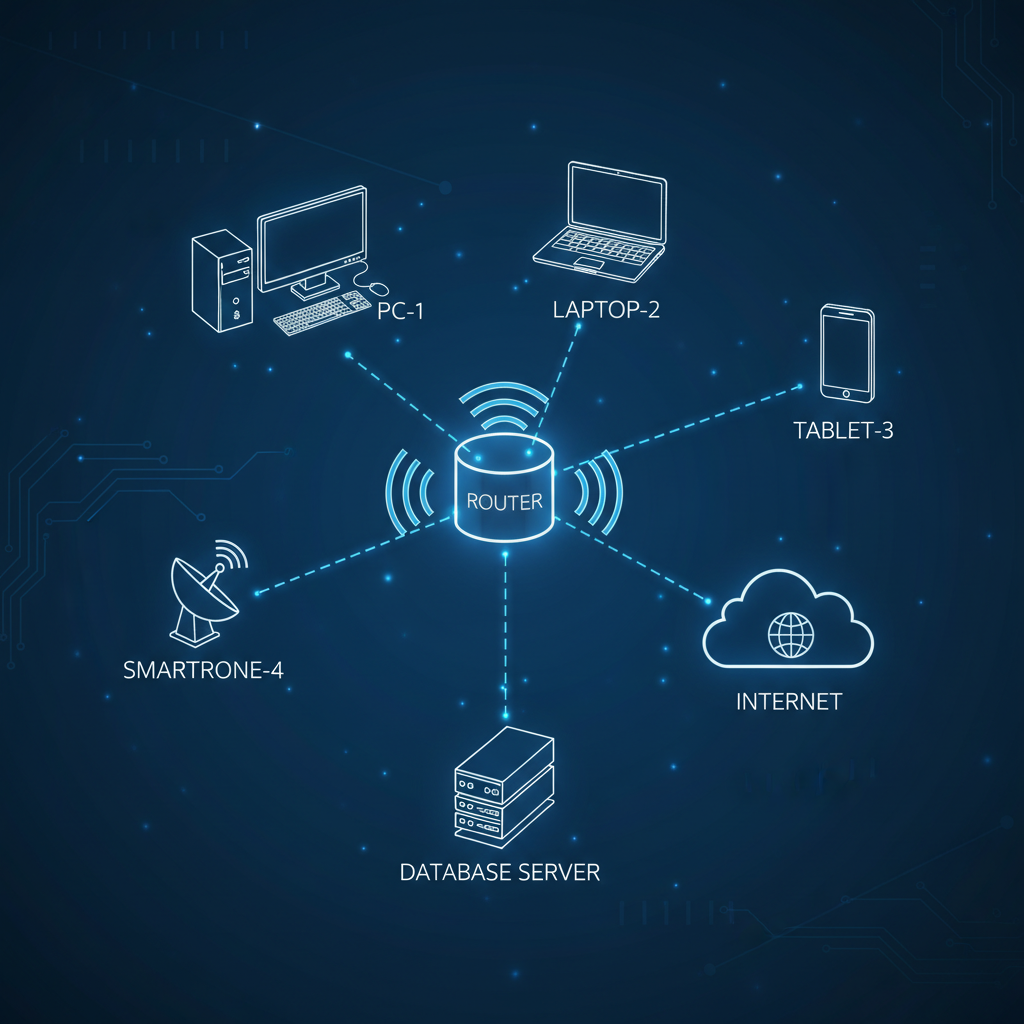 ⚠️ This picture may have spelling mistakes. Trust the words in the lesson.
3. Network Devices: The Traffic Cops and Post Offices
For many devices to connect and send information efficiently, we need special devices to manage the traffic.
- Router: Think of a router as a smart traffic cop or a main post office. Its job is to direct information (called 'packets') between different networks. For example, your home router connects your home network to the giant network of the internet. It knows the best path for your data to travel.
- Switch: A switch is like a mail sorter inside one post office. It connects multiple devices within the *same* network (like all the computers in your classroom or house) and helps them send information to each other quickly and efficiently.
Analogy: If your house is one network, the router connects your house to the street (the internet). The switch is inside your house, connecting your phone, tablet, and computer to each other.
4. Rules (Protocols): The Language of the Network
Just like people need to speak the same language to understand each other, computers need rules, too! These rules are called protocols.
- TCP/IP (Transmission Control Protocol/Internet Protocol): These are like the main rules of the road for the internet. They ensure that information sent from one computer arrives at the correct destination and that all the pieces are put back together correctly.
- HTTP (Hypertext Transfer Protocol): This is the rule that allows your web browser to talk to websites and display web pages. When you type "https://" at the beginning of a web address, you're using this protocol.
Analogy: Protocols are like the rules of a board game, or the grammar and vocabulary of a language. Everyone agrees to follow them so communication is clear.
Types of Networks: Different Sizes for Different Needs
Networks come in different sizes, depending on how many devices they connect and how far apart those devices are.
- LAN (Local Area Network): This is a network that covers a small physical area, like your home, a classroom, or a single office building. It's usually very fast.
Analogy: Your house, your classroom, or your local school library. Everyone knows everyone else, and it's easy to share things.
- WAN (Wide Area Network): This type of network covers a much larger geographical area, connecting LANs together. Think cities, states, or even countries. The internet is the most famous (and biggest!) WAN.
Analogy: Connecting different cities with highways, or like a giant postal service that sends mail across the country.
- The Internet: The Network of Networks! The internet is the largest WAN in the world. It's a global network that connects billions of devices and networks together, allowing us to access websites, send emails, play online games, and so much more, all from almost anywhere on Earth!
How Information Travels: Sending Digital Mail
When you send a message or request a webpage, your computer doesn't send the whole thing at once. Instead, it breaks the information into tiny pieces called packets.
Analogy: Imagine you want to send a giant book to your friend. You wouldn't send the whole book at once; you'd break it into individual pages, put each page in an envelope (a packet), write the address on each envelope, and send them. Your friend would then receive all the envelopes and put the pages back in order to read the book.
- IP Address: Every device connected to a network has a unique address called an IP (Internet Protocol) address. It's like your home address, telling the network exactly where to send the packets.
- DNS (Domain Name System): You usually type website names like "google.com" instead of a long series of numbers (an IP address). The DNS is like a giant phone book for the internet. When you type "google.com", your computer asks the DNS to find the IP address for that name, and then it uses that IP address to send your request.
The Awesome Benefits of Networks!
- Instant Communication: Texting, video calls, email, social media.
- Resource Sharing: Share printers, files, and internet connections.
- Information Access: Look up anything on the internet, anytime.
- Entertainment: Online gaming, streaming movies and music.
- Collaboration: Work on projects with classmates even when you're not in the same room.
Staying Safe on Networks (A Quick Note)
Just like in the real world, it's important to be careful when you're connected to a network, especially the internet. Always think before you click, don't share personal information with strangers, and be aware of your digital footprint. Network security is a big topic for another day, but it's good to know that keeping your information safe is very important!
Conclusion: The Connected World
Computer networks are the invisible highways that allow our digital devices to communicate, share, and connect with the world. From your home Wi-Fi to the vast Internet, these networks make our modern lives possible, bringing information, entertainment, and communication right to our fingertips. Understanding how they work is a superpower in our increasingly connected world!
Keep learning, free
Create a free Syllabax account to unlock practice questions and games for this topic.
Visual Learning Enhanced! 🚀
To help you master this topic, we use Advanced Syllabax AI to generate detailed diagrams and visual models.
Note on Visuals: The AI sometimes makes spelling errors in image labels. Please refer to the lesson text for the correct terminology.