Wireless Technologies: Wi-Fi & Bluetooth
Watch this topic in 60 seconds
Free preview · Lesson 1
Understanding Wireless Technologies: Wi-Fi & Bluetooth
Understanding Wireless Technologies: Wi-Fi & Bluetooth
In our modern world, invisible waves are constantly carrying information all around us, connecting our devices without a single cable. This incredible feat is thanks to wireless technologies, and two of the most common ones you use every day are Wi-Fi and Bluetooth. Think of them as two different kinds of magical communication tools, each with its own special powers and uses. Let's explore how these technologies work in simple terms.
What is Wireless Communication?
Imagine trying to talk to a friend across a noisy room. You could shout (like a wired connection, direct and powerful), or you could send a note (like a messenger, but still physical). Wireless communication is like sending a secret message through the air using invisible messengers called radio waves. These waves are just like the ones that carry music to your car radio or signals to your TV, but they're specifically designed to carry digital information – things like photos, videos, messages, and website data.
The beauty of wireless is freedom. No tangled wires, no being stuck in one spot. You can move around and still stay connected!
Wi-Fi: Your Home's Internet Broadcast Station
Think of Wi-Fi (which stands for "Wireless Fidelity") as a mini-radio station specifically for your home or office. This station broadcasts an internet signal wirelessly, allowing multiple devices like your smartphone, laptop, tablet, and smart TV to all connect to the internet at the same time without needing individual cables.
How Wi-Fi Works (The Wi-Fi Router: Your Broadcast Tower)
At the heart of your Wi-Fi network is a device called a Wi-Fi Router. You can think of your router as a super-smart post office or a small lighthouse that receives the internet signal from your Internet Service Provider (ISP) through a cable. Instead of just delivering mail to one house, this post office then takes that internet signal and converts it into radio waves, broadcasting it out in all directions.
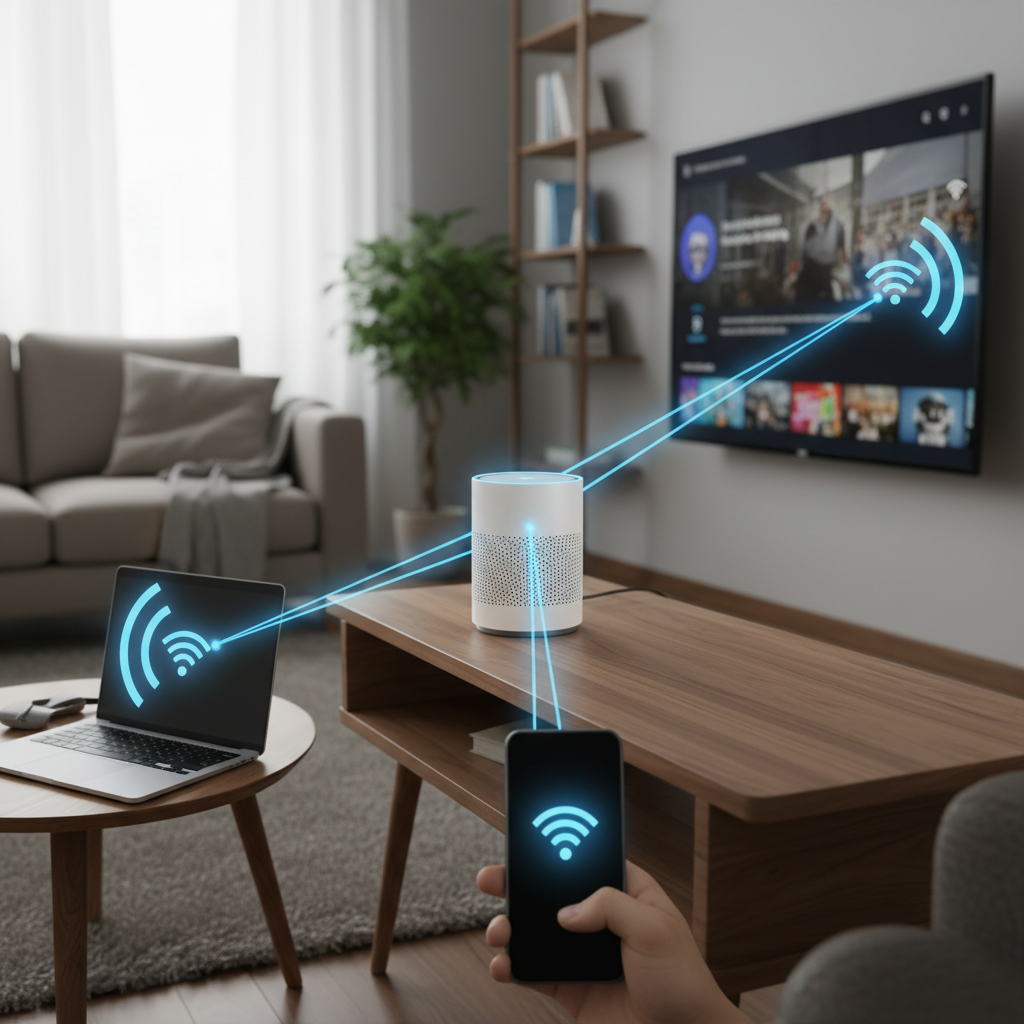
Your devices (like your phone) have a special antenna and receiver inside them, much like a radio has an antenna to pick up radio stations. When your phone wants to access the internet, it "tunes in" to your router's Wi-Fi signal. They then start talking back and forth using these radio waves – your phone sends requests (like "show me this website"), and the router sends back the information (the website content).
Wi-Fi's Reach and Speed
- Range: Wi-Fi typically works well over a larger area, like an entire house, an apartment, or even a small office building. The signal can usually travel through walls, though it gets weaker the further you are from the router or if there are too many obstacles.
- Speed: Wi-Fi is designed for speed. It's meant to handle lots of data quickly, which is why it's great for streaming videos, downloading large files, and video calls.
- Power: Because it covers a wider area and transmits data quickly, Wi-Fi uses more power than some other wireless technologies. That's why your phone's battery can drain faster when using Wi-Fi constantly compared to when it's just idle.
Security: Keeping Your Wi-Fi Safe
Just like you wouldn't want everyone to listen to your private conversations, you don't want strangers accessing your internet or your devices. That's why Wi-Fi networks are usually protected with a password (called a Wi-Fi password or network key). This encrypts the data, making it like a secret code that only devices with the password can understand. It prevents unauthorized users from connecting to your network.
Common Uses of Wi-Fi:
- Connecting your laptop, phone, or tablet to the internet at home, school, or a coffee shop.
- Streaming movies and music on smart TVs or gaming consoles.
- Connecting smart home devices like thermostats, lights, and security cameras to the internet.
Bluetooth: The Close-Range Whisperer
Now, let's talk about Bluetooth. If Wi-Fi is like a powerful radio station broadcasting to a whole area, Bluetooth is more like two friends whispering directly to each other, very close by. It's designed for short-range, device-to-device connections, often for accessories.
How Bluetooth Works (The "Handshake" or Pairing)
Bluetooth devices don't need a central router like Wi-Fi. Instead, two Bluetooth devices "shake hands" and agree to communicate directly with each other. This process is called pairing. For example, when you connect your wireless headphones to your phone, they perform this digital handshake. Once paired, they remember each other and can automatically connect in the future.
Bluetooth also uses radio waves, but they are much weaker and designed to travel only a short distance, typically up to about 10 meters (around 30 feet). This short range means it uses very little power, which is why your wireless earbuds can last for hours on a small battery.
Bluetooth's Reach and Speed
- Range: Very short, usually within a single room or just a few meters. Obstacles like walls can easily block the signal.
- Speed: Slower than Wi-Fi, but perfectly adequate for its intended purposes like sending audio to headphones or small bits of data to a smartwatch. It's not designed for streaming 4K video!
- Power: Very low power consumption, making it ideal for small, battery-powered devices.
Common Uses of Bluetooth:
- Connecting wireless headphones or earbuds to your phone for music or calls.
- Connecting wireless speakers to a laptop or phone.
- Pairing a wireless mouse, keyboard, or game controller to a computer.
- Using a smartwatch to receive notifications from your phone.
- Hands-free calling in cars.
Wi-Fi vs. Bluetooth: When to Use Which?
Think of it like choosing the right tool for the job:
- If you need internet access for multiple devices over a larger area and speed is important (like streaming a movie), you'll use Wi-Fi.
- If you need to connect two specific devices over a very short distance, often for a specific accessory, and low power is key (like connecting headphones to your phone), you'll use Bluetooth.
They are not competitors; they are complementary technologies that solve different problems!
Conclusion
Wi-Fi and Bluetooth are two fundamental pillars of modern wireless communication. Wi-Fi provides broad internet connectivity, acting as a local broadcast station for your home or office. Bluetooth, on the other hand, enables short-range, point-to-point connections for accessories, acting like a private whispered conversation between two devices. Understanding their basic functions, strengths, and limitations helps you appreciate the invisible technology that keeps our digital world connected and convenient.
Keep learning, free
Create a free Syllabax account to unlock practice questions and games for this topic.
Visual Learning Enhanced! 🚀
To help you master this topic, we use Advanced Syllabax AI to generate detailed diagrams and visual models.
Note on Visuals: The AI sometimes makes spelling errors in image labels. Please refer to the lesson text for the correct terminology.