Computer Networks Explained
Watch this topic in 60 seconds
Free preview · Lesson 1
Understanding Computer Networks Explained
Computer Networks Explained: Connecting Our Digital World!
Welcome, young explorers, to the fascinating world of computer networks! Have you ever wondered how your computer talks to your friend's computer, even if they live far away? Or how your tablet can print a picture on a printer across the room? It all happens thanks to something called a computer network.
Think of it like this: Imagine you and your friends want to share secrets, play a game, or even share snacks. If you're all in the same room, it's easy, right? You just talk, pass notes, or hand over a cookie. But what if your friend is in another house, or even another country? That's where you need a way to connect, like using a phone or sending a letter. A computer network is very similar – it's a way for computers and other digital devices to talk to each other and share things!
What is a Computer Network?
At its simplest, a computer network is a group of two or more computers and other electronic devices connected together so they can share information and resources. It's like a team of computers all working together, helping each other out.
Why are Networks So Useful?
Networks make our digital lives much easier and more fun! Here are some big reasons why they're so important:
- Sharing Information: Imagine you wrote an awesome story on your computer. With a network, you can easily send that story to your teacher, your parents, or your friends without needing to save it on a USB stick and carry it over. It's like sharing your favorite book with everyone in the library at the same time!
- Sharing Resources: Do you have one printer at home that everyone uses? That's because it's connected to a network! Instead of buying a printer for every computer, all the computers can share one printer. It's like a family sharing one big, delicious pizza instead of everyone ordering their own small one. You save resources and money!
- Communication: Networks allow us to send emails, have video calls (like Zoom or FaceTime), and send instant messages to people all over the world. It's how you can talk to your grandparents even if they live far away, or chat with a friend about your favorite video game. It's like having a super-fast, global telephone system!
- Accessing the Internet: The biggest and most famous network of all is the Internet! Networks are what allow us to go online, visit websites, watch videos, and play online games. Without networks, there would be no Internet as we know it!
The Building Blocks of a Network: What Makes It Work?
Just like a house needs walls, a roof, and doors, a computer network needs certain parts to function. Let's look at the main ones:
1. Devices: The 'Talkers'
These are the things that want to communicate. It's not just big desktop computers! It can be:
- Desktop computers and laptops
- Smartphones and tablets
- Printers and scanners
- Smart TVs and gaming consoles
- Even smart refrigerators and light bulbs!
Think of these devices as the people in a conversation. Each device is trying to send or receive information.
2. Connection Methods: The 'Pathways'
How do these devices actually connect and send information to each other? There are two main ways:
-
Cables (Wired Connections): These are physical wires that plug into devices. The most common type is an Ethernet cable. Imagine a network of roads and highways connecting cities. Each cable is like a dedicated road for data to travel quickly and reliably. These are great for fast, stable connections, especially for computers that don't move much.
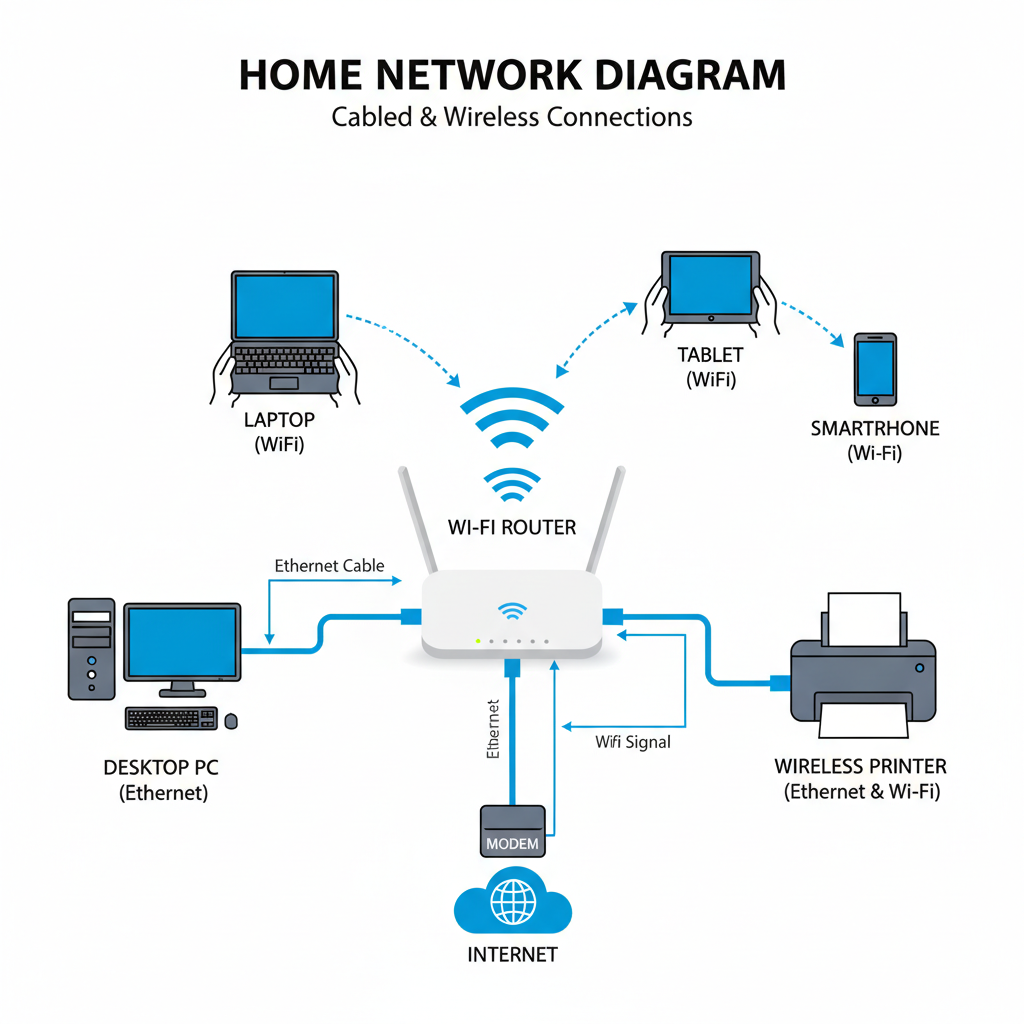 ⚠️ This picture may have spelling mistakes. Trust the words in the lesson.
- Wireless Connections (Wi-Fi): Instead of cables, wireless connections use invisible radio waves to send information through the air. This is what we call Wi-Fi! It's super convenient because you don't need to plug in a physical wire every time. Think of it like talking to someone across a room – your voice travels through the air without a string connecting you. Wi-Fi lets you move your laptop or tablet around freely while staying connected.
3. Network Devices: The 'Traffic Cops' and 'Post Offices'
Once devices are connected, how do they know where to send the information? That's where special network devices come in:
- Router: This is like the postal worker or a traffic controller for your network. When information (we call it 'data') comes in, the router figures out the best path for it to reach its destination, whether it's another device in your house or out to the Internet. Your home Wi-Fi signal comes from a router!
- Switch: In bigger networks (like at a school or office), a switch helps direct data to the correct device within the same network. Imagine a sorting machine in a big mail room, making sure each letter gets to the right mailbox in the building.
Types of Networks: Big and Small
Networks come in different sizes, just like cities and towns:
- LAN (Local Area Network): This is a small network that connects devices in a limited area, like your home, a classroom, or a single office building. It's like all the houses on one street connected together.
- WAN (Wide Area Network): This is a much larger network that connects devices over a broad geographical area, often across cities, countries, or even continents. The most famous WAN is the Internet itself! Think of it as all the major highways and roads connecting every city and town in the world.
How Information Travels: Data Packets
When you send a message, share a photo, or visit a website, the information isn't sent all in one giant piece. Instead, it's broken down into tiny chunks called data packets. Imagine sending a huge puzzle to a friend. Instead of trying to send the whole puzzle in one big, heavy box, you break it into smaller, easier-to-handle envelopes, each containing a few pieces. Each packet has information about where it came from and where it's going. Once all the packets arrive at their destination, they are reassembled to form the original message or file.
The Internet: The Global Super Network
The Internet is the largest computer network in the entire world! It's a massive collection of interconnected networks (LANs and WANs) that allows billions of devices to share information globally. When you're 'online,' you're connected to this huge global network. It's like a super-highway connecting every digital device on Earth!
Staying Safe on Networks
Just like you wouldn't tell a stranger your home address, it's important to be careful when using networks, especially the Internet. Here are some quick tips:
- Passwords: Always use strong passwords and keep them secret.
- Personal Information: Never share your full name, address, phone number, or school name with people you don't know online.
- Ask for Help: If you see something that makes you uncomfortable or confused, always ask a trusted adult (parent, teacher) for help.
Computer networks are an amazing invention that make our world more connected and help us learn, play, and communicate like never before. They are the invisible highways and pathways that power our digital lives!
Keep learning, free
Create a free Syllabax account to unlock practice questions and games for this topic.
Visual Learning Enhanced! 🚀
To help you master this topic, we use Advanced Syllabax AI to generate detailed diagrams and visual models.
Note on Visuals: The AI sometimes makes spelling errors in image labels. Please refer to the lesson text for the correct terminology.