Introduction to Computer Graphics
Watch this topic in 60 seconds
Free preview · Lesson 1
Understanding Introduction to Computer Graphics
Journey into Computer Graphics: Bringing Digital Worlds to Life!
Have you ever wondered how your favorite video games look so realistic, or how animated movies create fantastic creatures and breathtaking landscapes? The secret lies in something called Computer Graphics! At its heart, computer graphics is all about using computers to create, manipulate, store, and display images. It's like teaching a computer to be an artist, a photographer, and a movie director all at once!
Imagine you want to draw a picture. You pick up a pencil and paper, right? With computer graphics, the 'pencil' is code and algorithms, and the 'paper' is your computer screen. Let's dive into the fascinating world where digital magic happens!
1. Pixels: The Tiny Building Blocks of Every Image
Think about a giant LEGO model. It's made up of many small LEGO bricks, each with its own color. On a computer screen, every image you see—whether it's a photo, a game, or a website—is made up of thousands, sometimes even millions, of tiny colored squares called pixels. The word 'pixel' is short for 'picture element'.
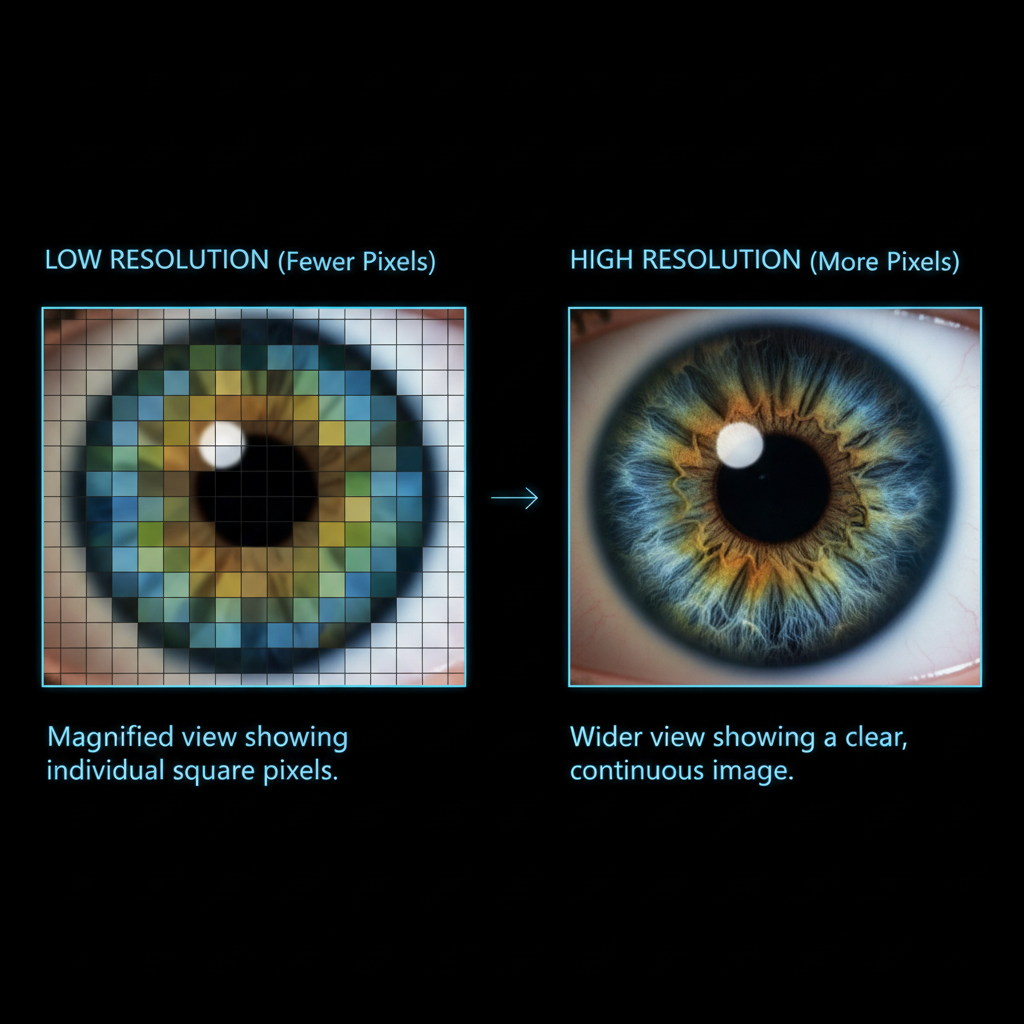
Analogy: Imagine your screen is a massive checkerboard, and each square on the checkerboard can glow with a specific color. Each of those squares is a pixel. When you zoom in very close to a digital image, you'll start to see these individual squares, just like you'd see individual LEGO bricks if you got close to a LEGO model.
Every single dot of light on your TV, phone, or computer monitor is a pixel. The computer tells each pixel what color to be, and when millions of these colored pixels work together, they create the complete picture you see.
2. Resolution: How Clear and Detailed Is Your Picture?
If pixels are the building blocks, then resolution tells us how many of those blocks are used to build an image or display a picture on a screen. Resolution is usually described by two numbers, like '1920x1080'. This means there are 1920 pixels horizontally (across) and 1080 pixels vertically (up and down).
Analogy: Think about knitting a scarf. If you use very thick yarn, you'll have fewer stitches (pixels) per inch, and the scarf will look coarser. If you use very fine yarn, you'll have many more stitches (pixels) per inch, and the scarf will look smoother and more detailed. Higher resolution means more pixels, which usually means a sharper, clearer, and more detailed image, because there are more tiny dots to capture all the fine details.
3. Color Models: How Computers 'See' Color
How does a computer know what color to make each pixel? It uses a color model. One of the most common color models is RGB, which stands for Red, Green, and Blue. This is because all the colors you see on a screen can be created by mixing different amounts of red, green, and blue light.
Analogy: Imagine you have three flashlights: one with a red filter, one with a green filter, and one with a blue filter. If you shine the red and green flashlights together on a white wall, you'll see yellow. If you shine all three together, you'll see white light. By changing the brightness of each flashlight, you can create millions of different colors. Your computer screen works the same way, with each pixel having tiny red, green, and blue lights that can be turned on or off at different intensities.
4. 2D vs. 3D Graphics: Flat Pictures vs. Worlds with Depth
2D Graphics (Two-Dimensional)
2D graphics are flat, like a drawing on a piece of paper or a photograph. They only have width and height. Most of the images you see on websites, cartoons, and simple games use 2D graphics. Everything is drawn on a single plane, so there's no sense of depth or 'popping out'.
Analogy: Drawing a picture of a house on a piece of paper. You can see how wide and tall the house is, but you can't walk around it or see its back side.
3D Graphics (Three-Dimensional)
3D graphics are different. They have width, height, AND depth, just like objects in the real world. This allows us to create scenes and objects that look like they have volume and can be viewed from different angles. This is what makes modern video games and animated movies look so incredibly realistic.
Analogy: Building a house with LEGO bricks in real life. You can see its width, height, and how deep it is. You can walk around it and see it from the front, side, or back. 3D computer graphics creates a mathematical model of an object that includes all this 'depth' information, making it seem solid and real.
5. Rendering: The Art of Creating the Final Image
When a computer creates a 3D scene—whether it's a character in a game or an object in an architectural design—it's not instantly ready to be seen on the screen. There's a complex process called rendering. Rendering is the process where the computer takes all the mathematical information about the objects, colors, textures, lights, and camera angles in a 3D scene and turns it into a final 2D image that you can see on your screen.
Analogy: Imagine you're a chef, and you have a recipe (the 3D model, textures, lights) and ingredients (data). You have to follow the steps of the recipe, cook all the ingredients, and combine them perfectly to create a delicious meal (the final rendered image). Rendering is the 'cooking' process for computer graphics.
This process can be very fast for simple images (like in real-time video games) or take many hours for incredibly detailed movie scenes (like those in animated blockbusters).
6. Animation: Bringing Still Images to Life
Animation is the process of making still images move, creating the illusion of motion. In computer graphics, animators create a series of individual images (called 'frames'), and when these frames are played one after another very quickly, our eyes perceive smooth, continuous movement.
Analogy: Remember those flip-books where you draw a slightly different picture on each page, and when you flip the pages fast, the drawing seems to move? Computer animation works on the same principle, but with thousands of precisely drawn or rendered digital images.
From the bouncing ball in a physics simulation to the expressive faces of characters in a Pixar movie, animation is what brings computer graphics to life.
Where Do We See Computer Graphics?
Computer graphics are everywhere! Here are just a few examples:
- Video Games: From simple mobile games to complex virtual worlds, computer graphics are essential.
- Movies and TV Shows: Special effects, entire animated films, and digital sets are all created using computer graphics.
- Design and Architecture: Architects use 3D models to show how buildings will look. Car designers create virtual prototypes.
- Medical Imaging: Doctors use computer graphics to visualize X-rays, MRI scans, and even create 3D models of organs.
- Simulations: Training pilots, planning surgeries, or understanding weather patterns often relies on computer-generated visuals.
Conclusion
Computer graphics is a vast and exciting field that blends art with science and technology. From the tiniest pixel to complex 3D worlds, it's how we create and interact with visual information in the digital age. Understanding these foundational concepts is your first step into appreciating the magic behind your screens and perhaps even creating your own digital masterpieces one day!
Keep learning, free
Create a free Syllabax account to unlock practice questions and games for this topic.
Visual Learning Enhanced! 🚀
To help you master this topic, we use Advanced Syllabax AI to generate detailed diagrams and visual models.
Note on Visuals: The AI sometimes makes spelling errors in image labels. Please refer to the lesson text for the correct terminology.