Networking Basics
Watch this topic in 60 seconds
Free preview · Lesson 1
Understanding Networking Basics
Networking Basics: How Your Devices Talk to Each Other!
Have you ever wondered how your phone sends a message to your friend across town? Or how you can watch a video on YouTube from a server thousands of miles away? It all happens thanks to something called a network! In simple terms, a network is just a bunch of connected things that can share information.
Think of it like this: Imagine you and your friends want to share notes for a class. If you're all sitting next to each other, you can just pass the papers around. That's a tiny, simple network! But what if your friends are at different tables, or even in different classrooms? You'd need a system to get those notes to them, maybe by using a messenger or a school mail system. Computer networks work in a very similar way, but on a much bigger and faster scale.
What is a Computer Network?
A computer network is a collection of connected computers and other devices (like phones, tablets, printers, and servers) that can communicate with each other and share resources. These connections can be made using physical cables or wirelessly through the air.
Analogy: Think of a network like a big family. Each family member (device) can talk to others, share toys (data), or use common things like the TV (a shared printer or internet connection). Everyone is connected in some way, making it easy to share and communicate.
Key Components of a Network
For a network to work, you need several important pieces. Let's break them down:
1. End Devices (The 'Talkers' and 'Listeners')
These are the devices people use every day to send and receive information. They are the 'ends' of the network where data starts or finishes its journey.
- Computers: Desktops, laptops
- Mobile Devices: Smartphones, tablets
- Printers: Network printers that everyone can use
- Servers: Powerful computers that store websites, games, or files and serve them to other computers. Think of a server as a giant library for digital information.
Analogy: End devices are like the people in a conversation. One person speaks (sends data), and another person listens (receives data).
2. Network Devices (The 'Traffic Cops' and 'Mail Sorters')
These devices help direct data traffic and make sure information goes to the right place.
-
Routers: Imagine a router as a super-smart post office that knows all the different roads and highways. When data arrives, the router looks at its destination address and decides the best path for it to travel to reach its goal, especially when sending data between different networks (like from your home network to the internet).
Analogy: A router is like a tour guide who knows the best way to get from your city to another city, making sure your letters (data) go on the right highway.
-
Switches: A switch is like a very organized mail sorter within a single building or a single network. It takes incoming data and quickly sends it only to the specific device that needs it, rather than sending it to everyone. This makes the network more efficient.
Analogy: A switch is like a school principal who knows exactly which student (device) in the school needs a particular message, and delivers it directly to them without bothering everyone else.
3. Transmission Media (The 'Roads' and 'Airwaves')
This is how data physically or wirelessly travels from one device to another.
-
Cables:
- Ethernet Cables: These are the most common type of physical cable used in home and office networks. They look like thicker phone cords with a clip on the end. They're great for fast and reliable connections.
- Fiber Optic Cables: These cables use light pulses (instead of electricity) to transmit data. They are super fast and can carry data over very long distances without losing quality, but they are more expensive. Think of them as superhighways for data!
Analogy: Cables are like the roads and highways that cars (data) travel on. Some are dirt roads (older, slower cables), and some are superhighways (fiber optic).
-
Wireless (Wi-Fi): This allows devices to connect to a network using radio waves, without needing any physical cables. Your phone, laptop, and tablet likely use Wi-Fi to connect to the internet.
Analogy: Wi-Fi is like talking through the air. You don't need a string connecting two tin cans; your voice just travels through the air to the other person's ear.
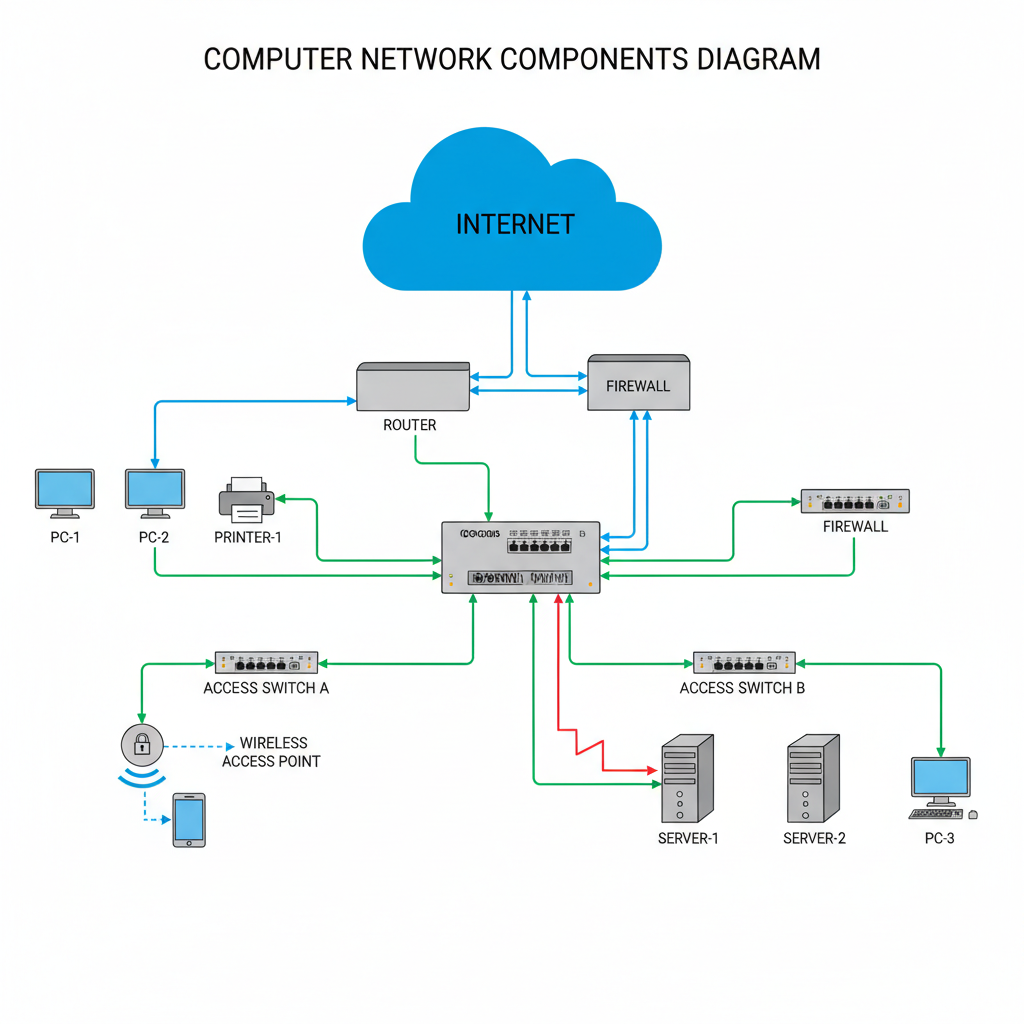 ⚠️ This picture may have spelling mistakes. Trust the words in the lesson.
How Data Travels: The 'Letters' and 'Addresses'
When you send a message or request a webpage, your computer doesn't send the entire thing as one giant chunk. Instead, it breaks the information into smaller pieces called packets.
Analogy: Think of a packet like a letter or a small package. If you wanted to send a whole book to a friend, you wouldn't send it as one huge, unlabeled box. You'd break it into chapters, put each chapter in an envelope (a packet), write the recipient's address and your return address on each envelope, and number them (e.g., 'Chapter 1 of 10', 'Chapter 2 of 10').
Each packet contains a small piece of the original data, along with information about where it came from (source address), where it's going (destination address), and its sequence number so the receiving device can put all the packets back in the correct order.
IP Addresses: Your Device's 'House Number' on the Internet
Every device connected to a network, especially the internet, needs a unique address so other devices know where to send information. This is called an IP (Internet Protocol) Address. An IP address looks like a series of numbers separated by dots, like 192.168.1.100.
Analogy: An IP address is exactly like your house address. If someone wants to send you a letter, they need your unique house address so the post office knows where to deliver it. On the internet, your computer's IP address tells other computers where to send data specifically to your device.
MAC Addresses: Your Device's Unique 'Birth Certificate' Number
While an IP address is like your house address (which can sometimes change if you move), a MAC (Media Access Control) Address is a unique physical address burned into your network card when it's manufactured. It's like a serial number or a device's 'birth certificate' number that never changes. MAC addresses are used mainly within a local network (like your home network) for devices to identify each other directly.
Analogy: A MAC address is like the unique serial number on your phone or game console. It's a permanent identifier for that specific piece of hardware.
Types of Networks
1. LAN (Local Area Network)
A LAN connects devices in a small, localized area, like your home, school, or a single office building. It's typically owned and managed by one organization or person. Data moves very quickly within a LAN.
Analogy: Your classroom or your home is a LAN. Everyone in that room can easily talk to each other and share things.
2. WAN (Wide Area Network)
A WAN connects devices over a large geographical area, spanning cities, states, or even countries. The most famous and largest WAN is the Internet! WANs are typically slower than LANs because the data has to travel much longer distances and pass through many more network devices.
Analogy: A WAN is like connecting many different schools (LANs) across an entire district or state. Data has to travel much farther, sometimes through complex routes.
The Internet: The 'Network of All Networks'
The Internet is the biggest WAN of all. It's a massive, global network that connects billions of computers and other devices worldwide. It's what allows you to visit websites, send emails to people around the globe, play online games with friends in different countries, and stream videos from anywhere.
Analogy: The Internet is like a giant, worldwide web of roads, highways, and air routes connecting every house (device) and city (LAN) on Earth. No matter where you are, you can send a letter (data) to almost anywhere else.
Network Protocols: The 'Rules of the Road'
For all these devices to understand each other, they need a common set of rules for communication. These rules are called protocols.
- TCP/IP (Transmission Control Protocol/Internet Protocol): This is the fundamental set of rules that makes the internet work. TCP makes sure that packets arrive correctly and in order, while IP handles the addressing and routing of those packets.
- HTTP (Hypertext Transfer Protocol): This protocol is what your web browser uses to communicate with web servers to display webpages. When you type
http://orhttps://, you're telling your browser to use this rule set.
Analogy: Protocols are like the rules of a game or the grammar rules of a language. If everyone follows the same rules, communication is clear and successful. If one person uses different rules, things get confusing!
Basic Network Security: Keeping Your Data Safe
Just like you wouldn't leave your front door wide open for anyone to walk into your house, you need to protect your network and the data on it. Basic network security involves:
- Strong Passwords: Using unique and complex passwords for your Wi-Fi network and online accounts.
- Firewalls: Software or hardware that acts like a guard at your network's entrance, checking all incoming and outgoing data and blocking anything suspicious.
- Antivirus Software: Programs that detect and remove harmful software (malware) from your devices.
Analogy: Network security is like putting locks on your doors, having an alarm system, and checking visitor IDs to keep your home and belongings safe. It protects your private information from unauthorized access.
Understanding networking basics is like learning how the invisible highways of information work. The more you know, the better you can understand and use the incredible power of connected devices!
Keep learning, free
Create a free Syllabax account to unlock practice questions and games for this topic.
Visual Learning Enhanced! 🚀
To help you master this topic, we use Advanced Syllabax AI to generate detailed diagrams and visual models.
Note on Visuals: The AI sometimes makes spelling errors in image labels. Please refer to the lesson text for the correct terminology.