Mastering Search Engines
Watch this topic in 60 seconds
Free preview · Lesson 1
Understanding Mastering Search Engines
Mastering Search Engines: Your Internet Superpower!
Hey there, 7th-grade digital explorers! Get ready to unlock a super important skill: mastering search engines. Think of the internet as the biggest library in the entire universe, with billions and billions of books, articles, pictures, and videos. Without a good way to find what you're looking for, it would be like trying to find a specific grain of sand on a giant beach – impossible!
That's where search engines come in. A search engine is like your personal, super-fast, super-smart librarian for the internet. Instead of physically going through shelves, you just type in what you're looking for, and it helps you find the most relevant information almost instantly.
How Do Search Engines Work? (The Magic Behind the Scenes)
It might seem like magic, but there's a lot going on behind the scenes. Here's a simplified look:
1. Crawling: The Internet Explorers
Imagine tiny, tireless robots (we call them 'spiders' or 'crawlers') constantly exploring every corner of the internet. They visit billions of web pages, following links from one page to another, just like you might follow a path through a huge park. Their job is to find new pages and updates to existing ones.
Analogy: Think of these crawlers like little mail carriers who go door-to-door, visiting every house (web page) in the world. They don't read the mail, but they know which houses exist and where they are.
2. Indexing: Building the Ultimate Card Catalog
Once the crawlers find a web page, the search engine doesn't just forget about it. It reads and understands the content of the page, figuring out what it's about. Then, it organizes all this information into a massive, organized database called an index. This index is like the world's largest, most detailed card catalog, where every single word and idea from every single web page is neatly filed away.
Analogy: After the mail carriers discover all the houses, the search engine is like a super-organized librarian who creates a detailed index card for every single book (web page) in the library. This card lists what the book is about, keywords in it, and where to find it. This step is crucial because it allows the search engine to quickly find information later.
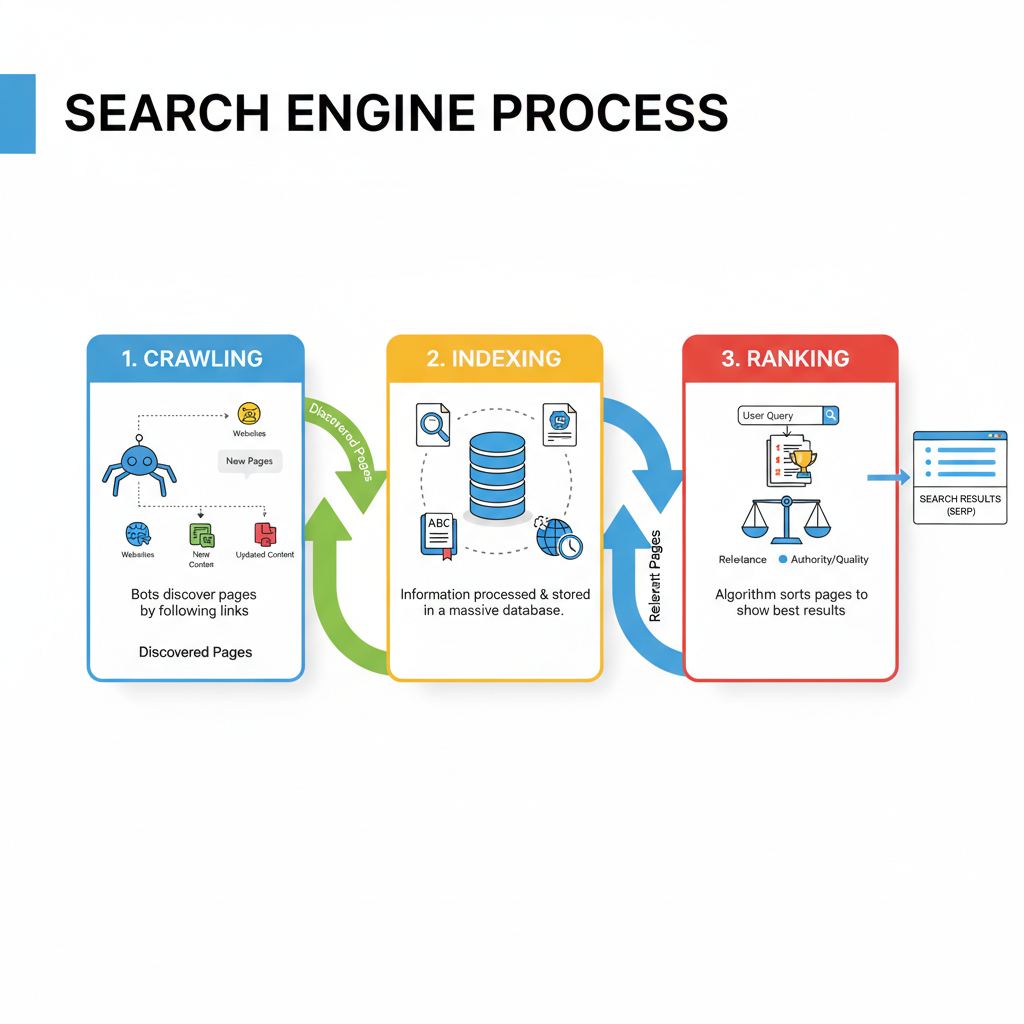
3. Ranking: The Best Results First!
When you type a question into the search bar, the search engine doesn't just pull up every page it has in its index. It uses complex formulas (called algorithms) to decide which pages are the most helpful and trustworthy for your specific question. It considers many factors, like how relevant the page is to your keywords, how popular and trusted the website is, and even how recently it was updated. The best results are then shown to you at the top of the search results page.
Analogy: Now, when you ask your super-smart librarian (the search engine) a question, she doesn't just give you a random pile of books. She quickly looks through her incredibly organized card catalog (the index) and then uses her expert judgment (the ranking algorithm) to pick out the *best* and most helpful books for your question, putting them in order from most helpful to least. That's why the first few results are usually the most useful!
Your Superpower: Using Keywords Effectively
The words you type into the search bar are called keywords. These are your instructions to the search engine. Using the right keywords is like giving your librarian very clear directions instead of just mumbling!
- Be Specific: Instead of 'dogs,' try 'best dog breeds for families.' You'll get much better results.
- Use Important Nouns and Verbs: Focus on the main subjects and actions. If you're looking for how to make a paper airplane, 'how to make paper airplane' is better than 'paper thing fly.'
- Don't Use Full Questions (Usually): While some search engines are getting better at understanding full questions, often just picking out the main keywords is more effective. For example, instead of 'What is the capital of France?', try 'capital of France.'
Basic Search Operators: Your Secret Decoder Ring
Want to get even more precise? These special symbols are called search operators and can really supercharge your searches:
- Quotation Marks (" "): Use these to search for an exact phrase. If you search for "Abraham Lincoln", the search engine will only show pages where those two words appear together in that exact order. Without the quotes, it might show pages with 'Abraham' and 'Lincoln' far apart.
Analogy: This is like telling the librarian, "I want *exactly* this title, no substitutes!" - Minus Sign (-): Use this to exclude a word. If you search for sharks -ocean, you'll find information about sharks that *isn't* related to the ocean (maybe shark teeth fossils found on land, or even land sharks in video games!).
Analogy: "Show me books about apples, but *not* about computers." - Site: (Search within a specific website): If you know you want information from a particular website, you can use site:example.com your keywords. For instance, site:nasa.gov Mars exploration will only show results from NASA's website about Mars exploration.
Analogy: "Only show me books from *this specific shelf* in the library!"
Evaluating Your Search Results: Be a Detective!
Just because something shows up high in search results doesn't automatically mean it's true or reliable. You need to be a detective and check your sources!
- Look at the URL (Web Address): Does it look like a trustworthy source? Websites ending in .edu (educational institutions), .gov (government), or reputable news organizations (.org, .com from known news sites) are often good starting points. Be wary of addresses that look suspicious or overly promotional.
- Check the Date: Is the information current? Something about technology from 2005 might not be accurate today.
- Who Wrote It?: Can you find information about the author or organization? Are they experts on the topic?
- Does it Seem Balanced?: Does the information present multiple sides of an issue, or does it sound heavily biased towards one opinion?
Analogy: When you get a book from the library, you don't just assume everything inside is true. You look at the cover, read the author's bio, check the publication date, and maybe even read reviews to see if it's a good source. Do the same with web pages!
Safety and Privacy Basics
When you use search engines, remember a few things about your safety and privacy:
- Don't Share Personal Info: Never type your name, address, phone number, or other personal details into a search bar or on websites you don't completely trust.
- Be Mindful of What You Click: If a link looks strange or promises something too good to be true, it probably is.
- Private Browsing: Most browsers have a 'private' or 'incognito' mode. This mode doesn't save your browsing history, cookies, or information entered into forms on your computer. It doesn't make you invisible on the internet, but it's good for when you're using a shared computer.
Conclusion: Search Smart, Learn More!
Learning to use search engines effectively is a fundamental skill in today's digital world. It helps you find answers, learn new things, complete homework, and explore your interests. By understanding how they work, using smart keywords, and evaluating your results, you'll be a true internet master!
Keep learning, free
Create a free Syllabax account to unlock practice questions and games for this topic.
Visual Learning Enhanced! 🚀
To help you master this topic, we use Advanced Syllabax AI to generate detailed diagrams and visual models.
Note on Visuals: The AI sometimes makes spelling errors in image labels. Please refer to the lesson text for the correct terminology.