Operating Systems: Windows & macOS Overview
Watch this topic in 60 seconds
Free preview · Lesson 1
Understanding Operating Systems: Windows & macOS Overview
Your Computer's Boss: Understanding Windows and macOS
Imagine a bustling city. Who keeps everything running smoothly? Not just one person, but a whole system working together! Your computer is like a tiny, super-smart city, and it has a very special "boss" that makes sure every single part works together perfectly. This boss is called an Operating System, or OS for short.
What is an Operating System (OS)?
Think of your computer's OS as a super-organized traffic cop. It stands at the busiest intersection of your computer, directing all the information, programs (like your favorite games or a writing app), and hardware (like your keyboard, mouse, or printer). Without this traffic cop, everything would crash into each other, and your computer wouldn't know what to do!
Another way to think about it is that the OS is the brain of your computer. It tells all the different parts of the computer what to do and helps them talk to each other. When you click on an icon, the OS tells the computer to open that program. When you save a drawing, the OS helps put it in the right folder. It's truly amazing!
It helps you do all the things you love on a computer: open apps, save your creative projects, connect to the internet to find information, and even print out your homework. The OS is always working quietly in the background, making sure everything runs smoothly.
Introducing the Two Big Bosses: Windows and macOS
Just like there are different kinds of cars (like sedans, SUVs, or trucks) or different brands of shoes (sneakers, sandals, boots), there are different kinds of operating systems. Today, we're going to meet the two most popular "bosses" for personal computers: Windows and macOS. They both do the same very important job – make your computer work – but they look and feel a little different, like two different flavors of ice cream or two different styles of bicycles!
Meet Windows: The World's Most Popular OS
Imagine if you walked down the street, and most of the cars you saw were the same brand. That's kind of how Windows is! It's made by a very big company called Microsoft, and it's on lots and lots of computers all around the world – you'll find it in homes, schools, libraries, and offices everywhere. Because it's so common, many different computer makers (like Dell, HP, Lenovo, and Acer) create computers that run Windows.
What it looks like: When you turn on a Windows computer, you usually see a "desktop" with little pictures called "icons" scattered across it. These icons are quick ways to open your favorite programs or files. At the very bottom of the screen, you'll find a long bar called the "taskbar." On the left side of the taskbar, there's a very famous "Start button" (it often has a window-shaped logo!). Clicking this Start button opens a menu where you can find all your programs, files, and settings. It's like the main control panel for your Windows computer!
Analogy: Windows is like a big, versatile community park that almost anyone can visit with almost any type of toy. It's very common and can adapt to many different needs.
Meet macOS: Apple's Stylish OS
Now, imagine a different car brand that's known for being very sleek, easy to use, and often used by artists, filmmakers, or designers because of its beautiful design. That's a bit like macOS! It's made by the company Apple, and here's a key difference: macOS only runs on Apple computers, like MacBooks (laptops) and iMacs (desktop computers). You won't find macOS on a Dell or HP computer.
What it looks like: macOS also has a "desktop" with icons for your files and folders. But instead of a taskbar and Start button, it often has a special bar called the "Dock" at the very bottom (or sometimes on the side) of the screen. The Dock holds icons for your favorite apps, and they bounce when you open them! At the very top of the screen, there's a "Menu Bar" that changes depending on what program you're currently using. It's known for its clean, elegant look.
Analogy: macOS is like a beautifully designed, special playground built just for Apple's own unique toys. It's known for being very stylish and often favored by people who work with art and music.
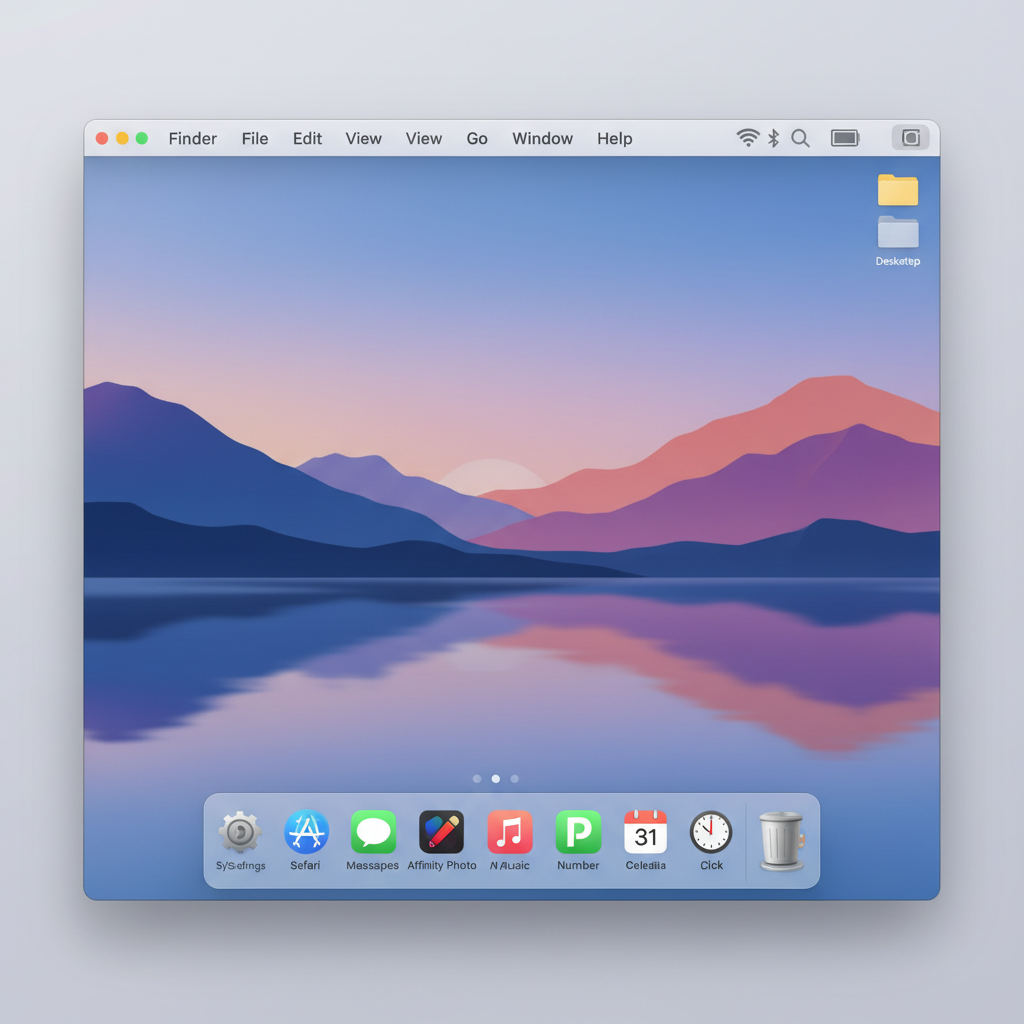 ⚠️ This picture may have spelling mistakes. Trust the words in the lesson.
Windows vs. macOS: Are They Really Different?
Think of them as two different types of houses. Both houses have kitchens, bedrooms, and bathrooms, but they might look different inside and out, and some might have different kinds of decorations. But they both serve the purpose of being a home!
- Appearance & Feel: Windows often has a very customizable look, allowing you to change many things. macOS is known for its elegant, consistent design that many people find very user-friendly.
- Where you find them: Windows runs on computers made by many different companies (Dell, HP, Lenovo, etc.). macOS only runs on Apple computers (MacBooks, iMacs, Mac Minis).
- Cost: Computers running macOS are often (but not always!) a bit more expensive than many Windows computers, partly because Apple designs both the hardware and the software, creating a very integrated experience.
But here's the most important part: They both do the SAME JOB! Whether you use a computer with Windows or a computer with macOS, both operating systems let you browse the internet, write stories, play games, draw pictures, and watch videos. They just have different ways of getting things done and different "looks" for their digital neighborhoods.
Why Do We Need an OS?
Without an OS, your computer would just be a pile of metal, wires, and plastic that doesn't know what to do. It would be like a car without a driver, or a band without a conductor! The OS is like the director of a play, making sure all the actors (programs), props (hardware), and lighting (display) work together perfectly to put on a great show for you!
Conclusion
So, whether you're using a computer with Windows or a computer with macOS, you're interacting with a powerful and smart operating system that makes your digital world possible. It's the silent hero working behind the scenes, allowing you to learn, create, explore, and play!
Keep learning, free
Create a free Syllabax account to unlock practice questions and games for this topic.
Visual Learning Enhanced! 🚀
To help you master this topic, we use Advanced Syllabax AI to generate detailed diagrams and visual models.
Note on Visuals: The AI sometimes makes spelling errors in image labels. Please refer to the lesson text for the correct terminology.