Learning Journey
Watch this topic in 60 seconds
Free preview · Lesson 1
Understanding The Central Processing Unit (CPU)
Understanding the CPU: The Brain of Your Computer (Grade 7)
Have you ever wondered what makes your computer, tablet, or smartphone think and do all the amazing things it does? Just like your brain helps you think, learn, and make decisions, your computer has its own 'brain.' This incredible component is called the Central Processing Unit, or CPU for short.
What is the CPU?
Imagine your computer is a busy city. The CPU is like the Mayor or the Head Office of that city. It's the most important chip inside your computer, responsible for carrying out most of the instructions that make your computer work. Every time you click an icon, type a letter, play a game, or watch a video, the CPU is hard at work, making it all happen!
Think of the CPU as a super-fast, super-smart calculator and decision-maker. It performs all the calculations, processes instructions, and manages the flow of information throughout the computer. Without a CPU, your computer would just be a fancy paperweight!
The CPU's Main Jobs (What it does!)
The CPU has three main jobs, which it does incredibly quickly:
- Receiving Instructions: It gets instructions from programs you are running (like a game or a web browser).
- Processing Data: It performs calculations and makes decisions based on those instructions.
- Sending Results: It sends the results of its work to other parts of the computer, like the screen or speakers.
It does all of this thousands, even millions, of times per second! That's why your computer can feel so fast and responsive.
Parts of the CPU: A Team Effort
Even though we call the CPU the 'brain,' it's not just one big blob. It's actually made up of several important parts that work together as a team. Let's look at the two main ones:
1. The Control Unit (CU)
Imagine the Control Unit as the traffic cop or the orchestra conductor inside the CPU. Its job is to manage and coordinate all the operations of the computer. When you click an icon, the Control Unit is the first to know! It understands the instructions, figures out which part of the CPU needs to do what, and makes sure everything happens in the correct order.
- Analogy: If your computer is following a recipe, the Control Unit is the person reading the recipe, making sure you add ingredients in the right order and use the correct cooking tools. It doesn't actually cook; it just directs the cooking!
2. The Arithmetic Logic Unit (ALU)
This part of the CPU is the real 'worker bee' when it comes to numbers and decisions. The Arithmetic Logic Unit (ALU) is like the super-smart math whiz and logic expert. It handles all the mathematical calculations (like addition, subtraction, multiplication, and division) and makes logical comparisons (like 'is X greater than Y?' or 'are these two things the same?').
- Analogy: In our recipe analogy, if the Control Unit is reading the recipe, the ALU is the person actually doing the mixing, measuring, and checking if the ingredients are fresh. It's the one doing the actual 'work' of manipulating data.
3. Registers
While the CU and ALU are doing their jobs, they need places to temporarily store tiny bits of information they are currently working with. These are called Registers. Think of registers as tiny, super-fast scratchpads or sticky notes directly inside the CPU. They hold data that the ALU is about to process, or results that the ALU has just finished calculating, for very short periods.
- Analogy: When you're solving a math problem on paper, you might jot down intermediate steps or numbers you need to remember. Registers are like those quick notes – they're not for long-term storage, just for the immediate task at hand.
How the CPU Works (A Simple Cycle)
The CPU is constantly performing a simple cycle of operations, often called the 'fetch-decode-execute' cycle:
- Fetch: The Control Unit fetches (gets) an instruction from the computer's memory. (Like picking up a step from a recipe.)
- Decode: The Control Unit decodes (understands) what the instruction means. (Like understanding what 'add two cups of flour' means.)
- Execute: The Control Unit tells the ALU or another part of the CPU to execute (perform) the instruction. (Like actually adding the flour.)
- Store (sometimes): The result of the execution might be stored back in memory or in a register for later use.
This cycle repeats millions of times every second, making your computer incredibly powerful!
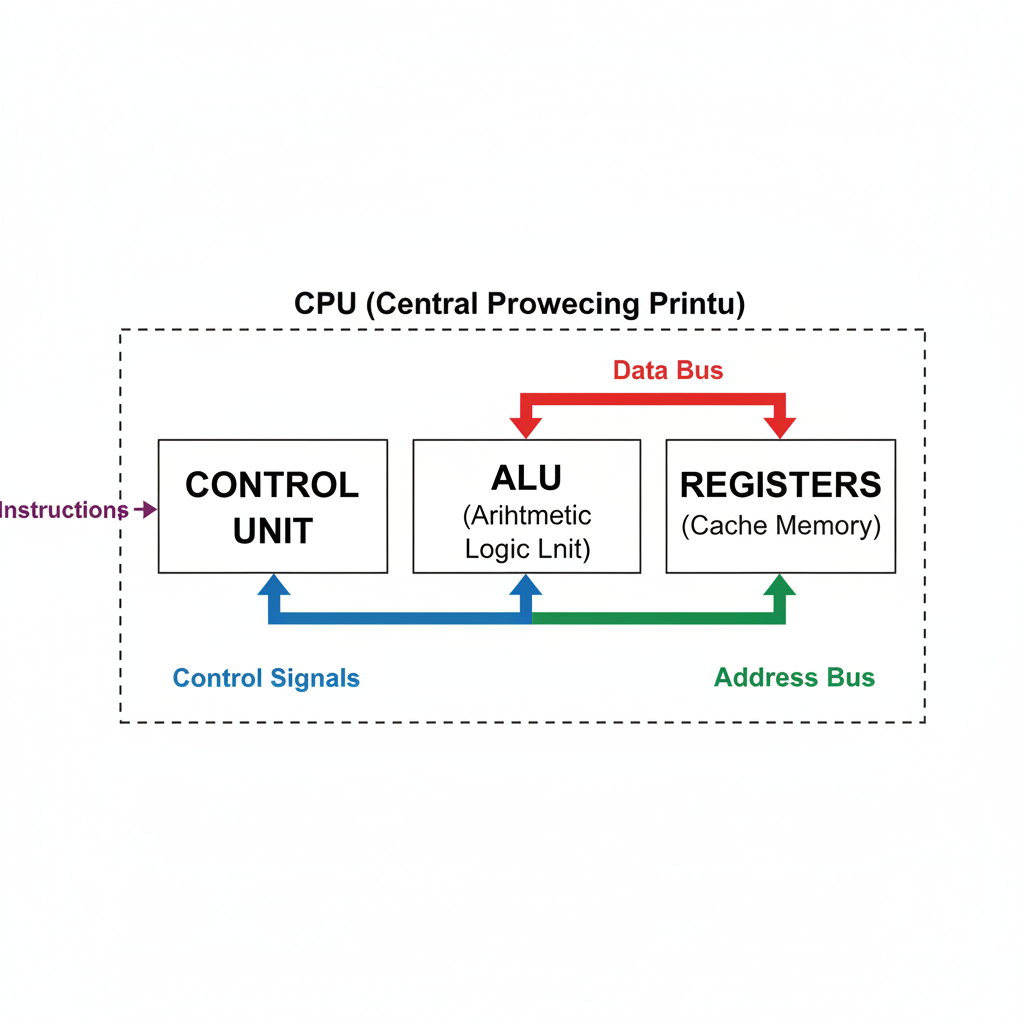 ⚠️ This picture may have spelling mistakes. Trust the words in the lesson.
Why is the CPU So Important?
The CPU's speed is often measured in gigahertz (GHz). A higher GHz number generally means a faster CPU, which in turn means your computer can process information quicker. A faster CPU can open programs faster, run more complex games smoothly, edit videos without lag, and generally make your entire computing experience more enjoyable.
Think of it like the engine in a car. A more powerful engine (a faster CPU) allows the car (your computer) to perform better and faster. It's the core component that makes your digital world come alive!
So, the next time you use your computer, remember the amazing little 'brain' inside, the CPU, working tirelessly to make everything happen!
Keep learning, free
Create a free Syllabax account to unlock practice questions and games for this topic.
Visual Learning Enhanced! 🚀
To help you master this topic, we use Advanced Syllabax AI to generate detailed diagrams and visual models.
Note on Visuals: The AI sometimes makes spelling errors in image labels. Please refer to the lesson text for the correct terminology.