Email & Online Communication Tools
Watch this topic in 60 seconds
Free preview · Lesson 1
Understanding Email & Online Communication Tools
Mastering Digital Connections: Email & Online Communication Tools
Welcome to the world of digital communication! Just like you talk to your friends, family, and teachers every day, we also 'talk' to people using computers, phones, and the internet. These tools are super important in school, at work, and just for staying in touch. Think of the internet as a giant highway system, and online communication tools are the different types of vehicles we use to send messages back and forth!
1. Email: The Digital Post Office
Imagine you want to send a letter to a friend who lives far away. You'd write it, put it in an envelope, write their address, put a stamp on it, and drop it in a mailbox. Eventually, a mail carrier delivers it to your friend's house. Email (short for 'electronic mail') works in a very similar way, but it's much faster because it all happens digitally over the internet!
- What it is: Email is like sending a digital letter or message from one computer to another, anywhere in the world, almost instantly.
- Your Email Address: Just like your house has a unique street address, your email address is your unique digital address. It usually looks something like
yourname@example.com. The part after the@symbol tells the internet 'post office' which email service (like Gmail, Outlook, Yahoo) handles your mail. - How it Travels: When you send an email, it doesn't travel through the air. It's broken down into tiny digital packets that zoom across the internet (our 'highway system') from your computer's 'post office' (your email server) to the recipient's 'post office' (their email server), and then into their inbox.
Key Parts of an Email:
When you compose an email, you'll see a few important fields:
- To: This is where you put the email address(es) of the main person or people you want to send the message to. (Analogy: The primary recipient's address on the envelope).
- Cc (Carbon Copy): This stands for 'Carbon Copy.' Anyone whose email address is in the Cc field will receive a copy of the email, but it's usually for people who need to know about the email but aren't the main recipients. Everyone in the 'To' and 'Cc' fields can see who else received the email. (Analogy: Sending a copy of a physical letter to someone else, and everyone knows they got a copy).
- Bcc (Blind Carbon Copy): This stands for 'Blind Carbon Copy.' People in the Bcc field receive a copy of the email, but no one else (not in 'To', 'Cc', or other 'Bcc' fields) can see that they received it. This is useful for sending emails to a large group of people while keeping their addresses private. (Analogy: Giving a copy of a letter to someone secretly, so others don't know).
- Subject: This is a short, descriptive phrase that tells the recipient what your email is about before they even open it. A good subject line is like a newspaper headline – it grabs attention and summarizes the content. (Analogy: The title on a book or the headline of a news article).
- Body: This is the main part of your email where you write your message. You can include text, links, and even images.
- Attachments: You can 'attach' files like documents, pictures, or videos to your email. These files travel along with your message. (Analogy: Putting extra papers or photos inside a physical envelope).
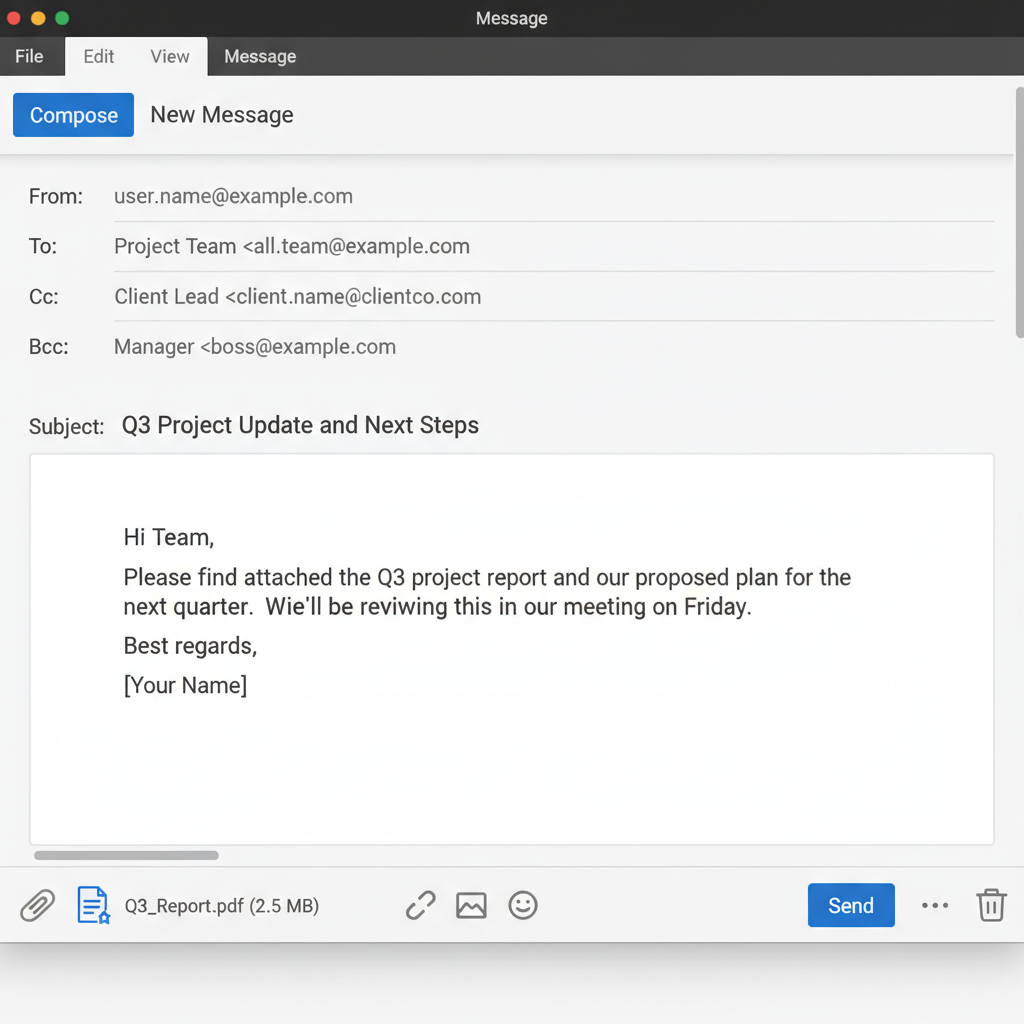 ⚠️ This picture may have spelling mistakes. Trust the words in the lesson.
Anatomy of an email: Understanding where each piece of information goes.
Email Etiquette (Netiquette): Being a Good Digital Citizen
Just like there are rules for talking politely in person, there are rules for polite email communication:
- Clear Subject Lines: Always use a clear subject line so people know what your email is about. Avoid vague subjects like "Hi" or "Question."
- Be Polite and Professional: Use greetings (e.g., "Dear Mr. Smith," "Hi Sarah,") and closings (e.g., "Sincerely," "Thanks,").
- Proofread: Always check your spelling and grammar before sending. Typos can make you look careless.
- Keep it Concise: Get to the point! People are busy, so try to be clear and brief.
- Think Before You Send: Once an email is sent, it's hard to get back. Don't send anything you wouldn't say in person.
2. Other Online Communication Tools
Beyond email, there are many other fantastic tools that help us communicate online, each designed for different types of interactions.
a. Instant Messaging (IM) / Chat Apps
- What they are: These are tools like WhatsApp, Snapchat, Instagram DMs, or Google Chat that let you send short, quick messages back and forth in real-time. It's like having a quick conversation or passing notes in class, but digitally!
- How they work: Messages appear almost instantly. You can chat one-on-one or in groups.
- Why use them: Great for quick questions, planning something with friends, or informal chats. They often support sending photos, videos, and even making calls.
b. Video Conferencing Tools
- What they are: Tools like Zoom, Google Meet, or Microsoft Teams allow you to have face-to-face meetings or classes over the internet using video and audio. It's like a phone call, but you can see everyone's faces!
- How they work: You join a 'virtual room' where you can see and hear others. You can also share your computer screen to show presentations or documents.
- Why use them: Essential for online classes, remote work meetings, or catching up with family who live far away.
c. Discussion Forums / Message Boards
- What they are: These are online places (like Reddit, or forums for specific hobbies) where people post messages and questions, and others can read and reply. Think of it like a digital bulletin board or a community whiteboard where people leave notes and responses.
- How they work: Conversations are usually organized into 'threads' about specific topics. Unlike instant messaging, these conversations aren't usually in real-time; people reply whenever they have time.
- Why use them: Great for asking questions, sharing knowledge, or discussing specific interests with a community of like-minded people.
d. Social Media Platforms
- What they are: Platforms like Facebook, Twitter, or TikTok allow you to share updates, photos, and videos with a network of friends or the public. They also often include direct messaging features. (Analogy: A public diary or newsfeed where you share snippets of your life, and friends can comment or send private messages.)
- How they work: You create a profile, post content, and interact with others' posts through likes, comments, and shares.
- Why use them: For sharing personal updates, following news, connecting with friends, and discovering new content.
3. Digital Citizenship: Being Responsible Online
Using all these powerful tools comes with responsibilities. Being a good 'digital citizen' means being safe, respectful, and smart online. Think of it as being a good citizen in a digital town!
- Privacy: Be careful about what personal information you share. Your online posts can be seen by many people, even if you think they're private.
- Safety: Never share passwords. Be wary of suspicious links or messages. If something feels 'off,' it probably is.
- Respect: Always be kind and respectful in your online interactions. The person on the other side of the screen is a real person with feelings.
- Critical Thinking: Not everything you read online is true. Always question information and check sources.
Online communication tools are incredibly useful for connecting us with the world. By understanding how they work and using them responsibly, you can make the most of these amazing digital connections!
Keep learning, free
Create a free Syllabax account to unlock practice questions and games for this topic.
Visual Learning Enhanced! 🚀
To help you master this topic, we use Advanced Syllabax AI to generate detailed diagrams and visual models.
Note on Visuals: The AI sometimes makes spelling errors in image labels. Please refer to the lesson text for the correct terminology.