Networking Fundamentals
Watch this topic in 60 seconds
Free preview · Lesson 1
Understanding Networking Fundamentals
Networking Fundamentals: Connecting Our Digital World (Grade 9)Networking Fundamentals: Connecting Our Digital World
Welcome to the exciting world of computer networking! You might not realize it, but every time you send a text, watch a video online, or play a game with a friend across town, you're using a network. Think of networks as the invisible superhighways and roads that allow information to travel from one place to another. Without them, our digital world would be a very lonely place!
What is a Network? Simple Terms, Big Ideas
At its core, a network is simply a group of two or more connected devices that can share resources and exchange information. These devices could be computers, smartphones, tablets, printers, or even smart refrigerators! The goal is for them to communicate with each other.
Analogy: A Group Conversation
Imagine you and your friends are sitting in a circle, talking. Each of you is a 'device' or 'node'. The 'network' is the conversation itself – the connection that allows your thoughts and words (data) to flow between you. Without this connection, you'd just be talking to yourself!
Key Concepts & Basic Definitions: The ABCs of Networking
- Node/Host: Any device connected to a network. This could be your laptop, phone, or a printer. Each node has a unique identity on the network.
- Analogy: People in a City. Just like every person in a city has a name and address, every device (node/host) on a network has its own way of being identified.
- Data: The information being sent over the network. This can be text, images, videos, audio, or instructions.
- Analogy: The Message Itself. When you send a letter, the letter's content is the 'data'. When you talk to a friend, your words are the 'data'.
- Bandwidth: This refers to the maximum amount of data that can be transmitted over a network connection in a given amount of time, usually measured in megabits per second (Mbps) or gigabits per second (Gbps).
- Analogy: The Width of a Highway. A wide highway (high bandwidth) can let many cars (data) pass at the same time, making traffic flow faster. A narrow road (low bandwidth) means fewer cars can pass, causing slowdowns.
- Latency: The time it takes for a data packet to travel from its source to its destination across a network. Lower latency is better, especially for things like online gaming or video calls.
- Analogy: Travel Time. If you send a letter to a friend, the time it takes for the letter to arrive is the 'latency'. You want that time to be as short as possible!
Different Kinds of Networks: Size Matters!
Networks come in all shapes and sizes, from connecting devices in a single room to linking computers across the entire globe.
1. Local Area Network (LAN)
A LAN connects devices in a relatively small geographical area, like a home, school, office building, or a campus. It's often owned and managed by a single organization or person.
Analogy: Your House or Classroom. All the devices in your home (computers, smart TVs, phones) connected to your Wi-Fi router form a LAN. Similarly, all the computers in your school's computer lab are likely part of a LAN.
2. Wide Area Network (WAN)
A WAN connects multiple LANs over a large geographical area, spanning cities, states, or even countries. The internet itself is the largest WAN in the world.
Analogy: Intercity Highway System. Think of different towns or cities as separate LANs. The major highways connecting these towns are like the WAN, allowing people (data) to travel long distances between them.
3. The Internet: The Ultimate Global Network
The Internet is a vast, global network of interconnected computer networks that uses standard communication protocols. It's essentially a 'network of networks', allowing billions of users worldwide to share information.
Analogy: The Entire World's Postal System. Imagine if every house (LAN) in every city (WAN) on Earth could send a letter to any other house, anywhere, instantly. That's how the Internet works for data!
Network Devices: The Tools That Make It Work
Just like roads need traffic lights, signs, and bridges, networks rely on special hardware to guide data. Here are some of the most common ones:
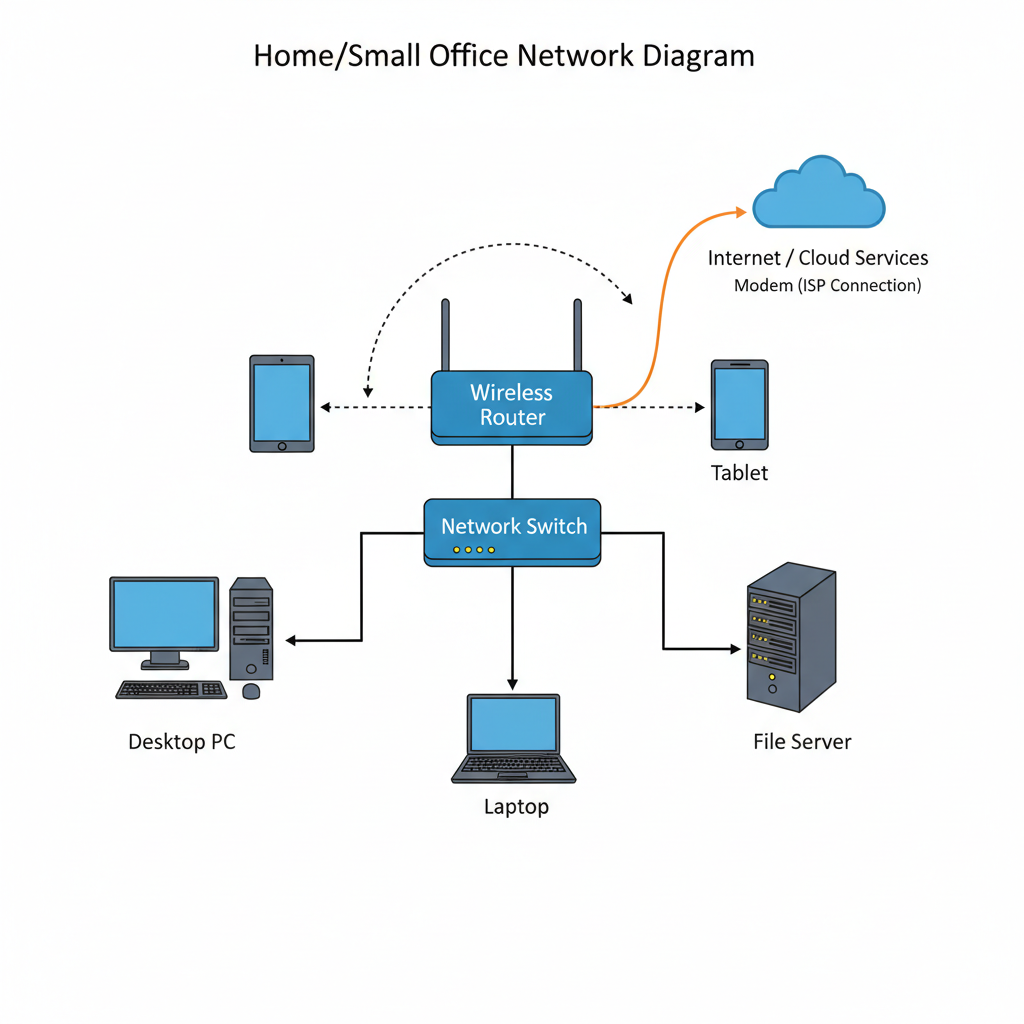
- Router: A device that forwards data packets between computer networks. It directs traffic and helps data find the best path to its destination, especially between different networks (like your home network and the internet).
- Analogy: A Traffic Cop or Postal Worker. A traffic cop directs cars at an intersection to their correct roads. A postal worker sorts mail and sends it to the right city or country. Routers do the same for data, guiding it to the right network.
- Switch: A device that connects multiple devices within the same LAN. It learns which devices are connected to which of its ports and sends data only to the specific device it's intended for, making communication efficient.
- Analogy: A Super-Efficient Mail Sorter for a Building. Imagine a building with many offices. A switch is like a smart mail sorter that knows exactly which office (device) needs which piece of mail (data) and sends it directly, without bothering everyone else.
- Modem: A device that converts digital signals from your computer into analog signals that can travel over traditional telephone or cable lines, and vice versa. It's your gateway to the internet from your home.
- Analogy: A Language Translator. Your computer speaks 'digital' language, but the internet's 'roads' (cable/fiber lines) often speak a different 'analog' language. The modem translates between the two so your data can travel outside your house.
- Cables: Physical wires (like Ethernet cables or fiber optic cables) that connect devices and carry data signals. They are the 'roads' of a wired network.
- Analogy: Roads or Tunnels. Just like cars need roads to travel from one place to another, data often needs cables to travel between devices. Fiber optic cables are like super-fast, clear tunnels!
- Wireless Access Point (WAP): A device that allows wireless devices (like your phone or laptop) to connect to a wired network using Wi-Fi signals.
- Analogy: A Radio Station for Your Devices. A WAP broadcasts Wi-Fi signals, allowing your devices to 'tune in' wirelessly and connect to the network, just like a radio station broadcasts music for your car radio.
 Protocols: The Rules of the Road
For devices to communicate successfully, they need to speak the same language and follow the same rules. These rules are called protocols.
- TCP/IP (Transmission Control Protocol/Internet Protocol): This is the fundamental set of protocols that forms the backbone of the Internet. IP handles addressing and routing data packets, while TCP ensures that data is delivered reliably and in the correct order.
- Analogy: Rules of a Game + Postal Codes. Imagine playing a board game. TCP is like the game's rules, ensuring everyone takes turns correctly and pieces move properly. IP is like the postal codes and street names that help you send a package to the right house.
- HTTP/HTTPS (Hypertext Transfer Protocol/Secure): These protocols are used for transferring web pages over the Internet. When you type a website address into your browser, HTTP (or the more secure HTTPS) is what allows your browser to request and receive that webpage.
- Analogy: Asking for a Book in a Library. HTTP is like the polite way you ask the librarian for a specific book. HTTPS is the same, but you're doing it in a private, secure whisper so no one else can hear your request or the librarian's answer.
IP Addresses: Your Device's Home Address
Every device connected to a network needs a unique identifier, just like every house needs a unique address. This is called an IP Address (Internet Protocol Address).
- IPv4: The older, more common type of IP address, like
192.168.1.1. It uses four sets of numbers separated by dots. - IPv6: A newer type of IP address designed to handle the massive number of devices connecting to the internet. It's much longer, like
2001:0db8:85a3:0000:0000:8a2e:0370:7334. - Analogy: House Addresses. IPv4 is like an older system of street addresses (e.g., "123 Main St."). IPv6 is like a newer, much larger addressing system for a constantly growing world, allowing for way more unique addresses (e.g., "A1B2:C3D4:E5F6:7890:ABCD:EFGH:1234:5678").
Client-Server Model: Who Asks, Who Gives?
Many networks operate using a client-server model. In this model, some devices are clients (which request information or services), and other devices are servers (which provide that information or service).
Analogy: A Restaurant. You, the customer, are the 'client' – you request food. The kitchen staff and chef are the 'server' – they prepare and provide the food you requested.
Conclusion: The Connected Future
Understanding networking fundamentals is crucial in our increasingly connected world. From basic concepts like data and bandwidth to the different types of networks and the devices that make them tick, you've taken your first steps into appreciating the incredible infrastructure that powers our digital lives. Remember, whether it's a simple text message or a complex video conference, it's all thanks to the magic of networks!
© 2024 Networking Fundamentals Curriculum for Grade 9
Keep learning, free
Create a free Syllabax account to unlock practice questions and games for this topic.
Visual Learning Enhanced! 🚀
To help you master this topic, we use Advanced Syllabax AI to generate detailed diagrams and visual models.
Note on Visuals: The AI sometimes makes spelling errors in image labels. Please refer to the lesson text for the correct terminology.