Introduction to Computers
Watch this topic in 60 seconds
Free preview · Lesson 1
Understanding Introduction to Computers
Introduction to Computers: Your Digital Companions!
Welcome, 8th graders, to the exciting world of computers! In this lesson, we're going to demystify these amazing machines that are everywhere around us. From the phones in our pockets to the smartboards in our classrooms, computers are digital superheroes making our lives easier, faster, and more fun. Think of this lesson as a backstage pass to understand how these technological wonders work!
What Exactly IS a Computer?
At its core, a computer is an electronic device that can take in information (we call this input), process it, and then give us back new information (we call this output). It's designed to carry out a sequence of arithmetic or logical operations automatically. That sounds fancy, right? Let's break it down.
Analogy 1: The Super-Smart Chef. Imagine a chef. You (the input) tell the chef you want a pizza. The chef (the computer) takes your request, thinks about the ingredients, bakes the pizza, and then serves you a delicious pizza (the output). Computers do something very similar, but with data instead of dough!
Why Do We Need Computers? The Power Trio: Speed, Accuracy, and Storage!
Why are computers so important? Because they are incredibly good at three main things:
- Speed: Computers can perform calculations and tasks far, far faster than any human. They can do millions of operations in a second!
- Accuracy: If given the correct instructions, computers make very few, if any, mistakes. They are incredibly precise.
- Storage: Computers can store vast amounts of information – like all the books in a giant library – and recall it almost instantly.
Analogy 2: The World's Fastest Calculator and Filer. Imagine you had to add up 1,000 numbers in your head. Hard, right? A computer can do that instantly and perfectly. Now imagine trying to remember every single book you've ever read and exactly where you left it. A computer can store information about millions of books and tell you exactly where to find "Harry Potter and the Sorcerer's Stone" in milliseconds!
The Two Big Pieces: Hardware and Software
Every computer, no matter how big or small, has two main components that work together:
1. Hardware: The Parts You Can Touch!
Hardware refers to all the physical, tangible parts of a computer system. If you can touch it, feel it, or pick it up, it's hardware! Think of it as the computer's body.
Analogy 3: Your Body. Your body is made of bones, muscles, skin, and organs. These are all physical parts. Similarly, a computer's hardware includes its screen, keyboard, mouse, internal chips, and wires.
Let's look at the main types of hardware:
- Input Devices: Giving Information to the Computer
These are like the computer's "senses." They allow us to feed data and instructions into the computer.
- Keyboard: Used for typing text and commands. (Analogy: Your mouth, speaking words to tell the chef what to do.)
- Mouse: Used for pointing, clicking, and selecting items on the screen. (Analogy: Your finger, pointing at something you want.)
- Microphone: Used to input audio, like your voice. (Analogy: Your ears, hearing sounds.)
- Scanner: Converts physical documents or images into digital files. (Analogy: Your eyes, taking a picture of something.)
- Touchscreen: Allows direct interaction by touching the screen. (Analogy: Your hands, directly touching and moving objects.)
- Output Devices: Getting Information FROM the Computer
These are like the computer's "ways of expressing itself." They display or present information back to us in a human-understandable form.
- Monitor/Screen: Displays visual information, like text and images. (Analogy: Your face, showing expressions or information.)
- Printer: Produces hard copies of documents or images on paper. (Analogy: Your hands, writing down notes for someone.)
- Speakers/Headphones: Produce audio output. (Analogy: Your mouth, speaking sounds.)
- Projector: Displays images or videos onto a large screen or wall. (Analogy: A megaphone, broadcasting information to a large audience.)
- Processing Devices: The Computer's Brain!
This is where the magic happens! The processing unit is responsible for thinking, calculating, and carrying out instructions.
- Central Processing Unit (CPU): Often called the "brain" of the computer. It executes instructions, performs calculations, and manages the flow of information. It's the most important chip inside the computer. (Analogy: Your brain, doing all the thinking, problem-solving, and decision-making.)
- Memory & Storage Devices: The Computer's Memory Bank!
Computers need places to store information, both temporarily and permanently.
- Random Access Memory (RAM): This is the computer's short-term memory. It holds data and programs that are currently being used. When you turn off the computer, RAM forgets everything. (Analogy: Your workbench. You put tools and materials on it that you're using *right now*. When you finish a project, you clear the workbench.)
- Storage (Hard Drive - HDD, Solid State Drive - SSD): This is the computer's long-term memory. It stores all your files, programs, and the operating system permanently, even when the computer is turned off. (Analogy: Your filing cabinet or a library. You store important documents and books there for future use. They stay there even when you leave.)
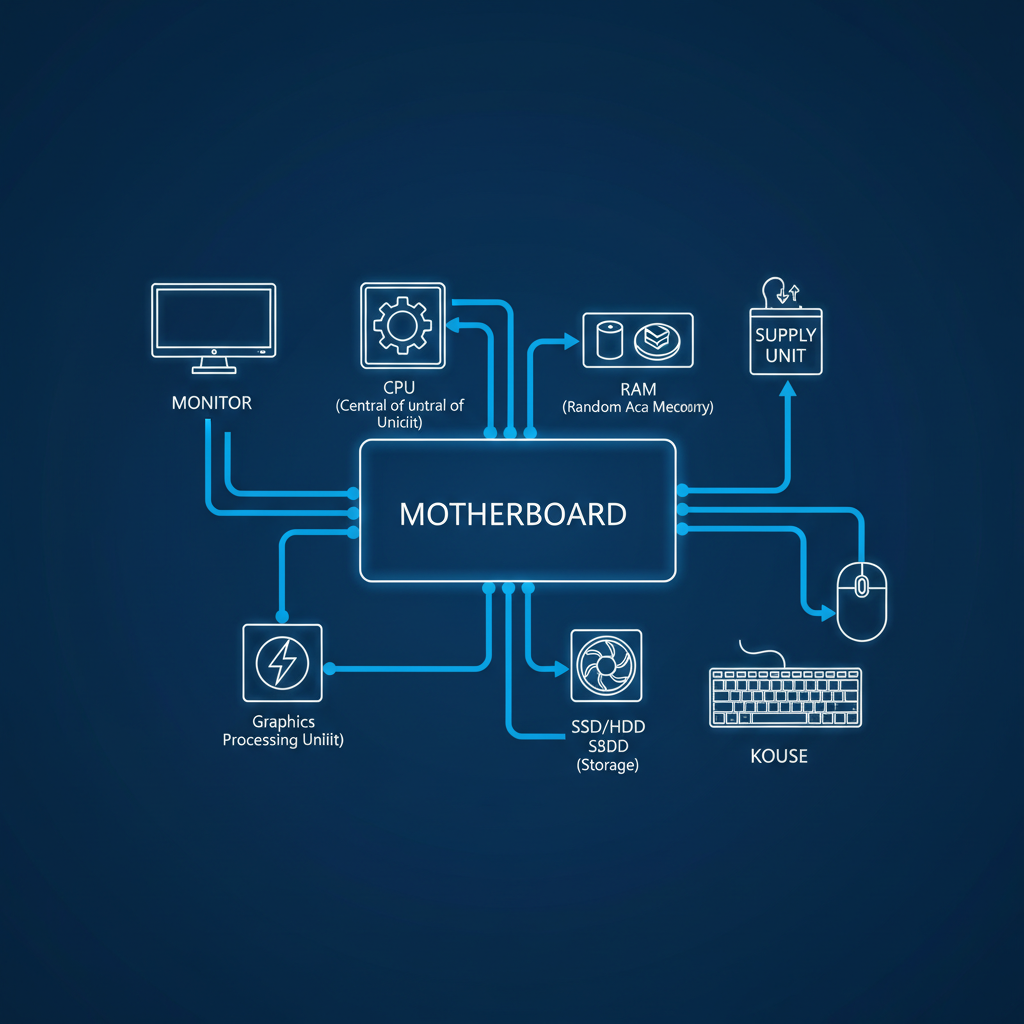 ⚠️ This picture may have spelling mistakes. Trust the words in the lesson.
2. Software: The Instructions That Make it Work!
Software refers to the set of instructions, data, or programs used to operate computers and execute specific tasks. You can't touch software, but it makes the hardware do amazing things. Think of it as the computer's mind or soul.
Analogy 4: A Recipe for a Cake. The hardware is like all the physical kitchen equipment (oven, mixing bowl, ingredients). The software is the recipe – the step-by-step instructions that tell you *how* to combine the ingredients, *how long* to bake, and *what temperature* to set the oven. Without the recipe (software), the equipment (hardware) just sits there!
There are two main types of software:
- Operating System (OS): This is the most important software on a computer. It manages all the computer's hardware and software resources and provides a common set of services for application software. Examples: Windows, macOS, Linux, Android, iOS. (Analogy: The conductor of an orchestra, making sure all the musicians (hardware) play together harmoniously and correctly.)
- Application Software: These are programs designed to perform specific tasks for the user. Examples: Web browsers (Chrome, Firefox), word processors (Microsoft Word), video games, photo editors (Photoshop), social media apps (TikTok, Instagram). (Analogy: The individual instruments or sheet music for a specific song within the orchestra.)
How Do Computers Work? The Input-Process-Output Cycle!
No matter how complex a task seems, all computers follow a fundamental three-step cycle:
- Input: The computer receives data or instructions from a user or another device. (You type a letter 'A' on the keyboard.)
- Process: The computer's CPU takes the input and performs operations on it according to its software instructions. (The CPU processes the 'A' keystroke and figures out it needs to display the letter.)
- Output: The computer displays, prints, or transmits the results of its processing. (The letter 'A' appears on your monitor screen.)
Analogy 5: Making a Sandwich.
- Input: You tell your friend, "Please make me a peanut butter and jelly sandwich." (This is the input – the instruction.)
- Process: Your friend goes to the kitchen, gets the bread, peanut butter, and jelly, spreads them, and puts the slices together. (This is the processing – following the instructions.)
- Output: Your friend hands you a delicious peanut butter and jelly sandwich. (This is the output – the result of the processing.)
Types of Computers (A Quick Look)
Computers come in many shapes and sizes, each designed for different purposes:
- Desktop Computers: Large, powerful computers typically found in homes and offices. They have separate monitors, keyboards, and mice.
- Laptop Computers: Portable versions of desktop computers, with all components integrated into one compact unit.
- Tablet Computers: Even more portable than laptops, with a touchscreen as the primary input method.
- Smartphones: Small, handheld computers that combine phone functions with computer capabilities.
- Wearables: Computers worn on the body, like smartwatches and fitness trackers.
Computers Everywhere!
From helping doctors save lives, to designing amazing video games, to connecting us with friends and family across the globe, computers are indispensable tools in almost every aspect of our modern world. Understanding how they work is a superpower that will help you navigate and shape the future!
Congratulations! You've just taken your first big step into the fascinating world of computers. Keep exploring, keep asking questions, and keep learning!
Keep learning, free
Create a free Syllabax account to unlock practice questions and games for this topic.
Visual Learning Enhanced! 🚀
To help you master this topic, we use Advanced Syllabax AI to generate detailed diagrams and visual models.
Note on Visuals: The AI sometimes makes spelling errors in image labels. Please refer to the lesson text for the correct terminology.