Cloud Computing Concepts
Watch this topic in 60 seconds
Free preview · Lesson 1
Understanding Cloud Computing Concepts
Exploring the Clouds: An Introduction to Cloud Computing
Welcome to the exciting world of Cloud Computing! You might have heard this term before, perhaps when talking about storing photos online, playing games, or using your favorite apps. But what exactly is the "cloud" in computing? Is it literally a fluffy white cloud in the sky? Not quite! In simple terms, cloud computing is like renting computing services (such as servers, storage, databases, networking, software, analytics, and intelligence) over the internet, instead of owning and maintaining your own. Think of it as a giant, shared digital playground where everyone can play with their own dedicated equipment, but no one has to buy the whole playground.
Analogy: Your Home Kitchen vs. a Restaurant
Imagine you love to cook. You need to buy all the ingredients, own all the pots and pans, a stove, an oven, and store everything in your kitchen. This is similar to traditional computing, where a company buys and maintains all its own servers, storage, and networking equipment in its own building (often called an 'on-premises' data center).
Now, imagine you go to a restaurant. You don't need to buy ingredients, pots, or pans. You just order what you want, eat, and pay for the meal. The restaurant provides everything, and they manage the kitchen, the staff, and the cleaning. This is like cloud computing. You use computing resources provided by someone else (the 'cloud provider') and pay only for what you use, without worrying about the underlying infrastructure.
The Core Idea: Renting, Not Owning
The fundamental principle behind cloud computing is the idea of moving from a capital expenditure (buying everything upfront) to an operational expenditure (paying for what you use). Instead of building your own power plant to get electricity, you just plug into the grid and pay your monthly bill. Cloud computing works in a very similar way for digital resources.
Key Characteristics of Cloud Computing
Cloud computing isn't just about using someone else's computers; it comes with several key features that make it so powerful and popular:
-
1. On-Demand Self-Service:
You can provision computing resources, like server time or network storage, automatically without needing human interaction from the cloud provider. It's like a vending machine for digital resources.
Analogy: The Vending Machine
When you want a snack from a vending machine, you don't need to ask an employee to get it for you. You just walk up, select your item, pay, and it's delivered instantly. Cloud computing works similarly: you can instantly get the computing resources you need with a few clicks, without waiting for someone to set them up for you.
-
2. Broad Network Access:
Cloud capabilities are available over the network (the internet) and accessed through standard mechanisms, meaning you can access your data and applications from almost any device, anywhere in the world, as long as you have an internet connection.
Analogy: An ATM Machine or Online Shopping
You can access your bank account from any ATM in the world, or shop online from your phone, tablet, or computer. Your bank (or the online store) makes its services available wherever you are, not just at a physical branch. Cloud services offer the same global accessibility.
-
3. Resource Pooling:
The cloud provider's computing resources are pooled together to serve multiple customers using a multi-tenant model, with different physical and virtual resources dynamically assigned and reassigned according to demand. It's like sharing a library's resources.
Analogy: A Public Library or a Shared Classroom
A library has many books, and many people share them. You don't get your own personal copy of every book; you borrow what you need when you need it. Similarly, a cloud provider has a huge pool of servers, storage, and networking gear. They dynamically allocate parts of these resources to different customers, ensuring efficient use for everyone.
-
4. Rapid Elasticity:
Capabilities can be rapidly and elastically provisioned (scaled up) and released (scaled down) to quickly and dynamically adjust to demand. This means if your website suddenly gets a huge surge of visitors, the cloud can automatically provide more power to handle it, and then scale back down when the rush is over.
Analogy: A Balloon Inflating and Deflating
Imagine your website is a balloon. When more people visit, it's like blowing more air into the balloon to make it bigger and handle the load. When fewer people visit, the air is let out, and it shrinks. Cloud computing allows your resources to expand and contract just as easily, only paying for the extra 'air' when you need it.
-
5. Measured Service:
Cloud systems automatically control and optimize resource use by leveraging a metering capability. Resources can be monitored, controlled, and reported, providing transparency for both the provider and the consumer. You only pay for what you use, just like your electricity or water bill.
Analogy: Your Utility Bill (Electricity, Water, Gas)
You don't pay a fixed price for electricity every month; you pay based on how much you consume, measured by a meter. Cloud providers do the same: they track how much storage you use, how much data you transfer, and how long your servers run, and then bill you accordingly. This 'pay-as-you-go' model is highly cost-effective.
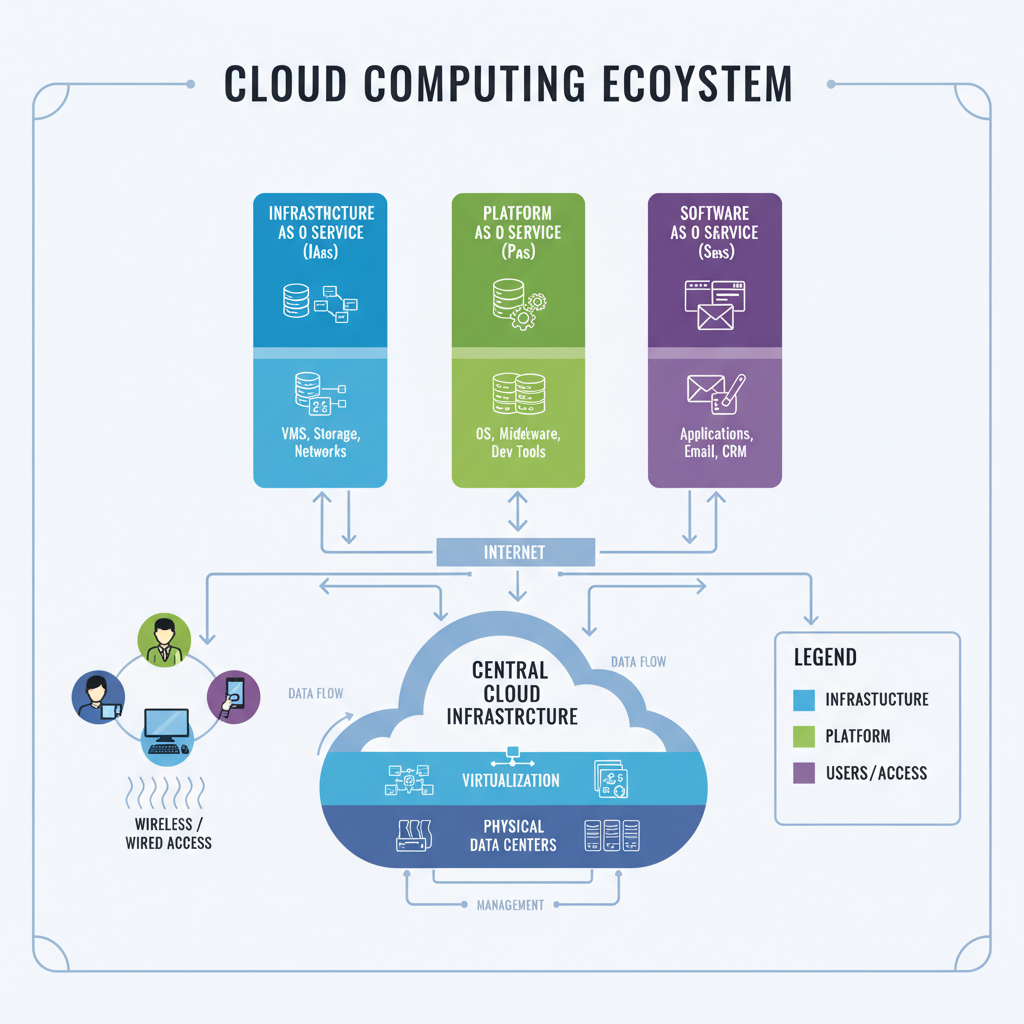 ⚠️ This picture may have spelling mistakes. Trust the words in the lesson.
Cloud Service Models: What Can You Rent?
Just like you can rent different things (an empty apartment, a furnished apartment, or a hotel room), cloud computing offers different levels of service:
-
1. Infrastructure as a Service (IaaS):
This is the most basic level. The cloud provider gives you the fundamental building blocks: virtual servers, networks, and storage. You're responsible for installing operating systems, applications, and all the software on top. Think of it as renting a plot of land and building your own house from scratch.
Analogy: Renting a Plot of Land
You rent the land, but you're responsible for bringing in the construction materials, hiring builders, designing the house, and maintaining it. With IaaS, the cloud provider gives you the 'land' (virtual machines, networks) and you build your 'house' (install operating systems, applications, and manage everything).
-
2. Platform as a Service (PaaS):
Here, the cloud provider gives you a complete environment for developing, running, and managing applications without the complexity of building and maintaining the infrastructure associated with developing and launching an app. It's like renting an apartment that comes with plumbing, electricity, and even a kitchen, but you still furnish and decorate it yourself.
Analogy: Renting an Unfurnished Apartment
The landlord provides the building, walls, roof, electricity, and plumbing. You don't worry about the foundation or wiring. You just move in, bring your furniture, and start living. PaaS provides the operating system, databases, and development tools, so you can focus on writing your application code.
-
3. Software as a Service (SaaS):
This is the most complete offering. The cloud provider hosts and manages the entire software application and its underlying infrastructure. You just use the software over the internet. Examples include Gmail, Netflix, Microsoft 365, or Google Docs. It's like staying in a fully furnished hotel room or taking a public bus.
Analogy: Renting a Fully Furnished Hotel Room or Taking a Bus
With a hotel room, everything is provided – the bed, bathroom, TV, cleaning. You just use it. With a bus, you don't own or drive it; you just get on and ride. With SaaS, you simply use the application without worrying about anything under the hood – no installations, no updates, no server management.
Cloud Deployment Models: Where Does the Cloud Live?
Cloud services can also be deployed in different ways:
-
1. Public Cloud:
Resources are owned and operated by a third-party cloud service provider and delivered over the internet. These resources (like servers and storage) are shared among multiple users. It's like a public park.
Analogy: A Public Park
Anyone can go to a public park. The city owns and maintains it, and many people use its facilities. Similarly, public cloud services are available to anyone with an internet connection, and the cloud provider manages all the infrastructure.
-
2. Private Cloud:
Cloud computing resources are used exclusively by a single organization. It can be physically located on the company's premises or hosted by a third-party service provider. It offers more control and security. Think of it as your own private backyard.
Analogy: Your Private Backyard
Only you and your family use your backyard. You have complete control over it, and no one else can access it. A private cloud is dedicated solely to one organization, offering exclusive use and customized security.
-
3. Hybrid Cloud:
This combines public and private clouds, allowing data and applications to be shared between them. This offers greater flexibility and more deployment options. For example, sensitive data might be kept in a private cloud, while less sensitive applications are run in a public cloud.
Analogy: A School Playground that is Sometimes Public
During school hours, the playground is private for students. After hours, the community can use it as a public park. A hybrid cloud lets you use your private resources for critical, sensitive tasks and 'burst' to the public cloud for less sensitive, high-demand tasks.
Why Cloud Computing is a Big Deal (Benefits)
Cloud computing has revolutionized how businesses and individuals use technology because of its numerous advantages:
- Cost Savings: No need to buy expensive hardware; you only pay for what you use.
- Flexibility: Access your data and applications from anywhere, on any device.
- Scalability & Elasticity: Easily grow or shrink your computing resources as needed, instantly.
- Reliability: Cloud providers often have multiple data centers, ensuring your services are almost always available.
- Security: Cloud providers invest heavily in security measures, often more than a single company could afford.
Things to Consider (Potential Downsides)
While powerful, cloud computing isn't without its considerations:
- Internet Dependency: You need an internet connection to access cloud services.
- Vendor Lock-in: It can sometimes be challenging to move data and applications from one cloud provider to another.
Conclusion
Cloud computing is transforming the digital landscape, making technology more accessible, flexible, and efficient. By understanding its core concepts, characteristics, service models, and deployment options, you're gaining valuable insight into a technology that powers much of the modern internet. It's like having access to a super-powered, invisible data center that's always ready to help you compute, store, and innovate!
Keep learning, free
Create a free Syllabax account to unlock practice questions and games for this topic.
Visual Learning Enhanced! 🚀
To help you master this topic, we use Advanced Syllabax AI to generate detailed diagrams and visual models.
Note on Visuals: The AI sometimes makes spelling errors in image labels. Please refer to the lesson text for the correct terminology.