Computer Hardware Components
Watch this topic in 60 seconds
Free preview · Lesson 1
Understanding Computer Hardware Components
Unpacking the Digital Brain: A Journey Inside Your Computer!
Ever wondered what makes your computer tick? It’s not magic, but a fantastic collection of interconnected parts, each with a special job! Think of a computer like a superhero team, an orchestra, or even your own body. Each part is super important, and they all work together to make amazing things happen, from playing your favorite games to helping you research for school projects.
In this lesson, we’re going to open up the 'hood' of your computer (figuratively, of course!) and meet the star players – the hardware components. "Hardware" simply refers to all the physical parts of a computer that you can see and touch. It’s the stuff you could hold in your hand, unlike "software," which is the programs and instructions that run on the hardware (like apps on your phone or games on your PC).
The Grand Stage: The Motherboard
Imagine your computer is a busy city. The Motherboard is like the city's main street, the intricate network of roads, and the central electricity grid all rolled into one! It's a large circuit board that connects everything. All the other components plug into it, allowing them to communicate and share electricity. Without the motherboard, the parts would be like musicians without a stage – they can't play together!
- Simple Definition: The main circuit board that connects all of the computer's components.
- Analogy: The central nervous system of your body, connecting your brain to all your limbs and organs. Or, the main electrical grid that powers a city and connects all its buildings.
The Genius Thinker: The Central Processing Unit (CPU)
If the computer were a person, the CPU would be its brain. This tiny, powerful chip is where most of the computer's "thinking" happens. When you click an icon, type a sentence, or launch a game, the CPU is the component that processes those instructions and performs calculations at lightning speed. It's constantly doing math and following commands, billions of times a second!
- Simple Definition: The "brain" of the computer, responsible for executing instructions and performing calculations.
- Analogy: Your brain, processing thoughts and making decisions. Or, the head chef in a busy restaurant, taking orders and directing the cooking.
The Workbench of the Mind: Random Access Memory (RAM)
Now, imagine the CPU (the brain) needs a place to quickly jot down notes or temporarily hold things it's currently working on. That's where RAM comes in! RAM is like your short-term memory or a desk workbench. When you open a program, like your web browser or a game, the computer loads some of its data into RAM so the CPU can access it very, very quickly. The more RAM you have, the more "workspace" your computer has to handle multiple tasks smoothly at the same time. But remember, RAM is "volatile" – meaning anything stored there disappears when you turn off the computer!
- Simple Definition: Short-term memory used by the computer to store data that is actively being used, allowing quick access for the CPU.
- Analogy: Your desk or workbench where you keep your current homework and books open. When you're done, you put them away. Or, your short-term memory – you remember what you just read, but you might forget it later if you don't save it.
The Digital Library: Storage Devices (HDD & SSD)
Unlike RAM, you need a place to keep your files, photos, games, and programs permanently, even when the computer is turned off. This is the job of Storage Devices. There are two main types:
- Hard Disk Drive (HDD): Think of an old record player with spinning platters. An HDD stores data magnetically on these rapidly spinning discs. It's like a huge, traditional filing cabinet where you store all your important documents. HDDs can store a lot of data, but they are generally slower because mechanical parts have to move to read the information.
- Solid State Drive (SSD): Imagine a super-fast USB stick, but much larger and more powerful. SSDs store data on flash memory chips, with no moving parts. This makes them much faster and more durable than HDDs. They're like a modern, digital filing system that lets you access files instantly without searching through physical folders.
- Simple Definition: Where all your files, programs, and the operating system are permanently saved, even when the computer is off.
- Analogy: A large library or a digital filing cabinet where you keep all your books, papers, photos, and videos for long-term storage.
The Master Painter: The Graphics Processing Unit (GPU) / Graphics Card
Have you ever played a video game with amazing, lifelike graphics? Or watched a high-definition movie on your screen? That's largely thanks to the GPU, often found on a dedicated Graphics Card. While the CPU is a general thinker, the GPU is a specialist at one thing: creating and rendering images, videos, and animations very, very quickly. It's like a dedicated artist who draws millions of tiny dots (pixels) on your screen every second to create the beautiful visuals you see.
Here's a visual representation of how some of these components look inside a computer tower:
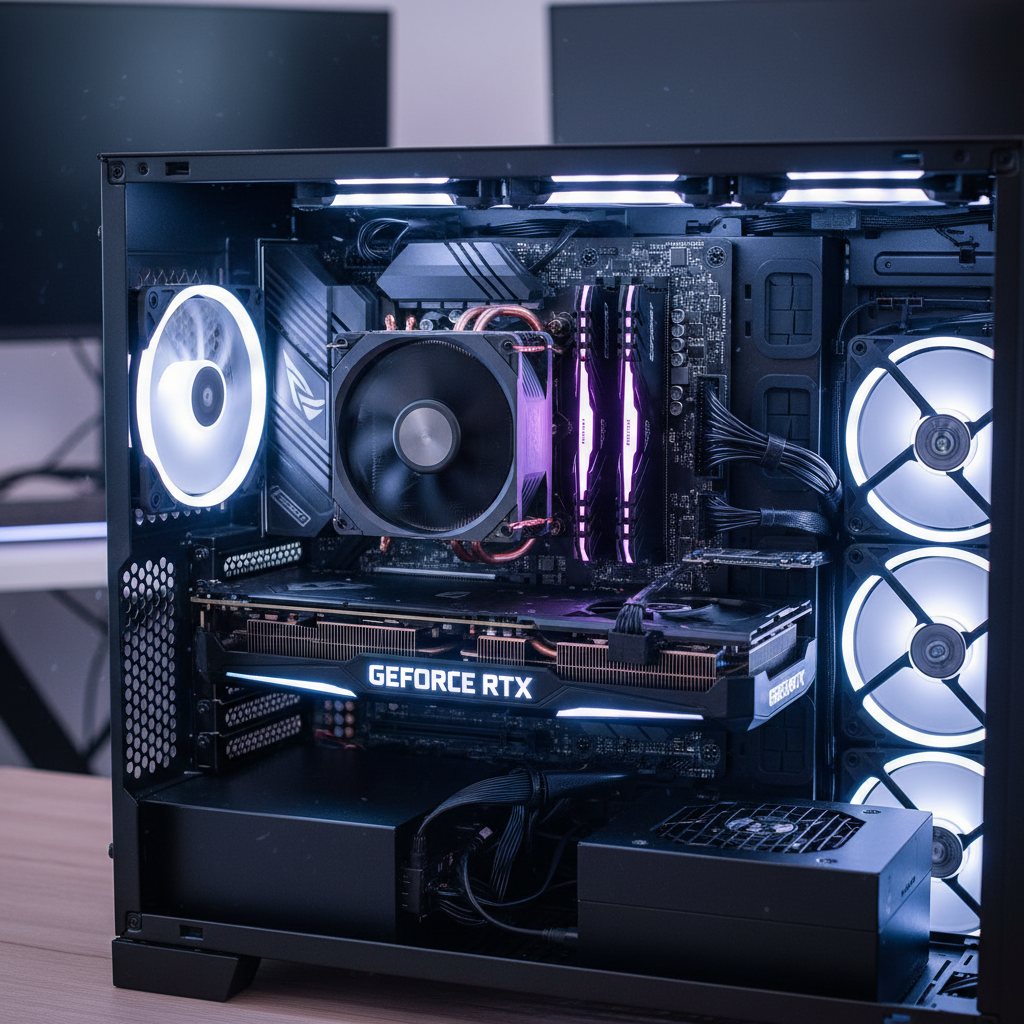
(Above: A look inside a computer case revealing the motherboard, CPU, RAM sticks, and a graphics card.)
- Simple Definition: A specialized electronic circuit designed to rapidly manipulate and alter memory to accelerate the creation of images, videos, and animations for display.
- Analogy: A dedicated artist who quickly draws all the pictures for a movie or game. Or, a projector in a movie theater, displaying images onto the screen for everyone to see.
The Computer's Heartbeat: The Power Supply Unit (PSU)
Every electrical device needs power, and your computer is no different! The Power Supply Unit (PSU) is like the computer's heart, pumping electricity to all the components. It takes the power from your wall outlet and converts it into the specific voltages and currents that each part of the computer needs to operate safely and effectively. Without a good PSU, your computer wouldn't even turn on!
- Simple Definition: Converts electricity from the wall outlet into usable power for all the computer's components.
- Analogy: The power plant that generates electricity for a city, or your own heart pumping blood to all parts of your body.
Your Communication Tools: Input and Output Devices
While not "inside" the main computer tower, these are essential hardware components that allow you to interact with the computer and for the computer to interact with you!
Input Devices: These are how you "talk" to the computer, giving it commands and information.
- Keyboard: Like a typewriter for your computer, letting you type letters, numbers, and symbols.
- Mouse: Your pointing finger, allowing you to click, drag, and select items on the screen.
- Microphone: Allows you to speak to the computer, for voice commands or recording.
- Webcam: A camera that lets the computer "see" you.
- Analogy: Your senses (eyes, ears, hands) that take in information from the world around you.
Output Devices: These are how the computer "talks back" to you, showing you results and information.
- Monitor/Screen: The computer's face, displaying all the visuals from games, programs, and websites.
- Speakers/Headphones: The computer's voice, letting you hear music, sounds, and voices.
- Printer: Allows the computer to "write" physical documents on paper.
- Analogy: Your mouth, hands, or facial expressions that allow you to communicate information back to the world.
The Symphony of Technology: How They All Work Together
So, how does this all come together? Imagine you want to open a game. You use the Mouse (input) to click the game icon. The CPU (brain) receives this instruction, grabs the game's initial data from the Storage (library) and loads it into RAM (workbench) for quick access. The GPU (artist) starts drawing the game's amazing graphics, which are then displayed on your Monitor (output). The PSU (heart) keeps everything powered, and the Motherboard (main street) ensures all these components can communicate seamlessly. It's a finely tuned machine, with each part playing a vital role!
Conclusion
Understanding computer hardware isn't just for tech experts; it's a fundamental part of understanding the digital world we live in. Knowing what these parts do helps you appreciate the technology you use every day, troubleshoot basic problems, and even make smart decisions if you ever need to buy or upgrade a computer. You're now one step closer to being a digital detective!
Keep learning, free
Create a free Syllabax account to unlock practice questions and games for this topic.
Visual Learning Enhanced! 🚀
To help you master this topic, we use Advanced Syllabax AI to generate detailed diagrams and visual models.
Note on Visuals: The AI sometimes makes spelling errors in image labels. Please refer to the lesson text for the correct terminology.