Multiplication shortcuts (Mental Calculations)
Watch this topic in 60 seconds
Free preview · Lesson 1
Understanding Multiplication shortcuts (Mental Calculations)
Mastering Multiplication Shortcuts: Quick Tricks for Your Brain!
Welcome, super mathematicians! Today, we're going on an exciting adventure to discover how to become multiplication wizards. Forget long, boring calculations! We're going to learn some super-secret shortcuts that will make multiplying numbers feel like magic. Think of your brain as a super-fast calculator, and these shortcuts are the special buttons that make it work even quicker!
Why Are Shortcuts So Cool?
Imagine you have a big pile of toys, say 12 boxes, and each box has 5 toys inside. How many toys do you have in total? You could count them all, but that would take a long time! Multiplication is like a super-speedy way to count groups of things. Shortcuts help us do this even faster, just like using a race car instead of walking!
When we multiply, we're essentially adding the same number over and over again. For example, 3 x 4 means 3 + 3 + 3 + 3. Shortcuts help us skip those extra steps and get to the answer right away. It’s like knowing a secret path through a maze instead of wandering around!
Shortcut 1: Multiplying by 10 - The "Add a Zero" Trick!
This is probably the easiest shortcut ever! When you multiply any whole number by 10, all you have to do is add a zero to the end of that number. Easy peasy!
Think of it like this: Imagine you have 7 cookies. If you have 10 friends who each want 7 cookies, you need to know how many cookies in total. Instead of counting 7 cookies ten times, just take the number 7 and add a zero. That's 70 cookies! Your number gets bigger, but it's super simple to figure out.
Example:
- 5 x 10 = 50 (Just add a zero to 5!)
- 23 x 10 = 230 (Add a zero to 23!)
- 100 x 10 = 1000 (Add a zero to 100!)
Shortcut 2: Multiplying by 100 - The "Add Two Zeros" Trick!
This one is very similar to the "multiply by 10" trick. When you multiply any whole number by 100, you just add two zeros to the end of the number. It's like giving your number a little boost!
Think of it like this: If you save
Example:
- 8 x 100 = 800 (Add two zeros to 8!)
- 15 x 100 = 1500 (Add two zeros to 15!)
- 30 x 100 = 3000 (Add two zeros to 30!)
Shortcut 3: Multiplying by 5 - The "Half of 10" Trick!
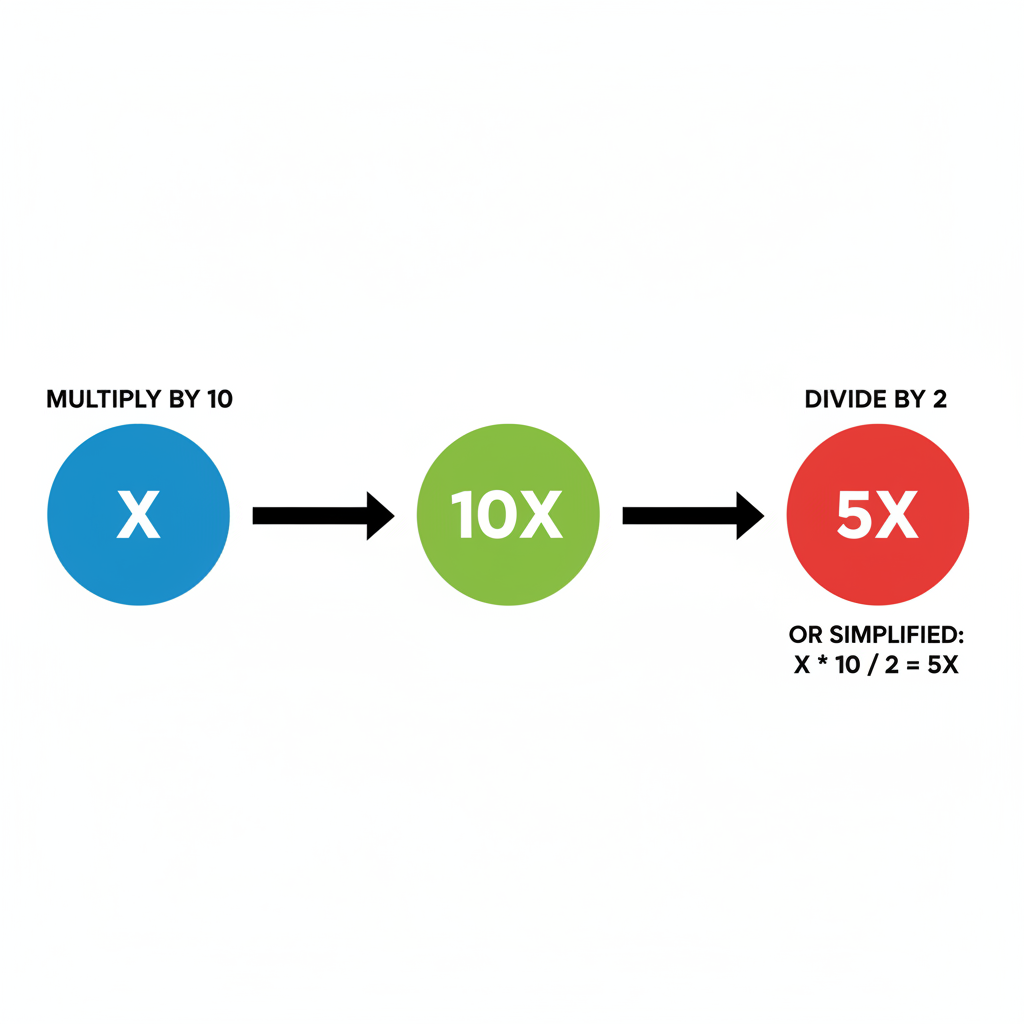
Multiplying by 5 can seem a bit tricky, but there's a super cool shortcut! If you want to multiply a number by 5, you can first multiply it by 10 (which we already know how to do – add a zero!), and then divide the answer by 2. Dividing by 2 is the same as finding half!
Think of it like this: Imagine you have 12 pieces of candy. You want to share them equally with one friend, so you need to find half. You have 12 pieces, so half is 6. Now, let's try this with multiplication. If you want to know 12 x 5, first do 12 x 10, which is 120. Then, find half of 120. Half of 120 is 60! So, 12 x 5 = 60.
Let's break it down:
- Multiply the number by 10 (add a zero).
- Divide the result by 2 (find half).
Example:
- 7 x 5:
- Step 1: 7 x 10 = 70
- Step 2: Half of 70 is 35. So, 7 x 5 = 35.
- 24 x 5:
- Step 1: 24 x 10 = 240
- Step 2: Half of 240 is 120. So, 24 x 5 = 120.
Shortcut 4: Multiplying by 11 - The "Add the Digits" Trick!
This shortcut is a bit more exciting! It works best for multiplying two-digit numbers by 11. Here’s how it works:
- Take the two-digit number (let's call it AB).
- Separate the two digits, A and B.
- Add the two digits together (A + B).
- Place the sum (A + B) in between the original two digits (A and B).
What if the sum (A + B) is a two-digit number? If A + B is 10 or more, you take the second digit of the sum and add it to the first digit (A), and then place the second digit of the sum after the first digit (which is now A+1). Don't worry, we'll do examples!
Think of it like this: Imagine you're building with LEGOs. You have a base of two bricks (A and B). Then you find a special connector brick that is the sum of A and B. You place that connector brick right in the middle to make a longer structure!
Example (when the sum is a single digit):
- 23 x 11:
- Digits are 2 and 3.
- Sum: 2 + 3 = 5.
- Place 5 between 2 and 3: 253. So, 23 x 11 = 253.
- 54 x 11:
- Digits are 5 and 4.
- Sum: 5 + 4 = 9.
- Place 9 between 5 and 4: 594. So, 54 x 11 = 594.
Example (when the sum is a two-digit number):
- 75 x 11:
- Digits are 7 and 5.
- Sum: 7 + 5 = 12.
- This is a two-digit number! Take the first digit of the sum (1) and add it to the first digit of the original number (7). So, 7 + 1 = 8.
- Take the second digit of the sum (2) and place it after the new first digit (8).
- The number becomes 825. So, 75 x 11 = 825.
- 92 x 11:
- Digits are 9 and 2.
- Sum: 9 + 2 = 11.
- This is a two-digit number! Take the first digit of the sum (1) and add it to the first digit of the original number (9). So, 9 + 1 = 10.
- Take the second digit of the sum (1) and place it after the new first digit (which is now 10). This means the '10' itself becomes the start of the number, and the '1' from the sum goes in the middle. So, 101. Wait, that's not right. Let's retry the rule carefully!
- Correct way for 92 x 11:
- Digits: 9 and 2. Sum: 9 + 2 = 11.
- The '1' from the '11' gets added to the '9', making it '10'.
- The other '1' from the '11' goes in the middle.
- So, the number is 1012. So, 92 x 11 = 1012.
Practice Makes Perfect!
These shortcuts are like learning to ride a bike. At first, it might feel a little wobbly, but the more you practice, the easier and faster you'll become. Try using these tricks whenever you see these numbers. You'll be a multiplication whiz in no time!
Keep learning, free
Create a free Syllabax account to unlock practice questions and games for this topic.
Visual Learning Enhanced! 🚀
To help you master this topic, we use Advanced Syllabax AI to generate detailed diagrams and visual models.
Note on Visuals: The AI sometimes makes spelling errors in image labels. Please refer to the lesson text for the correct terminology.