Types of Computers & Devices
Watch this topic in 60 seconds
Free preview · Lesson 1
Understanding Types of Computers & Devices
Understanding the World of Computers & Devices: A Beginner's Guide
Hello, future tech explorer! Have you ever thought about how many different kinds of "computers" you interact with every single day? It's not just the big box sitting on a desk or the phone in your pocket. The world is absolutely buzzing with smart devices, each designed for a specific purpose, like tools in a giant toolbox.
What Exactly IS a Computer?
Imagine a very smart helper who can follow instructions super fast. That's essentially what a computer is! It's a machine that takes information (we call this input), processes it (thinks about it and does something with it), and then gives you an answer or result (we call this output). Think of it like a chef: you give the chef ingredients (input), they follow a recipe (process), and then they give you a delicious meal (output). All computers, no matter how big or small, follow this basic idea.
The Core Parts of Every Computer (The "Brain" & "Memory")
Even though computers look different, they all have a few key things in common:
- CPU (Central Processing Unit) - The "Brain": This is the part that does all the thinking and calculating, like the chef's brain understanding the recipe and cooking. The faster the CPU, the faster your computer can "think."
- RAM (Random Access Memory) - The "Kitchen Countertop": Imagine your kitchen counter. When a chef is actively preparing a meal, they keep all the ingredients and tools they need right there on the counter for quick access. RAM is like that – it's where your computer temporarily stores information it's actively working on. It's super fast, but when you turn off the computer, everything on the "countertop" (RAM) is cleared away.
- Storage (Hard Drive/SSD) - The "Pantry/Refrigerator": This is where all your ingredients (programs, photos, documents, games) are stored safely for a long time, even when the computer is turned off. It's like your kitchen pantry or refrigerator, holding everything until you need it. It's slower to get things from here than from the countertop, but it keeps things safe permanently.
Meet the Family: Different Types of Computers
Now, let's look at the many members of the computer family. Each one has its own strengths and is built for different jobs.
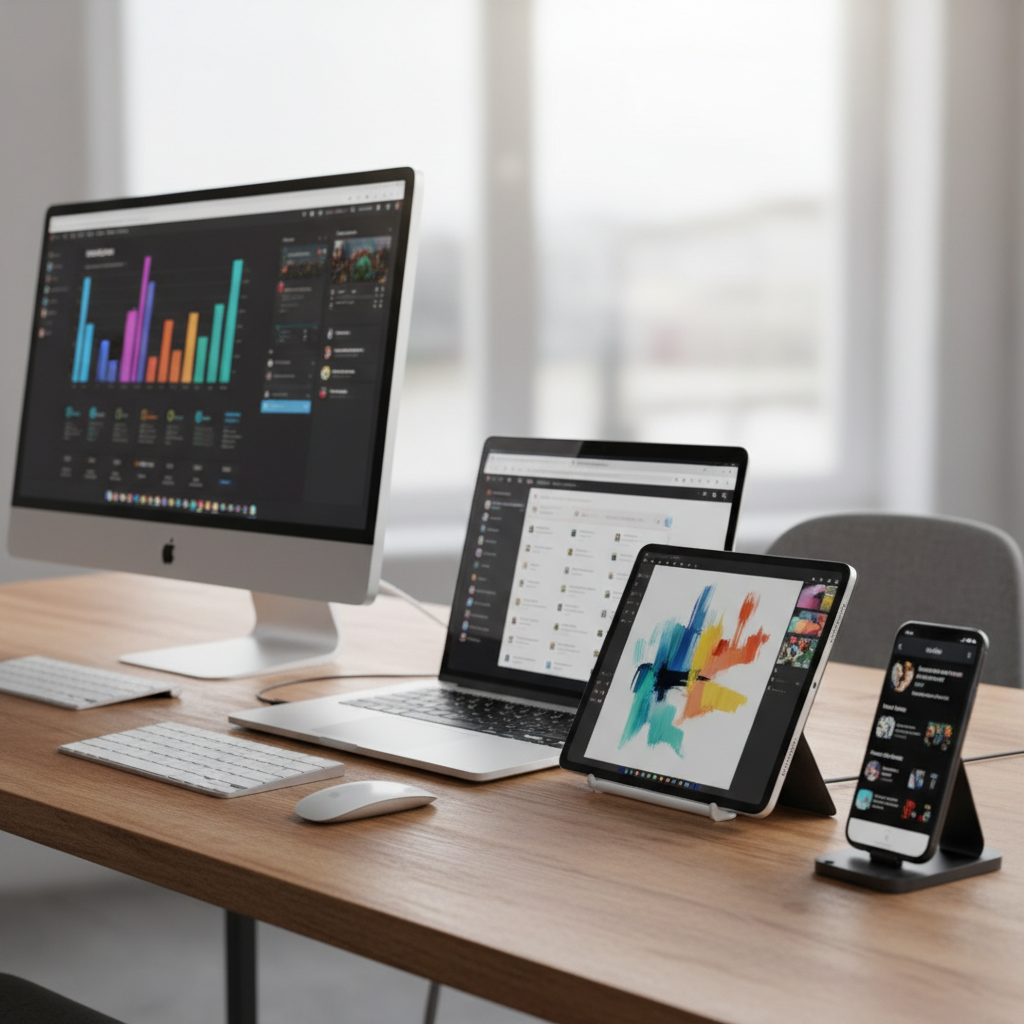
1. Desktop Computers: The Powerhouses at Home or School
Think of a desktop computer as a full, dedicated kitchen. You have a big oven (the main computer tower), a large counter (monitor), and separate tools like a mixer (keyboard) and a whisk (mouse). Desktop computers are powerful and usually stay in one place. They offer a lot of processing power and can be easily upgraded with new parts. They're great for gaming, video editing, or serious schoolwork where you need a big screen and a comfortable setup.
Key Features: Powerful, customizable, generally stays in one spot, often has a separate monitor, keyboard, and mouse.
2. Laptop Computers: Your Portable Workspace
If a desktop is a full kitchen, then a laptop is a portable kitchen that folds up! It has all the main parts of a computer (screen, keyboard, mousepad, and the "brain") built into one compact, foldable unit. Laptops are designed for people who need to take their work or entertainment with them. You can use them in your bed, at a coffee shop, or at school. They're super convenient but might not be as powerful or as easy to upgrade as a desktop.
Key Features: Portable, all-in-one design, built-in screen/keyboard/trackpad, battery-powered.
3. Tablet Computers: The Touch-Screen Wizards
Imagine a recipe card or a small cookbook – easy to hold, easy to tap through, and perfect for quick reference. That's kind of like a tablet! Tablets are very thin, flat computers with a large touch-screen that you interact with using your fingers or a special pen. They're great for browsing the internet, reading e-books, watching videos, playing simple games, and drawing. They're even more portable than laptops but generally less powerful and don't usually have a physical keyboard unless you add one separately.
Key Features: Highly portable, primary input is touch-screen, good for media consumption and light tasks.
4. Smartphones: Miniature Supercomputers in Your Pocket
Think of your smartphone as a super-powered Swiss Army knife, packed with tiny versions of many tools. It's a phone, a camera, a music player, a map, an internet browser, and a miniature computer all in one device that fits in your pocket! Smartphones have powerful processors, lots of memory, and incredible cameras. They've revolutionized how we communicate and access information on the go.
Key Features: Pocket-sized, multi-functional, primary communication device, powerful apps, constant internet connectivity.
5. Servers: The "Behind-the-Scenes" Workhorses
Have you ever wondered where all the websites, online games, and streaming videos come from? They don't just magically appear! They live on special, powerful computers called servers. Imagine a giant, industrial kitchen that runs 24/7, serving thousands or millions of customers at once. Servers are built to be extremely reliable and powerful, often without a screen or keyboard, living in special cooled rooms called "data centers." They "serve" information to all the other computers and devices connected to the internet.
Key Features: Extremely powerful, designed for continuous operation, provides services/data to other computers (clients), often runs without direct user interaction.
6. Wearable Technology: Computers on Your Body
What if your computer could be worn like clothing or jewelry? That's what wearable technology is! Devices like smartwatches, fitness trackers, and even smart glasses are mini-computers that you wear. A smartwatch is like having a tiny personal assistant on your wrist, telling you the time, showing messages, tracking your steps, and even monitoring your heart rate. They're designed for convenience and to seamlessly integrate into your daily life.
Key Features: Worn on the body, collects data about you (fitness, health), provides quick notifications, often connects to a smartphone.
7. Embedded Systems: The Hidden Brains Everywhere
This is perhaps the most surprising type! Embedded systems are tiny, specialized computers hidden inside other devices to make them "smart." Think about the microwave that knows exactly how long to cook your popcorn, the washing machine that has different cycles, the anti-lock brakes in a car, or even the smart thermostat in your house. These devices have a small computer "embedded" within them, dedicated to performing one or a few specific tasks. You might not even realize they're computers because you don't interact with them like a laptop or phone, but they're everywhere, making our lives easier and safer.
Key Features: Small, specialized computer, dedicated to a specific task, hidden inside other machines (appliances, cars, industrial equipment).
Why So Many Types?
Just like a carpenter needs different tools for different jobs (a hammer for nails, a saw for wood), we need different types of computers for different tasks. A smartphone is perfect for quick communication on the go, while a desktop is better for complex video editing. Each device is optimized for its unique role, making our digital world incredibly diverse and powerful!
By understanding these different types, you can make smarter choices about which device is best for your needs and appreciate the amazing technology that surrounds us every day!
Keep learning, free
Create a free Syllabax account to unlock practice questions and games for this topic.
Visual Learning Enhanced! 🚀
To help you master this topic, we use Advanced Syllabax AI to generate detailed diagrams and visual models.
Note on Visuals: The AI sometimes makes spelling errors in image labels. Please refer to the lesson text for the correct terminology.