Multimedia Creation Basics
Watch this topic in 60 seconds
Free preview · Lesson 1
Understanding Multimedia Creation Basics
Welcome to Multimedia Creation Basics!
Have you ever watched a cool video online, seen an amazing presentation at school, or listened to a podcast that kept you hooked? All of these are examples of multimedia! Multimedia is simply combining different types of media, like text, images, audio, and video, to create something engaging and informative. Think of it like making a delicious super-sandwich! You wouldn't just use bread, right? You'd add cheese, lettuce, sauce, and maybe even a juicy patty. Each ingredient adds flavor and makes the sandwich more interesting and satisfying. That's exactly what multimedia does for information!
Why is Multimedia Important?
In today's world, we're surrounded by multimedia. It's how we learn, communicate, and entertain ourselves. Being able to understand and create multimedia helps you:
- Communicate better: A picture often explains things faster than words alone.
- Tell stories: Videos and audio can bring stories to life.
- Share ideas effectively: Presentations with visuals and sound are much more memorable.
- Be creative: It's a fun way to express yourself and show what you know!
The Core Ingredients of Your Multimedia Sandwich
Let's break down the main 'ingredients' we use when creating multimedia:
1. Text: The Bread and Butter
What it is: Text is simply written words – headlines, paragraphs, captions, lists, etc. It's the most basic way to convey information.
Analogy: Text is like the bread of your super-sandwich. It forms the foundation and holds everything together. Without bread, it's just a pile of ingredients!
In Multimedia: Text provides explanations, labels, titles, and details. It guides your audience through the content.
2. Images: The Cheese and Lettuce
What it is: Images include photographs, drawings, illustrations, charts, and graphs. They are visual representations of ideas or real-world objects.
Analogy: Images are like the cheese and lettuce – they add color, texture, and immediate visual appeal. They make your sandwich look inviting and add a layer of flavor without being the main event.
In Multimedia: Images can illustrate concepts, show examples, convey emotions, or simply make your content more attractive. A picture of a solar system is much clearer than just describing it in words!
3. Audio: The Secret Sauce!
What it is: Audio is sound. This can be spoken words (like narration or voiceovers), music, or sound effects (like a doorbell ringing or birds chirping).
Analogy: Audio is the secret sauce or special spread in your sandwich. You might not see it, but it adds a huge amount of flavor and makes the whole experience better! It can be calming, exciting, or add emphasis.
In Multimedia: Audio can set the mood with background music, explain complex ideas with narration, or add realism with sound effects. Think about how much more impactful a video of a thunderstorm is with the rumbling sound!
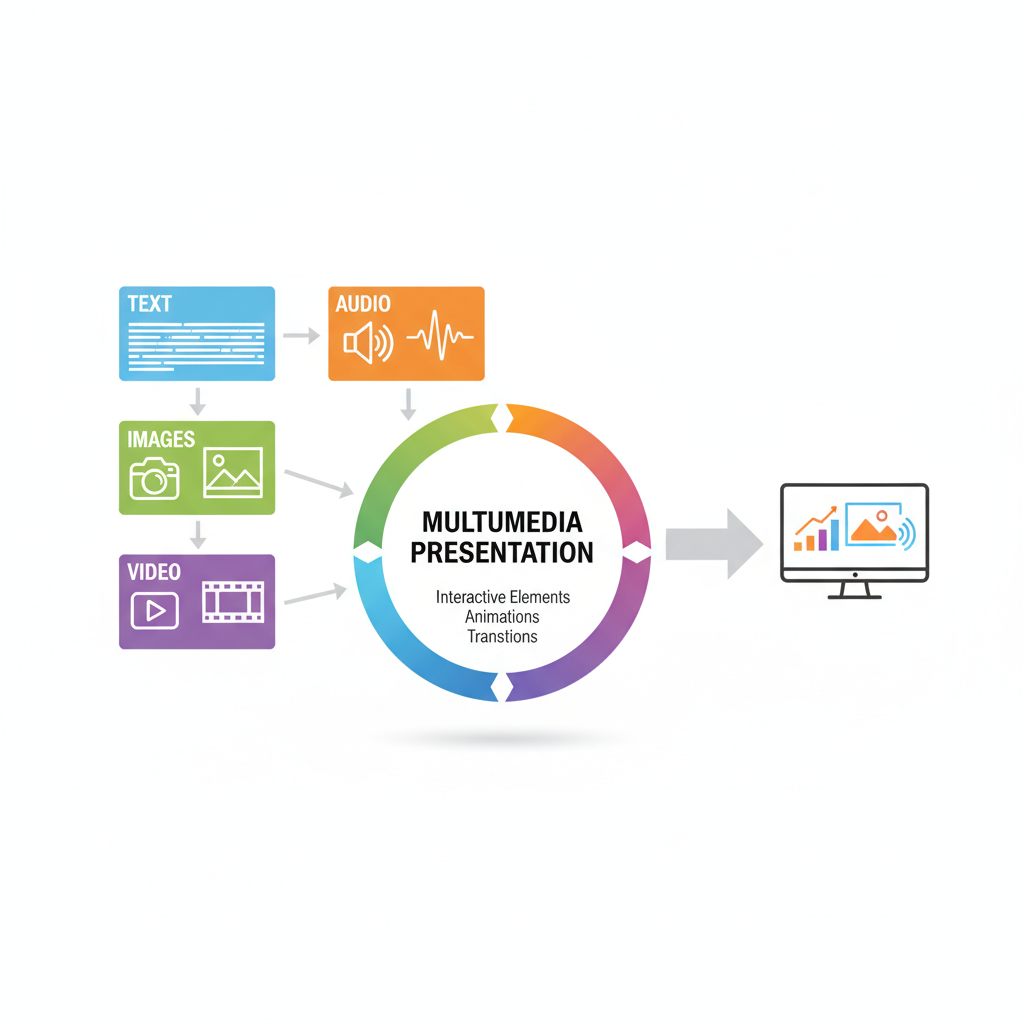 ⚠️ This picture may have spelling mistakes. Trust the words in the lesson.
Imagine these elements coming together to tell a powerful story!
4. Video: The Juicy Patty (or Veggie Burger!)
What it is: Video is a sequence of moving images, usually with accompanying audio. It can be a recorded clip of an event, an animation, or a combination of both.
Analogy: Video is the main patty of your sandwich. It's often the most substantial and attention-grabbing part. It combines many elements – moving visuals and sound – into one powerful component.
In Multimedia: Video is fantastic for showing processes, demonstrating actions, or capturing real-life events. A video tutorial on how to tie a knot is far more effective than just reading instructions.
5. Animation: The Fancy Garnish
What it is: Animation is creating the illusion of movement by rapidly displaying a sequence of images or frames. Think of flipbooks or cartoons.
Analogy: Animation is like a fancy toothpick holding your sandwich together, or a decorative flag on top. It's not always essential, but it adds a touch of flair, makes things more dynamic, and can highlight specific parts.
In Multimedia: Animation can draw attention, explain complex concepts step-by-step (like how a heart pumps blood), or simply add an element of fun and engagement.
Basic Tools for Creating Multimedia
You don't need super fancy software to start! Here are some common types of tools you might use:
- Text Tools: Any word processor (like Google Docs or Microsoft Word) works great.
- Image Tools: Simple drawing programs (like Paint) or online editors (like Canva, though a bit more advanced) can help you create or edit pictures. Even your phone's camera app is an image creation tool!
- Audio Tools: Your phone's voice recorder app is a great start. Basic computer programs like Voice Recorder or Audacity (free, more advanced) can record and edit sounds.
- Video Tools: Many phones have built-in video recorders. Simple video editors often come with your computer's operating system (like Photos app on Windows or iMovie on Apple devices) to trim clips or add music.
- Combination Tools: Presentation software like Google Slides or Microsoft PowerPoint are excellent for combining all these elements into one cohesive project.
Planning Your Multimedia Project: The Blueprint
Just like a chef plans their ingredients before cooking, or an architect draws a blueprint before building, you should plan your multimedia project. This is called storyboarding.
Storyboarding: This means sketching out your ideas scene by scene. For each 'slide' or 'moment' in your project, you'd think about:
- What text will be there?
- What images or video clips will I show?
- Will there be any audio (music, narration)?
- What's the main point of this part?
Planning ahead saves a lot of time and makes your project much better organized!
A Quick Word on Responsibility: Using Others' Stuff
Imagine you worked really hard to create a fantastic drawing. You wouldn't want someone to just copy it and say it's theirs, right? The same goes for images, music, and videos created by others. Always try to create your own content or make sure you have permission to use someone else's work. This is called respecting copyright. It's a big topic, but for now, just remember: when in doubt, create your own or ask!
Time to Be a Multimedia Creator!
You now have the basic understanding of what multimedia is and its core components. The exciting part is putting these pieces together to tell YOUR story, share YOUR knowledge, or create something truly unique. Start small, experiment with different tools, and don't be afraid to try new things. The world of multimedia is vast and full of creative possibilities. Happy creating!
Keep learning, free
Create a free Syllabax account to unlock practice questions and games for this topic.
Visual Learning Enhanced! 🚀
To help you master this topic, we use Advanced Syllabax AI to generate detailed diagrams and visual models.
Note on Visuals: The AI sometimes makes spelling errors in image labels. Please refer to the lesson text for the correct terminology.