Loops and Iteration
Watch this topic in 60 seconds
Free preview · Lesson 1
Understanding Loops and Iteration
Loops and Iteration: Making Computers Repeat Tasks Like Magic!
Have you ever had to do the same thing over and over again? Maybe you had to write your name 10 times, or wash 20 dishes, or count out 50 candy pieces for a party? It can get pretty boring and tiring, right? Well, computers are awesome because they don't get bored! In fact, they are designed to do repetitive tasks incredibly fast and without making mistakes.
This is where 'Loops' and 'Iteration' come in. Think of them as special instructions you give a computer to say, 'Hey, do this task multiple times until I tell you to stop!' It's one of the most powerful and fundamental ideas in all of computer programming.
What is a Loop? (The Repetition Superpower)
Imagine you're a baker, and you need to bake 10 batches of cookies. Instead of writing 'Bake cookies' ten separate times on your recipe card, you'd probably just write 'Bake cookies (repeat 10 times)'. That 'repeat 10 times' part is exactly what a loop is in programming!
A loop is a sequence of instructions that is continually repeated until a certain condition is met. Each time the loop runs through its instructions, it's called an iteration. So, if you bake cookies 10 times, you've completed 10 iterations of the cookie-baking loop.
Why are Loops So Important?
- Efficiency: Instead of writing the same code many times, you write it once inside a loop. This saves a ton of time and makes your code much shorter.
- Automation: Computers can perform tasks much faster and more reliably than humans. Loops allow us to automate tasks that would be tedious or impossible for us to do manually.
- Handling Data: Loops are perfect for processing lists of items. Imagine you have a list of 100 student names and you need to print each one. A loop can go through each name, one by one, and print it.
Two Main Types of Loops: For and While
Just like there are different tools for different jobs, there are different types of loops for different situations. We're going to look at the two most common types: 'for' loops and 'while' loops.
1. The 'For' Loop: When You Know How Many Times to Repeat
The 'for' loop is like having a specific count or a known list of items you want to go through. It's perfect when you know exactly how many times you want the loop to run.
Analogy: Think about counting the number of steps you take from your front door to the mailbox. You might say, "I will take 1 step, then 2 steps, then 3 steps... until I reach 10 steps to the mailbox." You know beforehand that you need to take 10 steps.
Here's how a 'for' loop generally works (in simple terms, not specific code):
Start counting from a number (e.g., 1)
As long as the count is less than or equal to my target (e.g., 10)
    Do this task (e.g., take a step)
    Add 1 to the count
In programming, a 'for' loop often looks something like this (this is pseudo-code, not a real language, but shows the idea):
FOR counter FROM 1 TO 10:
    PRINT "Taking step number " + counter
END FOR
This loop would run 10 times, printing "Taking step number 1", then "Taking step number 2", and so on, up to "Taking step number 10". It's very predictable!
2. The 'While' Loop: When You Repeat Until a Condition is Met
The 'while' loop is different. You don't necessarily know *exactly* how many times it will run when you start. Instead, it keeps repeating as long as a certain condition is true. Once that condition becomes false, the loop stops.
Analogy: Imagine you're waiting for a traffic light to turn green. You don't know exactly how long it will be red, but you know you need to keep waiting *while* the light is red. As soon as the light turns green, you stop waiting and go!
Here's how a 'while' loop generally works:
Check if a condition is TRUE (e.g., Is the traffic light RED?)
WHILE the condition is TRUE:
    Do this task (e.g., WAIT)
    Check the condition again
STOP WHEN the condition becomes FALSE (e.g., The light turns GREEN)
In programming (again, pseudo-code):
SET light_color = "RED"
WHILE light_color IS "RED":
    PRINT "Still waiting for the light to change..."
    // (Imagine something here that eventually changes light_color to "GREEN")
END WHILE
PRINT "The light is green! Go!"
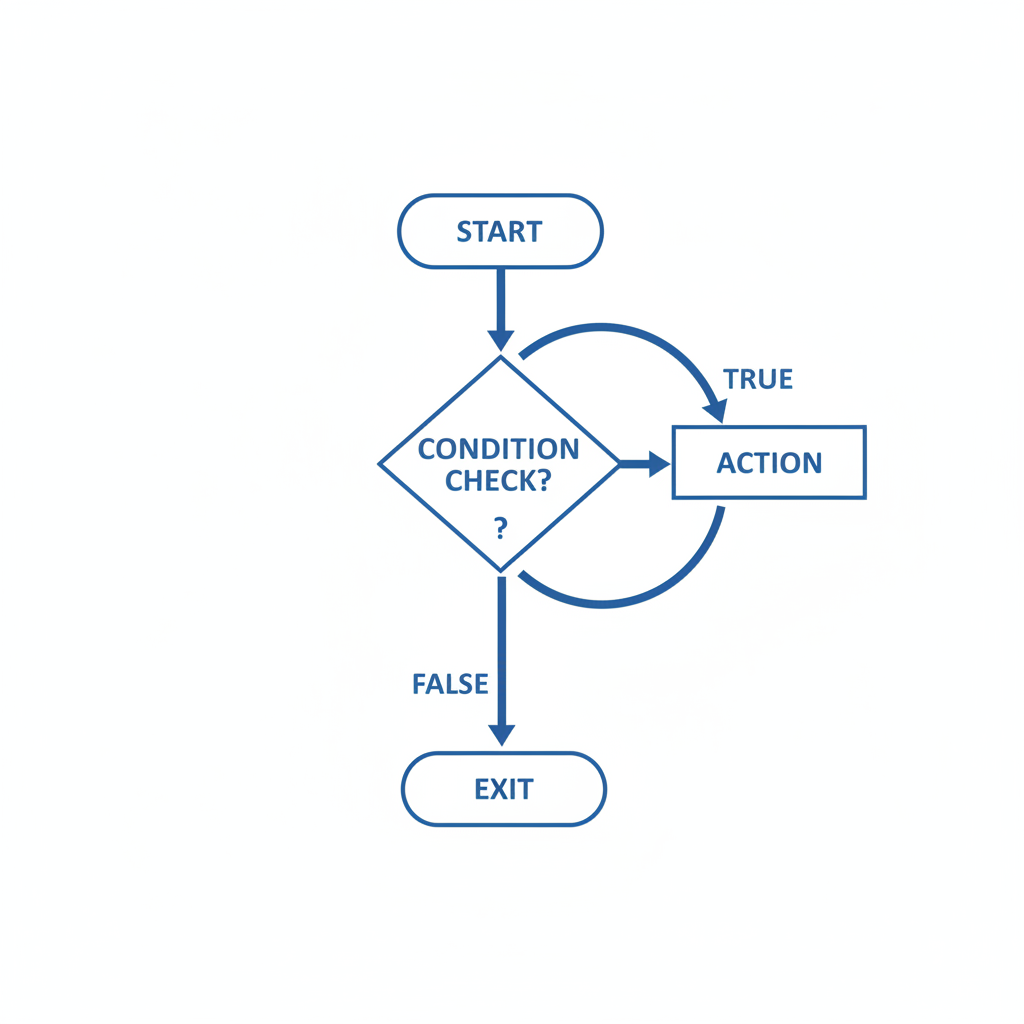 ⚠️ This picture may have spelling mistakes. Trust the words in the lesson.
The 'while' loop is great for situations where you're waiting for user input, or checking if a game character has run out of lives, or performing an action until a sensor detects something.
Important Concept: Infinite Loops (The Never-Ending Story!)
An infinite loop is a loop that never stops because its stopping condition is never met. It's like a hamster on a wheel that just keeps running and running forever!
For example, if you had a 'while' loop like this:
SET energy_level = 100
WHILE energy_level IS GREATER THAN 0:
    PRINT "Still running!"
    // UH OH! We forgot to decrease energy_level!
END WHILE
This loop would print "Still running!" forever because `energy_level` would always be 100, and 100 is always greater than 0. The condition `energy_level IS GREATER THAN 0` would never become false!
Infinite loops can crash programs or make your computer very slow because they consume all its attention. It's super important to make sure your loops always have a way to eventually stop!
How to Avoid Infinite Loops:
- For 'for' loops: Make sure your counter eventually reaches its end.
- For 'while' loops: Make sure the condition that controls the loop eventually becomes false. There must be something inside the loop that changes the condition.
- Sometimes, you might need a 'break' statement. This is like an emergency stop button that immediately exits a loop, no matter what its condition is. It's usually used for special cases or error handling.
Bringing it All Together: Loops in Your Daily Life (and Code!)
Loops are everywhere in computing. When you scroll through a social media feed, a loop is probably loading more posts. When a game character walks across the screen, a loop is repeatedly drawing their new position. When your music player goes through a playlist, it's looping through the songs.
Understanding loops is a fundamental step to becoming a great programmer. They give you the power to tell a computer, "Do this many times, or until this happens," and let the computer do all the tedious work for you!
Keep learning, free
Create a free Syllabax account to unlock practice questions and games for this topic.
Visual Learning Enhanced! 🚀
To help you master this topic, we use Advanced Syllabax AI to generate detailed diagrams and visual models.
Note on Visuals: The AI sometimes makes spelling errors in image labels. Please refer to the lesson text for the correct terminology.