Looping Constructs (For/While)
Watch this topic in 60 seconds
Free preview · Lesson 1
Understanding Looping Constructs (For/While)
Understanding Loops: Repeating Actions with For and While
Welcome, future programmers! Today, we're diving into one of the most powerful and fundamental concepts in computer science: loops. Imagine you have a task that needs to be done multiple times – not just once or twice, but perhaps a hundred, a thousand, or even millions of times. Would you write the same instructions over and over again? Absolutely not! That's where loops come in. They are like special instructions that tell your computer to repeat a set of actions until a certain goal is met.
Why Do We Need Loops? The Power of Repetition!
Think about everyday life. Repetition is everywhere, and automating it makes our lives much easier.
- Analogy 1: Chores. Imagine your parent asks you to wash 10 dishes. You wouldn't say, "Wash dish 1," then "Wash dish 2," then "Wash dish 3," and so on, ten separate times. Instead, you'd think, "I need to wash *a* dish, and I'll keep doing that *until* all 10 dishes are clean." This is the essence of a loop!
- Analogy 2: Baking Cookies. If a recipe says "add one cup of flour, then stir; repeat 3 times," you don't write down "add one cup of flour, stir; add one cup of flour, stir; add one cup of flour, stir." You just follow the instruction to repeat the adding and stirring three times.
- Analogy 3: Exercise Reps. When your coach tells you to do 3 sets of 10 push-ups, you don't list out 30 individual push-up instructions. You understand: "Do 1 push-up, 10 times. Then repeat that whole set, 3 times."
In programming, loops give us a way to write instructions once, and then tell the computer to execute those instructions multiple times efficiently, without having to copy and paste the same code over and over.
The "For" Loop: Counting Your Steps Precisely
The for loop is like a super-organized friend who knows exactly how many times something needs to be done. You use a for loop when you know, right from the start, how many repetitions you need to perform.
Analogy for the for Loop: Counting Exercise Reps
Imagine your gym teacher says, "Do 10 jumping jacks." You know the exact number: 10. You start at 1, count up to 10, and then you stop. A for loop works exactly like this – it's perfect for when you have a definite start, a definite end, and a way to count your progress.
Anatomy of a For Loop (simplified concept)
Most for loops, in one form or another, follow a similar structure:
  for (start_point; stopping_condition; how_to_progress) {
    // The code/actions you want to repeat go here
  }
start_point: This is where you begin your count or process. (e.g., "Start counting from 1").stopping_condition: This is the rule that determines whether the loop should continue or stop. As long as this condition is true, the loop keeps going. (e.g., "Continue as long as my count is less than or equal to 10").how_to_progress: This tells the loop how to move from one repetition to the next. (e.g., "Increase my count by 1 each time").
Simple For Loop Example (Conceptual)
Let's print "Hello" five times using a conceptual for loop:
  Set a counter variable 'i' to 1
  For 'i' from 1 to 5, increasing 'i' by 1 each time:
    Print "Hello"
How it works:
- The counter 'i' starts at 1.
- The loop checks: Is 'i' (which is 1) less than or equal to 5? Yes.
- It prints "Hello".
- 'i' increases to 2.
- The loop checks: Is 'i' (which is 2) less than or equal to 5? Yes.
- It prints "Hello".
- This continues until 'i' becomes 6.
- The loop checks: Is 'i' (which is 6) less than or equal to 5? No. The loop stops.
You get "Hello" printed exactly five times!
The "While" Loop: Repeating Until a Condition Changes
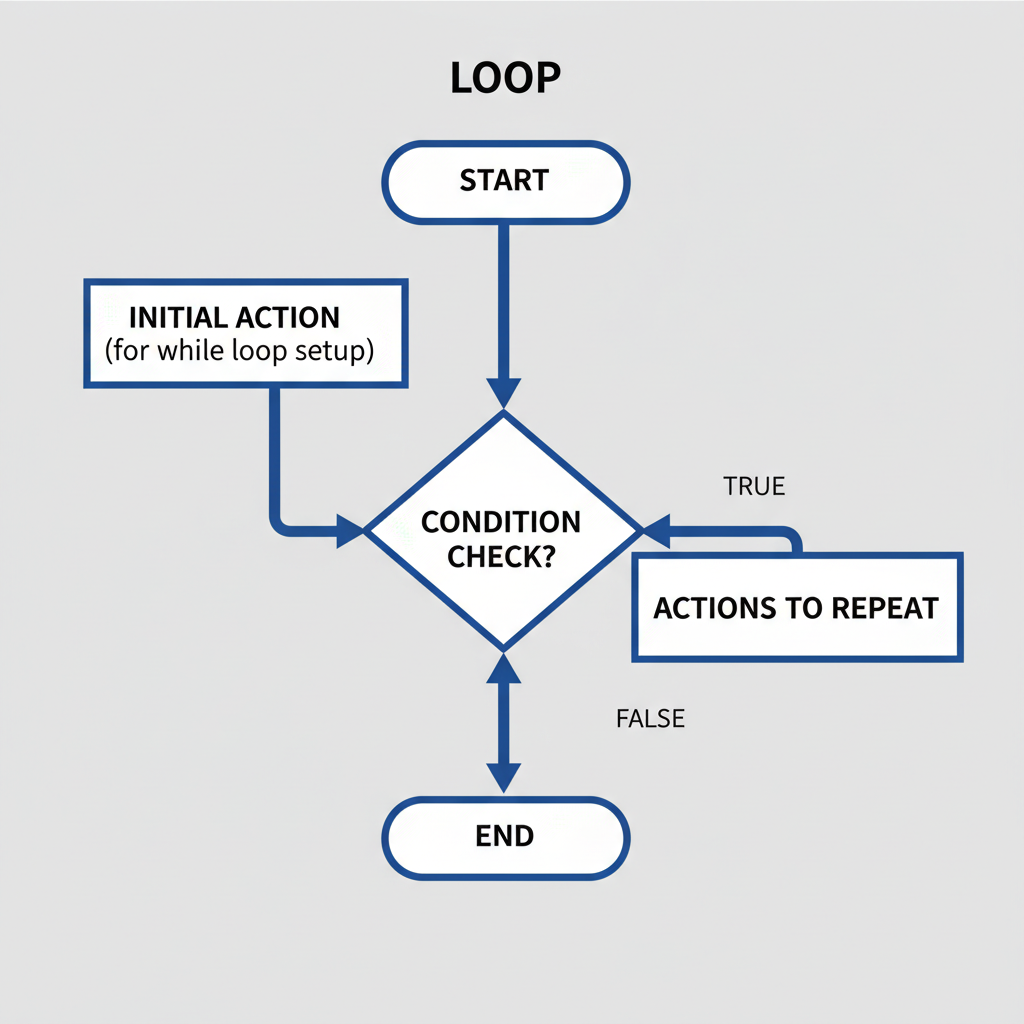
The while loop is more like a patient observer. It keeps doing something *as long as* a certain condition remains true. You use a while loop when you don't know the exact number of repetitions beforehand, but you have a clear condition that, once false, should stop the repetition.
Analogy for the while Loop: Filling a Glass with Water
Imagine you're filling a glass with water. You don't say, "Pour water 5 times." Instead, you say, "Pour water *while* the glass is not full." You keep pouring, and at each moment, you check the condition: "Is the glass full yet?" When it finally is, you stop. You didn't know how many "pours" it would take, but you knew the stopping condition.
Anatomy of a While Loop (simplified concept)
A while loop is typically simpler in structure than a for loop:
  while (condition_is_true) {
    // The code/actions you want to repeat go here
    // IMPORTANT: Something inside the loop MUST eventually make the condition false!
  }
condition_is_true: This is the rule that the loop continuously checks. As long as this condition evaluates to true, the code inside the loop will execute.- IMPORTANT: Inside the loop, you *must* have some action that will eventually change the condition to false. If the condition never changes, your loop will run forever!
Simple While Loop Example (Conceptual)
Let's count up to 3 using a conceptual while loop:
  Set a variable 'count' to 0
  While 'count' is less than 3:
    Print "Current count is: " + count
    Increase 'count' by 1
How it works:
- 'count' starts at 0.
- The loop checks: Is 'count' (0) less than 3? Yes.
- It prints "Current count is: 0".
- 'count' increases to 1.
- The loop checks: Is 'count' (1) less than 3? Yes.
- It prints "Current count is: 1".
- 'count' increases to 2.
- The loop checks: Is 'count' (2) less than 3? Yes.
- It prints "Current count is: 2".
- 'count' increases to 3.
- The loop checks: Is 'count' (3) less than 3? No. The loop stops.
You get a count from 0 to 2, and then the loop gracefully ends.
For Loop vs. While Loop: When to Use Which?
Choosing between a for loop and a while loop depends on the problem you're trying to solve:
- Use a
forloop when:- You know precisely how many times you need to repeat something. (e.g., "print names 5 times," "process 10 items in a list," "iterate from 1 to 100").
- You need a counter variable that goes from a start to an end point.
- Use a
whileloop when:- You don't know the exact number of repetitions beforehand.
- The repetition depends on a specific condition remaining true. (e.g., "keep asking for input until the user types 'quit'," "continue moving forward while there's a clear path").
- You need to loop indefinitely until an external event or user input changes a condition.
Avoiding Infinite Loops: The Runaway Train!
An infinite loop is a loop that never stops because its stopping condition is never met. It's like a train that keeps going around and around the same track without ever reaching a station. This can crash your program or make it unresponsive.
Example of a problematic (infinite) while loop (conceptual):
  Set is_raining to true
  While is_raining is true:
    Print "I'm staying inside."
    // NOTHING changes 'is_raining' to false!
In this example, is_raining will always be true, so the loop will print "I'm staying inside." forever! To fix this, something *inside* the loop (or outside, based on an event) must change is_raining to false.
Always double-check your while loops to ensure there's a clear path for the condition to eventually become false, allowing the loop to terminate.
Key Concepts to Remember
- Iteration: A single run through the actions within a loop.
- Loop Body: The set of instructions that are repeated within the loop.
- Loop Condition: The expression that determines whether the loop continues or stops.
- Counter/Iterator: A variable (often used in
forloops) that keeps track of the current repetition number or position.
Conclusion
Loops are incredibly powerful tools that let computers perform repetitive tasks efficiently. Whether you know the exact number of repetitions (for loop) or need to repeat until a certain condition changes (while loop), mastering these constructs is essential for writing effective and intelligent programs. Keep practicing, and you'll be looping like a pro in no time!
Keep learning, free
Create a free Syllabax account to unlock practice questions and games for this topic.
Visual Learning Enhanced! 🚀
To help you master this topic, we use Advanced Syllabax AI to generate detailed diagrams and visual models.
Note on Visuals: The AI sometimes makes spelling errors in image labels. Please refer to the lesson text for the correct terminology.