Learning Journey
Watch this topic in 60 seconds
Free preview · Lesson 1
Understanding Cybersecurity Basics
Cybersecurity Basics: Protecting Your Digital Life (Grade 10)
Welcome to the exciting and crucial world of Cybersecurity! In today's digital age, almost everything we do involves technology – from connecting with friends on social media and doing homework online to banking and online shopping. Just like we learn to look both ways before crossing the street to stay safe in the physical world, we need to learn how to stay safe in the digital world. That's what cybersecurity is all about.
What is Cybersecurity? The Digital Shield
At its core, cybersecurity is the practice of protecting systems, networks, and programs from digital attacks. These attacks are usually aimed at accessing, changing, or destroying sensitive information; extorting money from users; or interrupting normal business processes. In simpler terms, it's about keeping your data safe, private, and available when you need it.
Why is it so important for YOU?
- Protecting Your Personal Information: Your name, address, phone number, photos, school records – all of this is valuable. If it falls into the wrong hands, it can be used for identity theft or other harmful activities.
- Safeguarding Your Devices: Your smartphone, laptop, and tablet are packed with personal data and are essential tools for learning and entertainment. Cybersecurity keeps them running smoothly and prevents them from being hijacked.
- Ensuring Online Trust: When you shop online, use social media, or access school resources, you want to be sure that your interactions are secure and private. Cybersecurity helps build that trust.
The Enemies of the Digital World: Common Threats
Just like there are different types of pests that can try to get into your house, there are many kinds of digital threats. Knowing them is the first step to defending against them.
- Malware (Malicious Software): This is a broad term for any software designed to harm or exploit your device.
- Viruses: Like a biological virus, they attach to legitimate programs and spread to other computers when those programs are executed. Analogy: A computer virus is like a common cold. It spreads from person to person (or computer to computer), making you feel sick (slows down your computer) and can be quite annoying.
- Worms: Self-replicating malware that spreads across networks without needing a host program. They are designed to spread rapidly and often exploit vulnerabilities.
- Ransomware: This is particularly nasty. It locks you out of your own files or computer and demands payment (a 'ransom') to unlock them. Analogy: Ransomware is like someone locking all the doors and windows of your house and demanding money to give you the keys back.
- Spyware: Secretly observes your computer activity without your knowledge. It can record keystrokes, capture screenshots, and collect personal data.
- Phishing: This is a trick where attackers try to fool you into giving up sensitive information (like passwords or credit card numbers) by pretending to be a trustworthy entity (like your bank, school, or a popular online service) in an email, text, or website. Analogy: Phishing is like a con artist dressing up as a police officer to trick you into revealing your home address or bank details. They look official, but they're trying to steal from you.
- Social Engineering: This is a wider term for manipulating people into performing actions or divulging confidential information. Phishing is a type of social engineering. It plays on human psychology, like curiosity, fear, or a sense of urgency.
- Password Attacks: Attackers try to guess or crack your passwords. This can involve trying many common passwords (brute-force attacks) or using lists of leaked passwords from other breaches.
- Denial-of-Service (DoS) Attacks: These attacks try to make a website or online service unavailable by overwhelming it with traffic, like too many people trying to enter a store at once, blocking everyone else out.
The Core Principles of Cybersecurity: The CIA Triad
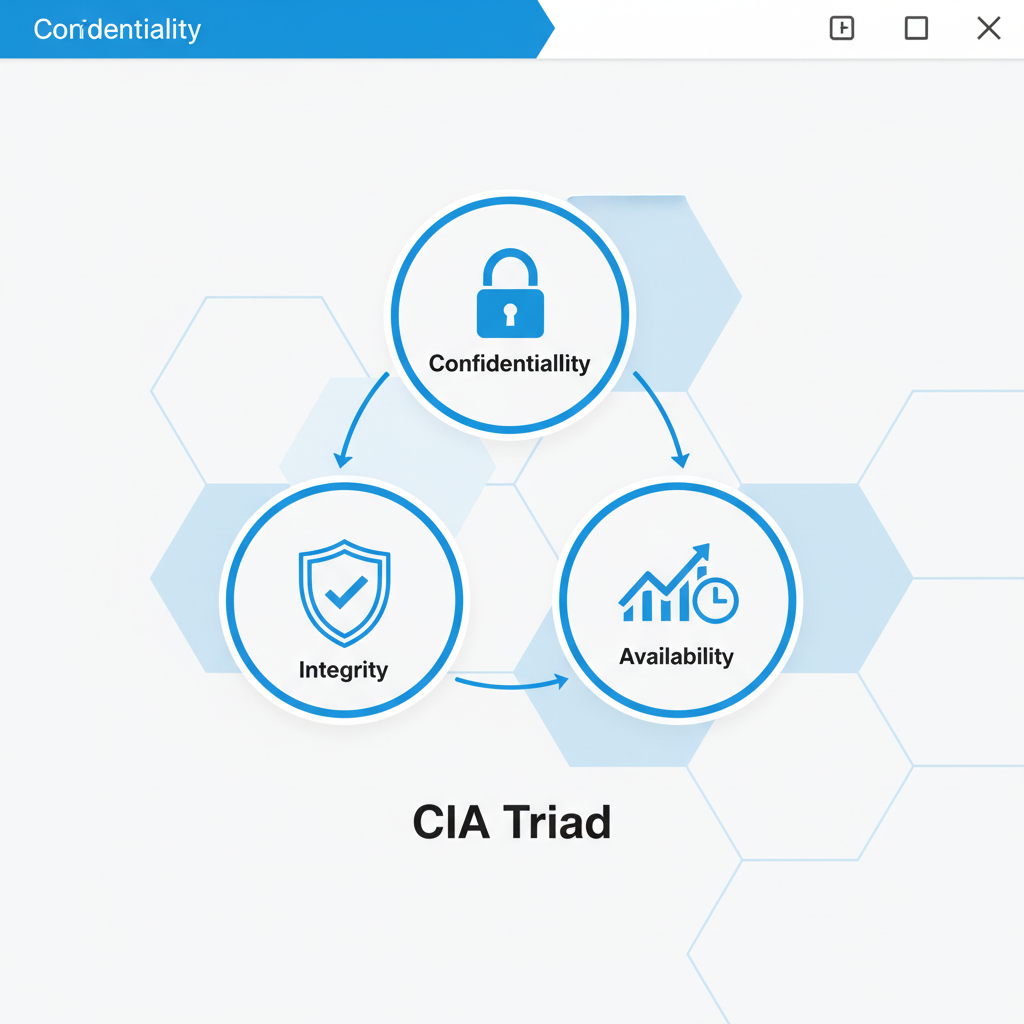
Cybersecurity aims to protect three main aspects of information, often remembered by the acronym CIA Triad:
- C - Confidentiality: This means keeping sensitive information secret and ensuring that only authorized individuals can access it.
- I - Integrity: This means ensuring that information is accurate, complete, and has not been tampered with or altered without authorization.
- A - Availability: This means ensuring that authorized users can access information and systems when they need them.
 ⚠️ This picture may have spelling mistakes. Trust the words in the lesson.
Your Personal Cybersecurity Toolkit: Staying Safe Online
You don't need to be a tech wizard to protect yourself. Here are some essential practices:
- Strong, Unique Passwords & Multi-Factor Authentication (MFA):
- Use long passwords (12+ characters) that mix uppercase and lowercase letters, numbers, and symbols.
- Don't reuse passwords across different accounts. If one account is breached, all your accounts are at risk.
- Enable Multi-Factor Authentication (MFA) whenever possible. This adds an extra layer of security, usually by sending a code to your phone or requiring a fingerprint, even if someone knows your password. Analogy: A strong password is like having a sturdy lock on your front door. MFA is like having that lock, PLUS needing a special key card or a secret knock before the door even opens.
- Keep Software Updated: Software developers constantly release updates to fix security holes (vulnerabilities). Always update your operating system, web browser, and apps. Analogy: Software updates are like getting vaccinations or fixing a leaky roof. They patch up weaknesses before they can be exploited by 'bugs' or 'storms' (malware).
- Use Antivirus/Anti-Malware Software: Install reputable security software on your computer and keep it updated. It helps detect and remove malicious programs.
- Be Wary of Suspicious Links and Downloads:
- Before clicking on a link in an email or text, hover over it (on a computer) to see the actual destination. If it looks suspicious, don't click it.
- Only download software or files from trusted sources.
- Backup Your Data: Regularly copy your important files (photos, documents, projects) to an external hard drive or a cloud storage service. If your device is compromised or fails, you won't lose everything. Analogy: Backing up your data is like making spare keys for your house or having an insurance policy for your car. If something goes wrong, you have a fallback.
- Use a Firewall: A firewall acts like a security guard for your network, monitoring incoming and outgoing traffic and blocking anything suspicious. Most operating systems have built-in firewalls; make sure they are enabled.
- Think Before You Share: Be mindful of what you post online. Once it's out there, it's very hard to take back. Over-sharing can make you a target for social engineering.
Your Role as a Responsible Digital Citizen
Cybersecurity isn't just for experts; it's a shared responsibility. Every click, every download, and every password choice you make has an impact on your safety and potentially the safety of others. By understanding these basics and practicing good digital hygiene, you become a powerful defender in the online world. Stay curious, stay cautious, and stay safe!
Keep learning, free
Create a free Syllabax account to unlock practice questions and games for this topic.
Visual Learning Enhanced! 🚀
To help you master this topic, we use Advanced Syllabax AI to generate detailed diagrams and visual models.
Note on Visuals: The AI sometimes makes spelling errors in image labels. Please refer to the lesson text for the correct terminology.