Memory: RAM and ROM
Watch this topic in 60 seconds
Free preview · Lesson 1
Understanding Memory: RAM and ROM
Understanding Computer Memory: RAM and ROM
Welcome to the fascinating world of computer memory! Just like our own brains, computers need a way to store information so they can work efficiently. But not all computer memory is the same. Some memory is for quick, temporary thoughts, while other memory holds permanent, essential instructions. In this lesson, we'll dive into two foundational types of memory: RAM (Random Access Memory) and ROM (Read-Only Memory).
Imagine your computer as a busy office. It has lots of different tasks to do, and it needs places to keep information temporarily while working on a project, as well as permanent instructions on how to start up each morning. That's where RAM and ROM come in – they are the different storage solutions for your computer's "brain."
What is Computer Memory?
At its core, computer memory is a place where data and instructions are stored for the CPU (Central Processing Unit) to access. The CPU is like the brain of the computer, constantly processing information. For the CPU to do its job quickly, it needs information readily available, not tucked away in a slow, distant archive.
Analogy: Your Brain's Memory
Think about your own memory. You have short-term memory (like remembering a phone number just long enough to dial it) and long-term memory (like remembering your name or how to ride a bike). Computer memory works similarly, with different types optimized for different purposes.
RAM: The Computer's Temporary Workspace
RAM stands for Random Access Memory. This is your computer's primary working memory. Think of it as a super-fast, temporary workspace where your computer keeps all the information it needs to access right now. When you open a program, edit a document, or browse the internet, all that active data is loaded into RAM.
Key Characteristics of RAM:
- Volatile: This is the most crucial characteristic. 'Volatile' means that RAM requires power to maintain the stored information. The moment you turn off your computer or it loses power, everything stored in RAM is immediately erased. It's like a whiteboard that gets wiped clean at the end of the day.
- Fast: RAM is incredibly fast, allowing the CPU to quickly read and write data. This speed is essential for your computer to run multiple programs smoothly and respond instantly to your commands.
- Temporary Storage: It's designed for short-term data storage, holding only the data and programs that are currently in use.
- Read and Write: The CPU can both read information from RAM and write new information to it very quickly.
- Larger Capacity (Compared to ROM): Modern computers typically have several gigabytes (GB) of RAM (e.g., 8GB, 16GB, 32GB).
Analogy: The Chef's Cutting Board or Your Desk
Imagine a chef preparing a meal. The RAM is like the chef's cutting board or countertop. It's where all the ingredients (data) are placed and actively worked on (processed). Once the dish is cooked (program closed or data saved to permanent storage), the countertop is cleared for the next task. If the power goes out in the kitchen, anything on the cutting board that hasn't been put away (saved) is lost.
Another great analogy is your school desk. When you're working on homework, your books, notes, and pens are all on your desk – easily accessible. When you're done, you put everything away, and the desk is clear. If a fire alarm goes off and you have to evacuate without putting your papers away, they might be lost or messed up when you return.
ROM: The Computer's Permanent Instruction Manual
ROM stands for Read-Only Memory. As the name suggests, this type of memory is generally used for storing permanent, unchanging instructions that the computer needs to function, especially when it first starts up. Unlike RAM, the data in ROM cannot be easily changed or overwritten, and it does not disappear when the power is turned off.
Key Characteristics of ROM:
- Non-Volatile: This is its defining feature. ROM retains its data even when the power is off. It's like an instruction manual printed in a book – the words don't disappear just because you close the book.
- Slower (Generally) than RAM: While vital, ROM is typically slower to access than RAM. Its purpose isn't lightning-fast data processing but reliable storage of fundamental instructions.
- Permanent Storage: It holds critical system information, often called 'firmware' (like the BIOS or UEFI), which tells the computer how to boot up, how to interact with basic hardware components (keyboard, mouse, hard drive), and perform diagnostic checks.
- Read-Only (Mostly): While modern ROM types can sometimes be updated (flashed), they are generally designed to be read from, not written to, by the user or regular applications.
- Smaller Capacity: ROM chips typically store much less data than RAM, often in megabytes (MB) or even kilobytes (KB), as they only need to hold essential startup instructions.
Analogy: The Chef's Recipe Book or an Engraved Stone Tablet
Going back to our chef, the ROM is like their prized recipe book. It contains all the fundamental recipes and instructions needed to cook any dish. These recipes are permanent and don't disappear after a meal is prepared, nor do they vanish if the kitchen loses power. You read from it, but you don't typically write in it or change the core recipes.
Another way to think about it is an ancient, engraved stone tablet. The information carved into it is permanent, unchangeable (without great effort), and doesn't disappear over time or when the lights go out. It contains the fundamental laws or instructions that are always there.
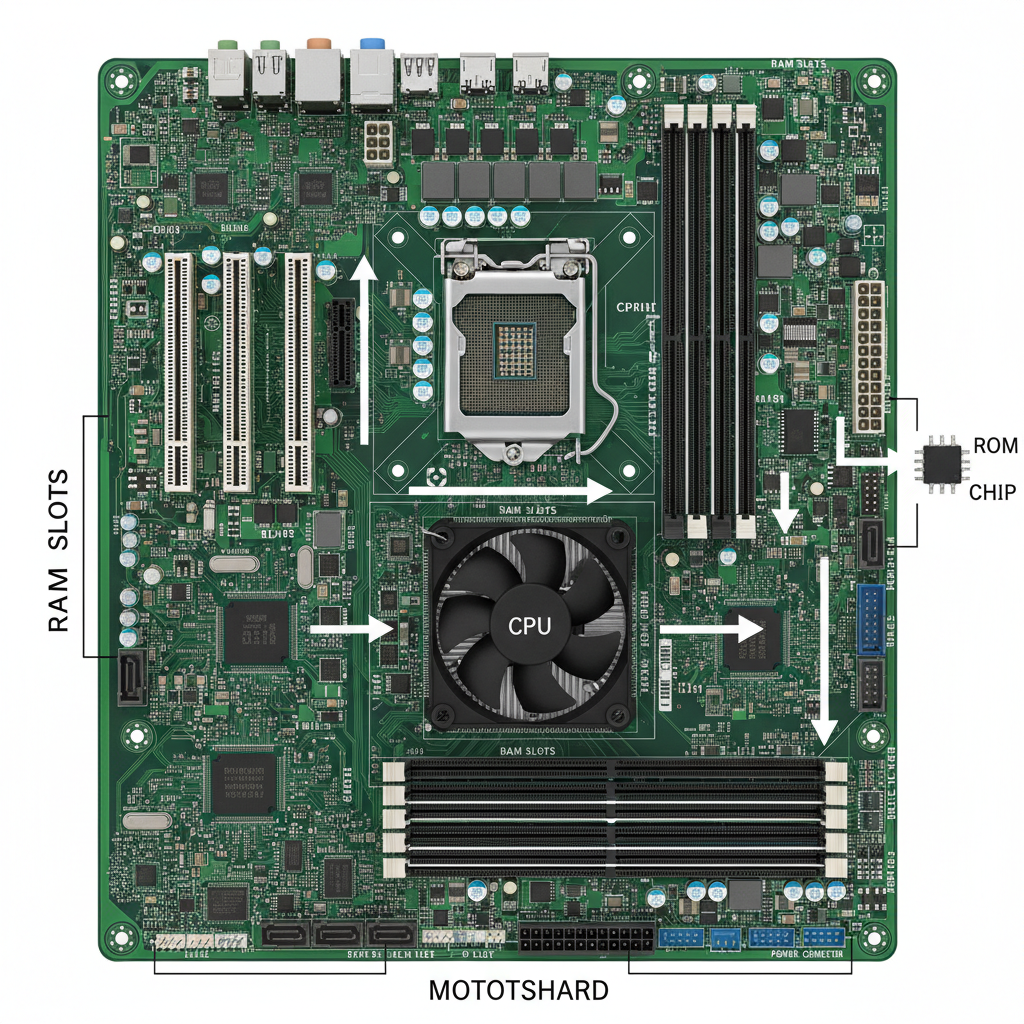 ⚠️ This picture may have spelling mistakes. Trust the words in the lesson.
Image: A typical computer motherboard, highlighting where RAM modules (long green sticks) and a smaller ROM chip (often black and rectangular) might be located.
RAM vs. ROM: A Quick Comparison
To summarize, let's look at the main differences:
Key Differences
- Volatility: RAM is volatile (loses data without power); ROM is non-volatile (retains data without power).
- Purpose: RAM is for active, temporary work; ROM is for permanent, essential startup instructions (firmware).
- Speed: RAM is much faster for reading/writing; ROM is generally slower to access.
- Capacity: RAM typically has a much larger capacity (GB) than ROM (MB/KB).
- Writability: RAM is constantly being written to and read from; ROM is primarily read from.
- Location: RAM comes in modules inserted into slots; ROM is often a chip soldered directly onto the motherboard.
Why Do We Need Both?
It's clear that RAM and ROM serve very different, yet equally vital, purposes. Without ROM, your computer wouldn't even know how to begin starting up or how to talk to its basic parts. It would be like trying to bake a cake without knowing how to turn on the oven or what ingredients you even have.
Without RAM, your computer would have no fast workspace to process information. Every time you wanted to do something, it would have to dig through slow, permanent storage, making your computer excruciatingly slow and impractical. It would be like trying to cook an entire meal on your lap without a counter or cutting board.
Together, RAM provides the immediate, flexible workspace for all your active tasks, while ROM provides the immutable, foundational rules and instructions that make the entire system possible. They are two sides of the same essential memory coin, each playing a crucial role in your computer's ability to function.
Keep learning, free
Create a free Syllabax account to unlock practice questions and games for this topic.
Visual Learning Enhanced! 🚀
To help you master this topic, we use Advanced Syllabax AI to generate detailed diagrams and visual models.
Note on Visuals: The AI sometimes makes spelling errors in image labels. Please refer to the lesson text for the correct terminology.