Introduction to Programming Concepts
Watch this topic in 60 seconds
Free preview · Lesson 1
Understanding Introduction to Programming Concepts
Introduction to Programming Concepts for Grade 9
Unlocking the Digital World: Your First Steps into Coding
What is Programming? The Art of Giving Instructions
Imagine you have a super-smart robot, but it only understands very precise commands. If you want it to make a sandwich, you can't just say, "Make a sandwich!" You have to tell it every single step:
- "Go to the fridge."
- "Open the fridge door."
- "Take out the bread."
- "Close the fridge door."
- "Put the bread on the counter."
- ... and so on, for every ingredient and every action.
Programming is exactly like giving those super-precise, step-by-step instructions to a computer. Computers are incredibly powerful, but they can't think for themselves or guess what you mean. You, as the programmer, become the 'brain' that breaks down a complex task into tiny, understandable steps that the computer can follow. These instructions are written in special languages that computers can understand, like English, Spanish, or French are human languages.
The goal? To make computers do useful things for us, whether it's playing a game, browsing the internet, controlling a robot, or helping scientists solve big problems.
Core Concept 1: Algorithms – The Recipe for Success
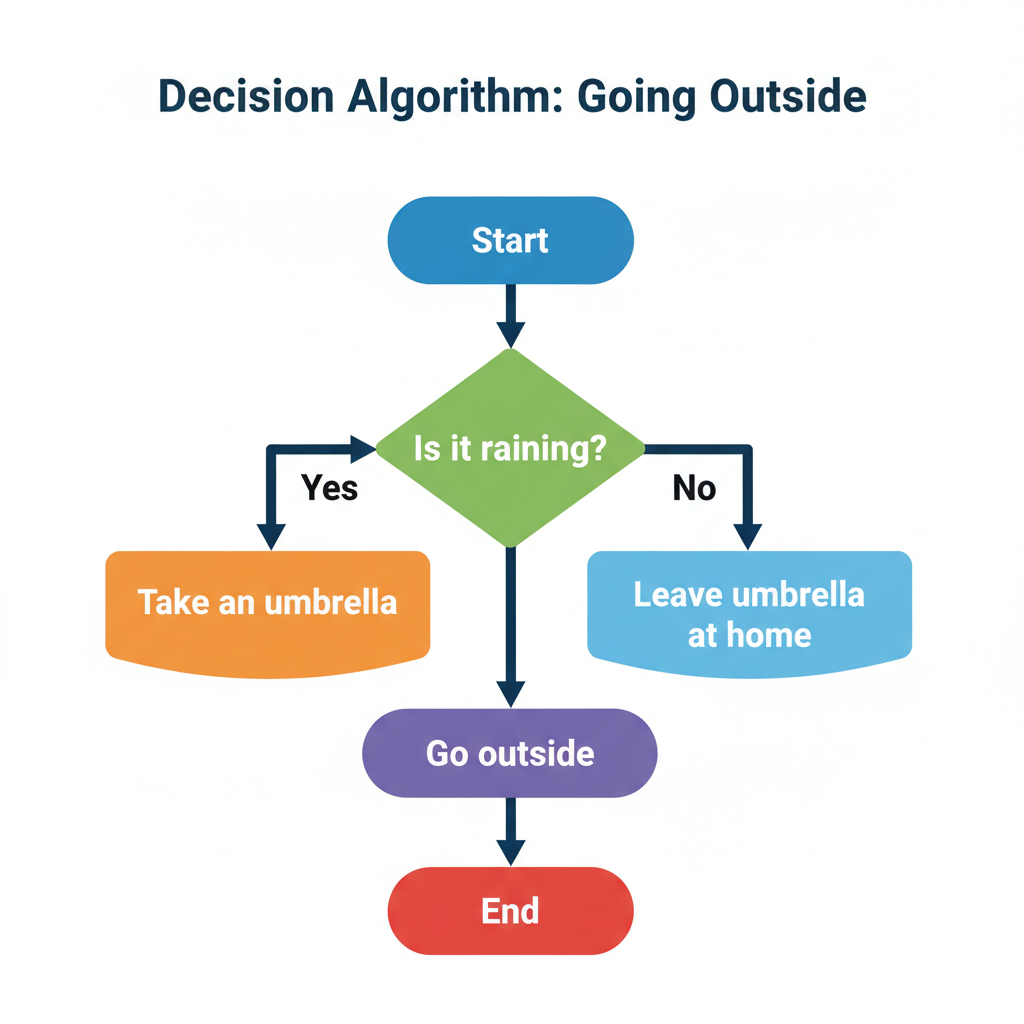
Think back to our sandwich-making robot. The entire list of steps, from getting the bread to putting the sandwich on a plate, is what we call an algorithm. An algorithm is simply a set of well-defined, ordered steps to solve a problem or achieve a specific task.
Analogy: Every time you follow a recipe to bake cookies, you're following an algorithm! The recipe tells you exactly what ingredients to use, in what order, and what to do with them (mix, bake, cool). If you miss a step or do them in the wrong order, your cookies might not turn out right. Similarly, a computer needs its algorithm to be perfectly clear and in the correct sequence.
Good algorithms are:
- Clear: No ambiguity.
- Finite: They must eventually stop.
- Effective: They must produce the correct result.
Core Concept 2: Variables – Labeled Containers for Information
In programming, computers often need to remember pieces of information while they are working. For example, if you're writing a program to calculate the area of a rectangle, the computer needs to remember the length and the width.
This is where variables come in. A variable is like a small, labeled box in the computer's memory where you can store a piece of information. You give the box a name (the variable's name), and then you can put data inside it. You can also change what's inside the box later on.
Analogy: Imagine you're packing for a trip. You have different boxes or bags, and you label them: "Shirts," "Pants," "Socks." The label is the variable's name (e.g., numberOfShirts), and what's inside the box is its value (e.g., 7). You can open the 'Shirts' box, take out a shirt, and put a new one in, changing its value.
Examples of what variables might store:
- Your age (a number)
- Your name (text)
- Whether it's raining outside (true/false)
Core Concept 3: Data Types – Kinds of Information
Just as you wouldn't try to store water in a mesh bag, or sand in a leaky sieve, computers also categorize the kind of information they store. This categorization is called a data type.
Analogy: Think of different types of containers in your kitchen. You have a jug for milk (liquid), a canister for flour (powder), and a fruit bowl for apples (solid objects). Each container is designed for a specific kind of item. In programming, data types tell the computer what kind of data to expect and how to handle it.
Common data types include:
- Numbers (Integers/Floats): Whole numbers (like
5,-10) are called integers. Numbers with decimal points (like3.14,99.99) are called floats or floating-point numbers. - Text (Strings): Any sequence of characters, like words, sentences, or even just single letters. In programming, these are often enclosed in quotation marks, e.g.,
"Hello World","Grade 9". - True/False (Booleans): A data type that can only have one of two values:
trueorfalse. These are fundamental for making decisions in your programs.
Core Concept 4: Input and Output – Talking to the Computer
For a program to be useful, it usually needs to interact with the outside world. This interaction happens through input and output.
- Input: This is how a program receives information from the user or another source. Think of it as the computer listening.
- Output: This is how a program sends information back to the user or another destination. Think of it as the computer speaking.
Analogy: When you're talking to a friend, your friend's ears are taking in your words (input), and their mouth is used to respond (output). Similarly, when you type your name into a website, that's input. When the website displays "Welcome, [Your Name]!", that's output.
Common forms of input:
- Typing on a keyboard
- Clicking a mouse
- Touching a screen
- Reading data from a file or sensor
Common forms of output:
- Displaying text or images on a screen
- Printing a document
- Playing a sound
- Saving data to a file
Core Concept 5: Conditional Statements (If/Else) – Making Decisions
Life is full of decisions, and so are computer programs! A program often needs to do different things based on certain conditions. This is handled by conditional statements, most commonly represented by if and else.
Analogy: Imagine you're deciding what to wear based on the weather:
IF it is raining, THEN take an umbrella.
ELSE (if it's not raining), THEN leave the umbrella at home.
A conditional statement allows your program to evaluate a condition (e.g., Is it true? Is this number greater than that one?) and then execute specific blocks of code only if that condition is met.
This allows programs to be dynamic and responsive, doing different things in different situations.
Core Concept 6: Loops – Repeating Actions Efficiently
Sometimes, you need a computer to do the same task over and over again. For example, if you want to print the numbers from 1 to 100, you wouldn't want to write 100 separate print commands. That would be tedious and inefficient!
This is where loops come in. A loop is a programming structure that allows you to repeat a block of code multiple times, either for a specific number of repetitions or until a certain condition is met.
Analogy: Think about doing chores: If you have to wash 10 dishes, you don't write 10 individual instructions. You have one instruction: "Wash a dish," and then you repeat it 10 times. Or, if you're running laps, you keep running "until" you complete 5 laps. Loops make programs much shorter, cleaner, and more powerful.
Two common types of loops:
- For Loop: Repeats a specific number of times (e.g., "do this 5 times").
- While Loop: Repeats as long as a certain condition is true (e.g., "keep doing this while the light is green").
Core Concept 7: Functions – Reusable Blocks of Code
Imagine you're building with LEGOs. Instead of having to build a car wheel from scratch every time you need one, you have a pre-assembled wheel piece. This makes building much faster and easier.
In programming, a function (also sometimes called a method or subroutine) is like that pre-assembled LEGO piece. It's a named block of code that performs a specific task. Once you've written a function, you can use it multiple times throughout your program without having to rewrite the same code.
Analogy: Think of a function as a mini-recipe within a larger cookbook. The 'bake cake' recipe might include a step that says 'make frosting.' Instead of listing all the frosting steps there, it just refers to the separate 'frosting recipe.' This keeps the main recipe clean and allows the 'frosting recipe' to be used for other desserts too!
Functions help programmers:
- Organize their code.
- Avoid repeating code (Don't Repeat Yourself - DRY principle).
- Make programs easier to read, understand, and debug.
Programming Languages: Your Tools to Communicate
Just as humans speak different languages, computers can understand instructions written in various programming languages. Each language has its own rules (syntax) and vocabulary.
Some popular programming languages for beginners include:
- Python: Known for its readability and simplicity. Great for web development, data science, and AI.
- JavaScript: The language of the web. Used to make websites interactive.
- Scratch: A visual, block-based programming language, perfect for learning core concepts without worrying about typing complex code.
Learning one programming language makes it easier to learn others, much like knowing one Romance language (like Spanish) can help you learn another (like Italian).
Conclusion: The Power in Your Hands
Programming is more than just writing code; it's about problem-solving, logical thinking, and creativity. By understanding these foundational concepts – algorithms, variables, data types, input/output, conditionals, loops, and functions – you are gaining the building blocks to create anything you can imagine in the digital world. The journey into programming is exciting, challenging, and incredibly rewarding. Welcome aboard!
Keep learning, free
Create a free Syllabax account to unlock practice questions and games for this topic.
Visual Learning Enhanced! 🚀
To help you master this topic, we use Advanced Syllabax AI to generate detailed diagrams and visual models.
Note on Visuals: The AI sometimes makes spelling errors in image labels. Please refer to the lesson text for the correct terminology.