Introduction to Robotics Concepts
Watch this topic in 60 seconds
Free preview · Lesson 1
Understanding Introduction to Robotics Concepts
Welcome to the Amazing World of Robotics!
Hello, young explorers! Have you ever seen a super cool toy car that can drive itself, or a vacuum cleaner that moves around your house all by itself? What about a machine in a factory that puts parts together perfectly every time? Well, you've just met some of the amazing creations from the world of robotics!
What is a Robot?
Imagine you have a very special friend. This friend isn't alive like a person or a pet, but it can move, see, hear, and even do tasks for you! This friend needs you to tell it exactly what to do, step by step, like following a recipe. That special friend is a robot!
In simple terms, a robot is a machine designed to carry out a complex series of actions automatically, especially one programmable by a computer. Think of it as a smart machine that can be told what to do and then does it on its own.
Just like a toy car has wheels and an engine, robots have different parts that work together to make them move and complete tasks. Let's take a closer look!
The Awesome Parts of a Robot
Every robot, big or small, has a few main parts that help it do its job. Let's break them down:
1. The Body (Structure or Chassis)
Think of your own body – you have a skeleton that holds everything together and gives you shape. Robots have something similar! Their body is the frame or structure that holds all the other parts. It can be made of metal, plastic, or other strong materials. It's what makes the robot look like a car, an arm, or even a human-like figure.
- Analogy: Just like your skeleton gives you shape and holds your organs, a robot's body gives it its form and holds its components.
2. The Brain (Controller)
What helps you think, make decisions, and remember things? Your brain, of course! Robots also have a "brain," which is usually a tiny computer or circuit board called a controller. This controller receives instructions (called a program) and tells all the other parts what to do, when to do it, and how fast. Without a brain, a robot would just be a pile of parts!
- Analogy: The robot's controller is like your brain, telling your hands to pick up a toy or your legs to run.
3. The Muscles (Actuators & Motors)
How do you move your arms and legs? With your muscles! Robots use special parts called actuators (mostly electric motors and gears) to move their different sections. These motors make wheels turn, arms swing, or grippers open and close. The controller sends signals to these actuators, telling them exactly how to move.
- Analogy: Robot motors and actuators are like your muscles, making the robot move, lift, and push.
4. The Senses (Sensors)
You use your eyes to see, your ears to hear, and your skin to feel, right? Robots have "senses" too, called sensors! Sensors help robots understand their surroundings. There are many kinds:
- Light sensors: Like robot eyes, they detect light and darkness.
- Touch sensors: Like robot skin, they feel if something is touching them.
- Distance sensors: Like a robot's ability to tell how far away something is, they measure the distance to objects (think of a bat using sound to "see").
- Sound sensors: Like robot ears, they can hear noises.
These sensors send information back to the robot's brain (the controller) so it can make smart decisions.
- Analogy: Robot sensors are like your five senses, helping the robot see, hear, feel, and understand the world around it.
5. The Tools (End-Effectors)
What do you use to pick things up or kick a ball? Your hands and feet! Robots often have special "tools" at the end of their arms or on their bodies to interact with the world. These are called end-effectors. Common end-effectors include:
- Grippers: Like robot hands, for picking up objects.
- Wheels or tracks: Like robot feet, for moving around.
- Welding torches or paint sprayers: For factory robots doing specific jobs.
- Analogy: End-effectors are like a robot's hands, feet, or special tools designed for specific tasks.
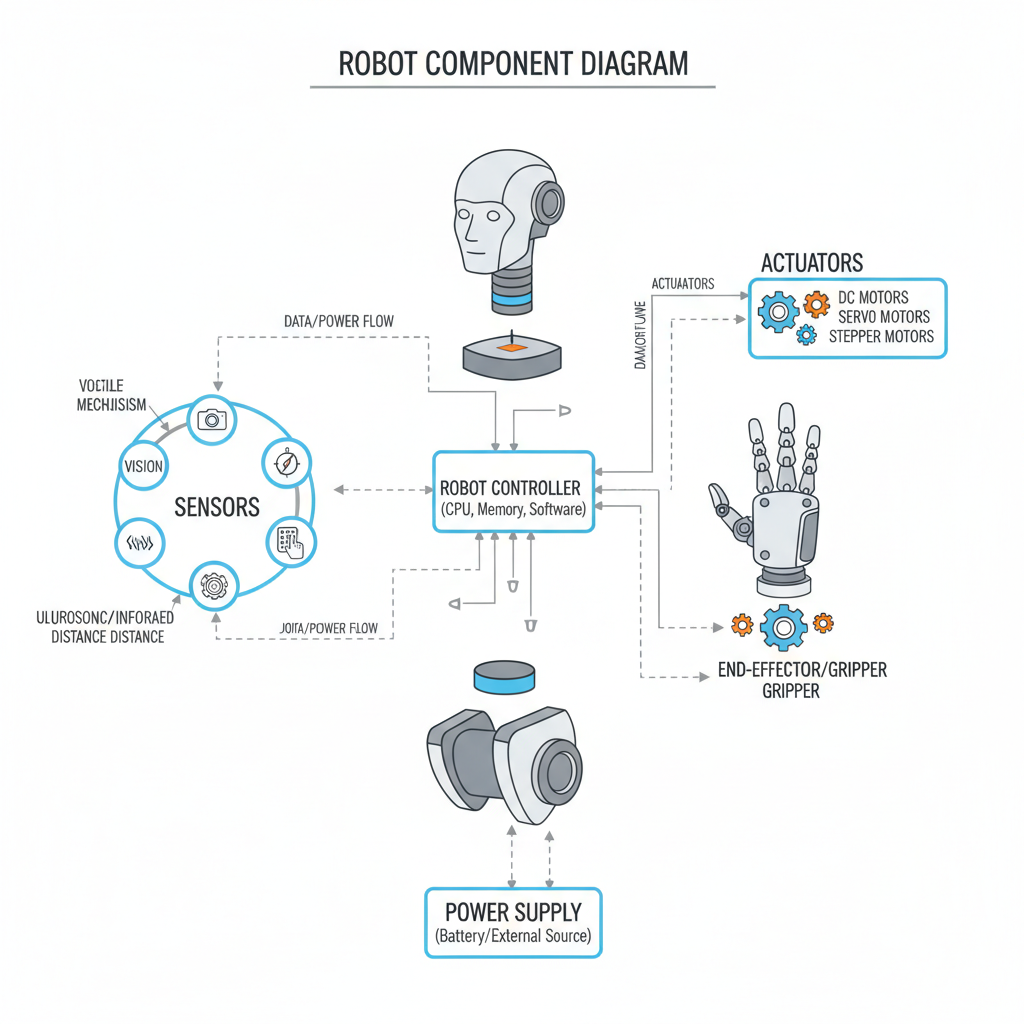 ⚠️ This picture may have spelling mistakes. Trust the words in the lesson.
How Do Robots Work? (Sense, Think, Act!)
You've learned about the parts, now let's see how they work together! It's a simple three-step process:
- Sense: The robot uses its sensors to gather information about its environment. For example, a light sensor sees if the light is on, or a distance sensor detects an object in front of it.
- Think: The information from the sensors goes to the robot's controller (the brain). The controller processes this information using its program. It decides what to do next based on the instructions it was given.
- Act: Once the controller has "thought" about what to do, it sends signals to the actuators (muscles) and end-effectors (tools). This makes the robot move, pick something up, or perform its task.
This cycle of Sense -> Think -> Act happens very quickly, allowing robots to perform complex tasks.
What Do Robots Do?
Robots are built to help us in many ways!
- Doing Repetitive Tasks: Imagine having to screw a thousand screws into a thousand toys. Boring for a human, but perfect for a robot that never gets tired or makes mistakes!
- Working in Dangerous Places: Robots can explore volcanoes, deep oceans, or even outer space – places too dangerous or difficult for humans.
- Performing Precise Jobs: Some robots can perform very delicate surgeries or assemble tiny electronic parts with incredible accuracy.
- Helping People: From vacuuming floors to assisting in hospitals, robots can make our lives easier and safer.
From the smallest toy to the largest factory machine, robots are changing the world around us!
Keep learning, free
Create a free Syllabax account to unlock practice questions and games for this topic.
Visual Learning Enhanced! 🚀
To help you master this topic, we use Advanced Syllabax AI to generate detailed diagrams and visual models.
Note on Visuals: The AI sometimes makes spelling errors in image labels. Please refer to the lesson text for the correct terminology.